
Interrupt Time Base Generation in interrupt mode fails
Hi all,
im trying to bring a timer interrupt to work. In the first step I want to create an LED blinky.
For that I followed the instructions from the Knowledge base example (How to generate a one second interrupt using an STM32 Timer). The only difference is that I use TIM17 instead of TIM3 (I also tried to use TIM3 at first, but with the same problem).
I also checked and debugged the generated Code to initialize the Timer. All functions mentioned in the description from stm32g4xx_hal_tim.c are implemented and called, when MX_TIM17_Init is called from main. The call hierarchy is MX_TIM17_Init --> HAL_TIM_Base_Init(&htim17) --> HAL_TIM_Base_MspInit(htim). The HAL_TIM_Base_MspInit() function resides in stm32g4xx_hal_msp.c and calls the functions to enable the peripheral:
void HAL_TIM_Base_MspInit(TIM_HandleTypeDef* htim_base)
{
 if(htim_base->Instance==TIM17)
 {
 /* USER CODE BEGIN TIM17_MspInit 0 */

 /* USER CODE END TIM17_MspInit 0 */
 /* Peripheral clock enable */
 __HAL_RCC_TIM17_CLK_ENABLE();
 /* TIM17 interrupt Init */
 HAL_NVIC_SetPriority(TIM1_TRG_COM_TIM17_IRQn, 0, 0);
 HAL_NVIC_EnableIRQ(TIM1_TRG_COM_TIM17_IRQn);
 /* USER CODE BEGIN TIM17_MspInit 1 */

 /* USER CODE END TIM17_MspInit 1 */
 }

}
After that HAL_TIM_Base_Start_IT(&htim17) is called:
MX_TIM17_Init();

 HAL_TIM_Base_Start_IT(&htim17);
When I step over this call with the Debugger the program is lost at address 0x1fff5064:
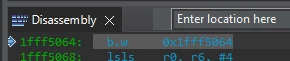 Interesting fact is that I can step through the HAL_TIM_Base_Start_IT function and can return with HAL_OK, but then it gets lost after that in the following while loop at the same address.
I also added an interrupt callback, but it is obviously never called. Also the TIM17_IRQHandler in stm32g4xx_it.c is never called.
void HAL_TIM_PeriodElapsedCallback(TIM_HandleTypeDef *htim) {
 //Check which timer triggered this callback
 if (htim == &htim17) { //The interrupt comes from the timer with one second period
 HAL_GPIO_TogglePin(GPIOD, CPU_LED1_BLUE_O_Pin); //Toggle the CPU LED BLUE
 }
}
Am I using the Timer correctly? Is there anything missing for a correct initialization?
Is there a maybe a mistake in the MX configuration?
STM32CubeIDE Version: 1.11.2 Build: 14494_20230119_0724 (UTC) is used.
STM32G473VEH6 is the used device.
Debugger: ST-LINK/V2
Any Help or Hints is appreciated! Many thanks in advance!
Daniel