


Andrew Neil
Super User
July 1, 2021
Solved

I-CUBE-LRWAN v2.0.0 with Nucleo-L073RZ board and I-Nucleo-LRWAN1 shield

  • July 1, 2021
  • 25 replies
  • 20237 views

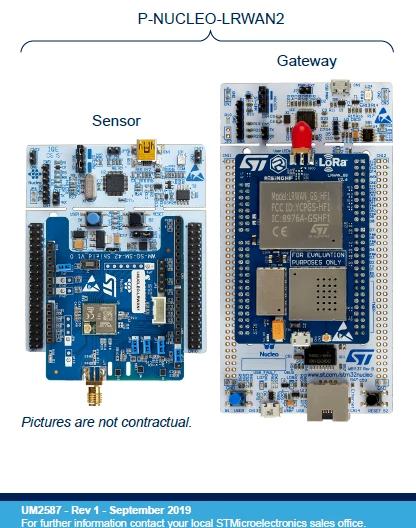
Nucleo-L073RZ board and I-Nucleo-LRWAN1 (USI module) shield - as supplied as the "Sensor" part of the P-NUCLEO-LRWAN2 kit:
0693W00000Bca5WQAR.png 

The documentation refers to I-CUBE-LRWAN at v1.2.2; in v2.0.0 (March 2021), the directory structure has changed somewhat.

I assume the correct path for the "Sensor" node project is now:

Projects\NUCLEO-L073RZ\Applications\LoRaWAN\LoRaWAN_AT_Master\STM32CubeIDE\I_NUCLEO_LRWAN1

Can anyone confirm if this actually works?

At the moment, mine doesn't seem to be sending any AT commands from the Nucleo board to the USI shield...

This topic has been closed for replies.
Best answer by JCOUP

OK, we see that the join has been accepted... 254 is the response to the battery level request and data has been send to the 99 port.. keep me info on the TTN result

25 replies

Andrew Neil
Super User
July 2, 2021

It seems that this does not work.

:\

I am sniffing the D0 (modem Tx) and D1 (modem Rx) pins with two TeraTerm instances.

With the original firmware as supplied, I could see AT commands & responses.

After building & downloading the LoRaWAN_AT_Master project in CubeIDE 1.5.1, when the Nucleo is reset, I see a junk character from it, which is echoed by the modem, and the modem then gives its <cr>#<space> prompt, but the Nucleo then never sends any AT commands:

0693W00000Bcf8fQAB.png(this represents several resets)

Stepping in the CubeIDE is useless (optimisation?), but I can see that HAL_UART_Transmit is being called to send "ATE=0\r", and it seems to return OK.

But no AT command is actually seen at the pins.

The code then, of course, just hangs waiting for the response.

A colleague has seen exactly the same behaviour in his own setup (ie, target different hardware and different host) - so it's not just something wrong with my setup.

 ADDENDUM

Going back to I-CUBE-LRWAN v1.3.1, building, downloading, and running its AT_Master project, it works as the original shipped firmware:

0693W00000BcfFqQAJ.png 

So it seems that the issue is with the v2.0.0 code?

PS

Although not shown in the screenshot, there is also a "junk" character from the Nucleo on startup/reset with the v1.3.1 code.

And it was the same with the shipped firmware.

A complex system that works is invariably found to have evolved from a simple system that worked.A complex system designed from scratch never works and cannot be patched up to make it work.
Andrew Neil
Super User
July 2, 2021
rYurd.1
Associate
July 2, 2021

all related and none of them had the solution !

Andrew Neil
Super User
July 2, 2021

Indeed: looks like ST released this in March 2021 and it has never worked!

:pouting_face:

A complex system that works is invariably found to have evolved from a simple system that worked.A complex system designed from scratch never works and cannot be patched up to make it work.
rYurd.1
Associate
July 2, 2021

I guess even worse.. because most of them older than March

Andrew Neil
Super User
July 5, 2021

It seems that, indeed, this has never worked:

0693W00000Bcnp3QAB.pngIt's using the wrong UART: it’s using LPUART1 – but the I-Nucleo-LRWAN1 is connected to USART2 !

This is correctly configured in sys_conf.h:

0693W00000BcnqBQAR.png 

But sys_conf.h is not included by usart.c!

If I add the missing include:

0693W00000BcnqVQAR.png 

it does then use the correct USART:

0693W00000BcnqfQAB.png 

But, when I download & run that, I get a Hard Fault somewhere in Master_LED_Modem_Init:

0693W00000BcnrJQAR.png(in one of the HAL_GPIO_... calls)

The behaviour is the same in STM32CubeIDE v1.5.1 and v1.6.1 (the latest).

Again, the code from I-Cube-LRWAN pack v1.3.1 works on exactly the same setup - so this is not a hardware issue, nor an issue with the USI module.

A complex system that works is invariably found to have evolved from a simple system that worked.A complex system designed from scratch never works and cannot be patched up to make it work.
JCOUP
Visitor II
July 12, 2021

Hello Andrew,

I do response and will do support to solve the current problem. Effectively by default UART was the LPUART1 due to the missing of initial definition of USART2 which is defined in "sys-conf.h" file. Do include "sys-conf.h" statement in uart.c file. To solve the hard fault (I do have to check completely why) do disable the debug mode ( in sys_app.c the DBG_Init() function). In addition in the Gpio_PreInit() function put in comment the two "__HAL_RCC_GPIOA_CLK_DISABLE()" and "__HAL_RCC_GPIOC_CLK_DISABLE() " statement. To see if you have activities on PA2 (UART2_Rx )/ PA3 (UART2_Tx) pins, best way is to connect a FTDI chip cable USB/UART . I'm working on the problem to solve the issue by this week

Andrew Neil
Super User
July 13, 2021

@JCOUP​ thanks for the reply.

"disable the debug mode"

But I do want debug access!

"To see if you have activities on PA2 (UART2_Rx )/ PA3 (UART2_Tx) pins, best way is to connect a FTDI chip cable USB/UART"

Yes, that's what I'm doing - see the post of July 2, 2021 at 12:00 PM: D1 = PA2 = USART2_TX; D0 = PA3 = USART2_RX

A complex system that works is invariably found to have evolved from a simple system that worked.A complex system designed from scratch never works and cannot be patched up to make it work.
JCOUP
Visitor II
July 13, 2021

Did you check with "__HAL_RCC_GPIOA_CLK_DISABLE()" and "__HAL_RCC_GPIOC_CLK_DISABLE()" in comment. When you do spying on PA2 or PA3, Try to either spy PA2 or spy PA3 but not both in the same time. For example just see if the AT cmd is well sent

Andrew Neil
Super User
July 13, 2021

'Did you check with "__HAL_RCC_GPIOA_CLK_DISABLE()" and "__HAL_RCC_GPIOC_CLK_DISABLE()" in comment'

Not yet ...

'Try to either spy PA2 or spy PA3 but not both in the same time'

Why not? What difference would that make? You really do need to be able to see both sides of the conversation!

A complex system that works is invariably found to have evolved from a simple system that worked.A complex system designed from scratch never works and cannot be patched up to make it work.
JCOUP
Visitor II
July 15, 2021

Andrew , Ok can you just put in #if 0 DBG_Init() #endif . Just to avoid to spepping in the debugger code.

Andrew Neil
Super User
July 15, 2021

The code is building correctly - it is doing the "DEBUGGER OFF" part - it's just the IDE that was incorrectly shading the source in the editor.

This was fixed by doing the Index > Rebuild:

0693W00000CzgwqQAB.png

A complex system that works is invariably found to have evolved from a simple system that worked.A complex system designed from scratch never works and cannot be patched up to make it work.
rYurd.1
Associate
July 15, 2021

Hi JCoup,

I have very fundamental question for you.. in fact to STM.. if you have a look , you iwll see that we all claiming same issue.. ( like : https://community.st.com/s/question/0D53W00000rauT3SAI/cant-make-at-master-application-to-work-on-nucleolrwan1nucleol073rz-pair)

1) we all purchased the same STM product (P-NUCLEO-LRWAN2 )

2) we all downloaded same code from STM web side (-CUBE-LRWAN Expansion Package)

3) we all tried same debugging as mentioned at STM web side

4) finally we all cliaming that "we dont see any transmission between 2 boards ( NUCLEO-LRWAN1 and NUCLEO-L073RZ )

So, instead of asking .. isnt it possible for you to create the problem on your side? and let us know "what was the problem?"

thanks, reha

JCOUP
Visitor II
July 16, 2021

Hi, yes you have exactly the same problem that Andrew. No communication between master and Modem. I have reproduced the problem on my side. I expect to propose to the community a fix soon ( beginning of next week).

rYurd.1
Associate
July 16, 2021

Hi JCoup

excellent news and thank you so much for your support. reha