Associate II
August 12, 2024
Solved

LSM6DSO Pedometer

Hi BenG142, I'm trying to develop a pedometer application using the LSM6DSOX sensor, but I haven't been successful. Could you share your project files with me? I'd like to know which registers you used.


This topic has been closed for replies.
BenG142
BenG142Best answer
Associate II
August 12, 2024

Hi @MasCreyt21 ,

Without more information on where you've been unsuccessful, I will try to explain all steps.

So, assuming you've had positive communications with the IC (read/write registers, etc):


1. Start by setting up the Performance/ Power Mode you want:

 case XL_Power_Mode_ODR::Mode_High_Performance_6_66_kHz:
 WriteRegisterBitRange(LSM6DSOX_CTRL1_XL, 7, 4, 0b1010 );
 WriteRegisterBit ( LSM6DSOX_CTRL5_C, 7, false ); //XL_ULP_Enable
 WriteRegisterBit ( LSM6DSOX_CTRL6_C, 4, false ); //XL_HM_Mode
 break;


2. Set up FIFO:

void LSM6DSOX_::setFifo_Steps(){

 WriteRegister ( LSM6DSOX_FUNC_CFG_ACCESS, 0x80 ); //Open Embedded Functions
 WriteRegisterBit( LSM6DSOX_EMB_FUNC_EN_A, 3, true ); //Enable Pedometer sensor in Adv Func
 WriteRegister ( LSM6DSOX_EMB_FUNC_EN_B, 0x10); //Enable false positive rejection
 WriteRegisterBit( LSM6DSOX_EMB_FUNC_FIFO_CFG, 6, true ); //Enable Step Counter Batching
 WriteRegister ( LSM6DSOX_FUNC_CFG_ACCESS, 0x00); //Close Embedded Functions

 WriteRegisterBitRange( LSM6DSOX_FIFO_CTRL4, 2, 0, 0b001 ); //set FIFO Mode


}


3. Read FIFO Registers:

 uint8_t reg1 = LSM6DSOX.ReadRegister(LSM6DSOX_FIFO_STATUS1);
 Serial.print("FIFO Status 1: ");
 Serial.println( reg1 );

 uint8_t reg2 = LSM6DSOX.ReadRegister(LSM6DSOX_FIFO_STATUS2);
 Serial.print("FIFO Status 2: ");
 Serial.println( reg2 );


4.  Clear FIFO at the end:

void LSM6DSOX_::setFifo_Clear(){
 WriteRegisterBitRange( LSM6DSOX_FIFO_CTRL4, 2, 0, 0b000);
}


Sadly not able to share the project, but hopefully this helps.

Cheers,

Ben


Screenshot from the closed thread mentioned by @Andrew Neil (Credit to @Federica Bossi) :
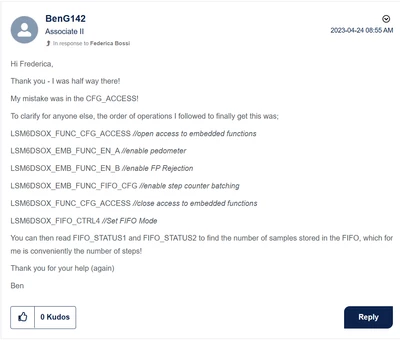
BenG142_0-1723479963735.png


3 replies

Andrew Neil
Super User
August 12, 2024

@MasCreyt21 wrote:

Hi BenG142


@BenG142 's thread was closed over a year ago:

https://community.st.com/t5/mems-sensors/lsm6dso-fifo-pedometer/td-p/61470


@MasCreyt21 wrote:

 I'm trying to develop a pedometer application using the LSM6DSOX sensor, but I haven't been successful.


So tell us what you did, and why you consider that "unsuccessful"

Did you follow the steps give by Ben and @Federica Bossi in the previous thread?

Please see the Posting Tips:

https://community.st.com/t5/community-guidelines/how-to-write-your-question-to-maximize-your-chances-to-find-a/ta-p/575228


A complex system that works is invariably found to have evolved from a simple system that worked.A complex system designed from scratch never works and cannot be patched up to make it work.
BenG142
BenG142Best answer
Associate II
August 12, 2024

Hi @MasCreyt21 ,

Without more information on where you've been unsuccessful, I will try to explain all steps.

So, assuming you've had positive communications with the IC (read/write registers, etc):


1. Start by setting up the Performance/ Power Mode you want:

 case XL_Power_Mode_ODR::Mode_High_Performance_6_66_kHz:
 WriteRegisterBitRange(LSM6DSOX_CTRL1_XL, 7, 4, 0b1010 );
 WriteRegisterBit ( LSM6DSOX_CTRL5_C, 7, false ); //XL_ULP_Enable
 WriteRegisterBit ( LSM6DSOX_CTRL6_C, 4, false ); //XL_HM_Mode
 break;


2. Set up FIFO:

void LSM6DSOX_::setFifo_Steps(){

 WriteRegister ( LSM6DSOX_FUNC_CFG_ACCESS, 0x80 ); //Open Embedded Functions
 WriteRegisterBit( LSM6DSOX_EMB_FUNC_EN_A, 3, true ); //Enable Pedometer sensor in Adv Func
 WriteRegister ( LSM6DSOX_EMB_FUNC_EN_B, 0x10); //Enable false positive rejection
 WriteRegisterBit( LSM6DSOX_EMB_FUNC_FIFO_CFG, 6, true ); //Enable Step Counter Batching
 WriteRegister ( LSM6DSOX_FUNC_CFG_ACCESS, 0x00); //Close Embedded Functions

 WriteRegisterBitRange( LSM6DSOX_FIFO_CTRL4, 2, 0, 0b001 ); //set FIFO Mode


}


3. Read FIFO Registers:

 uint8_t reg1 = LSM6DSOX.ReadRegister(LSM6DSOX_FIFO_STATUS1);
 Serial.print("FIFO Status 1: ");
 Serial.println( reg1 );

 uint8_t reg2 = LSM6DSOX.ReadRegister(LSM6DSOX_FIFO_STATUS2);
 Serial.print("FIFO Status 2: ");
 Serial.println( reg2 );


4.  Clear FIFO at the end:

void LSM6DSOX_::setFifo_Clear(){
 WriteRegisterBitRange( LSM6DSOX_FIFO_CTRL4, 2, 0, 0b000);
}


Sadly not able to share the project, but hopefully this helps.

Cheers,

Ben


Screenshot from the closed thread mentioned by @Andrew Neil (Credit to @Federica Bossi) :

BenG142_0-1723479963735.png


Associate II
August 19, 2024

@BenG142 
Thank you for your help, BenG142. Thanks to you, I solved my problem, and the LSM6DSOX is working as I wanted.