


How to create a new ISPU configuration starting from a C template
Summary
MEMS sensors with the intelligent sensor processing unit (ISPU) can run custom algorithms implemented in C code. This article describes how to create a new configuration from template code available on GitHub. Additionally, how to use MEMS Studio for programming and testing the new configuration.
Introduction
Some of the new STMicroelectronics MEMS sensors, such as the vibration sensor IIS3DWB10IS launched in 2026, embed an ISPU (intelligent sensor processing unit) to support real-time applications that rely on sensor data.
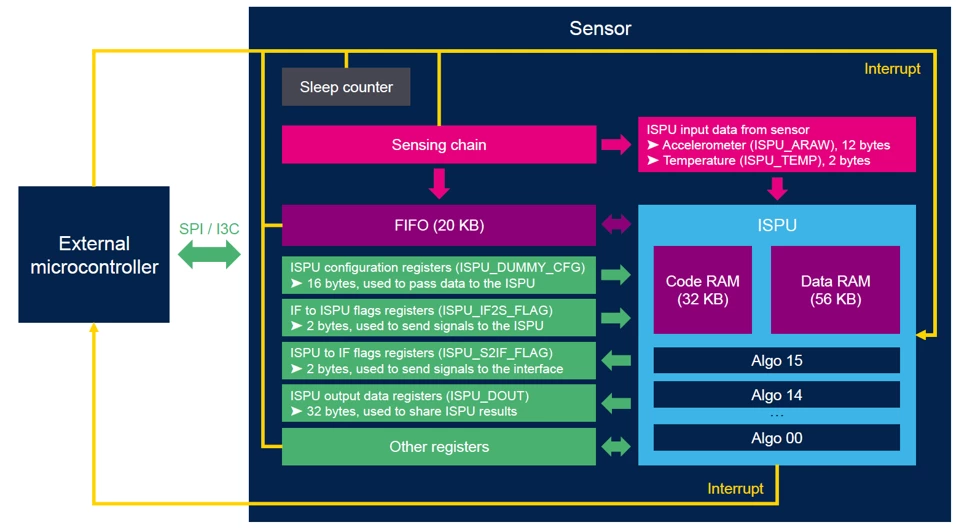
The ISPU is a programmable core that can execute real-time signal processing and edge AI algorithms. The core can be programmed in C code. On GitHub, application examples are already available, while new configurations can be developed starting from a provided template.
MEMS Studio, with the ISPU-Toolchain plugin, enables deployment of algorithms to the sensor and testing their functionality.
1. Evaluation board for sensors with ISPU
MEMS sensors are available in evaluation kits, so that they can easily plug to main evaluation boards including the STEVAL-MKI109D.
One of the latest evaluation kits for ISPU evaluation is the STEVAL-MKI253KA, a kit for evaluating the IIS3DWB10IS sensor.
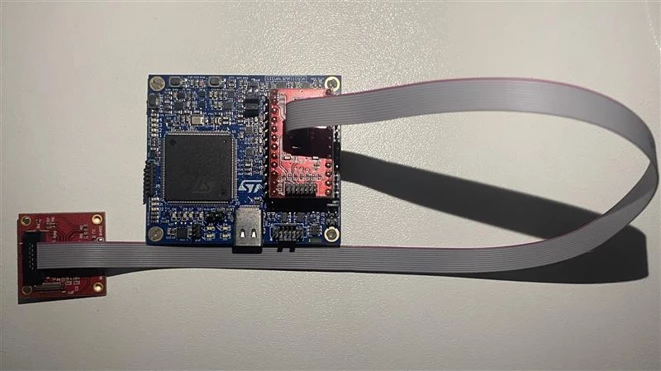
The image above shows the STEVAL-MKI253KA board connected to the STEVAL-MKI109D through a flat cable. This combination is one option for ST boards. Another option has been shown in a previous article, using the flex cable and the X-NUCLEO-IKS5A1 expansion board for STM32 Nucleo.
For a custom board, use the C drivers and examples available on the dedicated GitHub repository.
2. Writing C code for ISPU in MEMS Studio
MEMS Studio is a complete desktop software solution designed to develop embedded AI features, evaluate embedded libraries, analyze data, and design no-code algorithms for the entire portfolio of MEMS sensors.
For ISPU programming, MEMS Studio provides the C code templates in the “ISPU IDE” tool available in the “Sensor Evaluation” section.
The following files must be modified to customize the configuration:
- main.c, containing the application code with some empty functions, which can be filled with custom code.
- meta.txt, containing metadata allowing the graphical user interface (or the test firmware) to understand data available in ISPU outputs registers.
- conf.txt, containing other sensor settings (for example, accelerometer, ISPU, and algorithms settings)
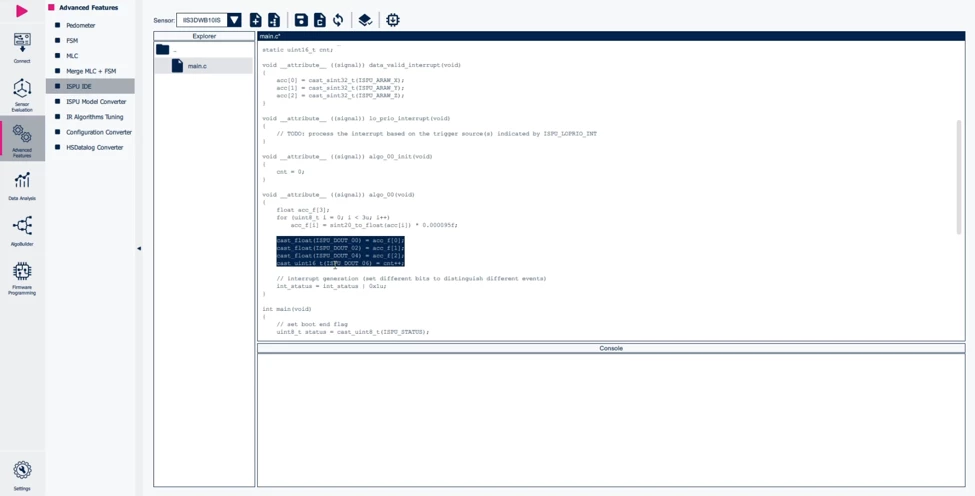
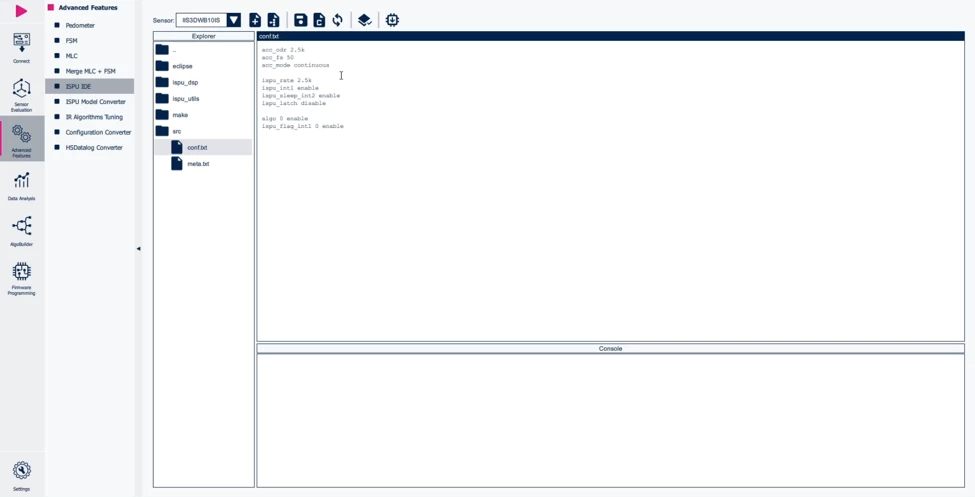
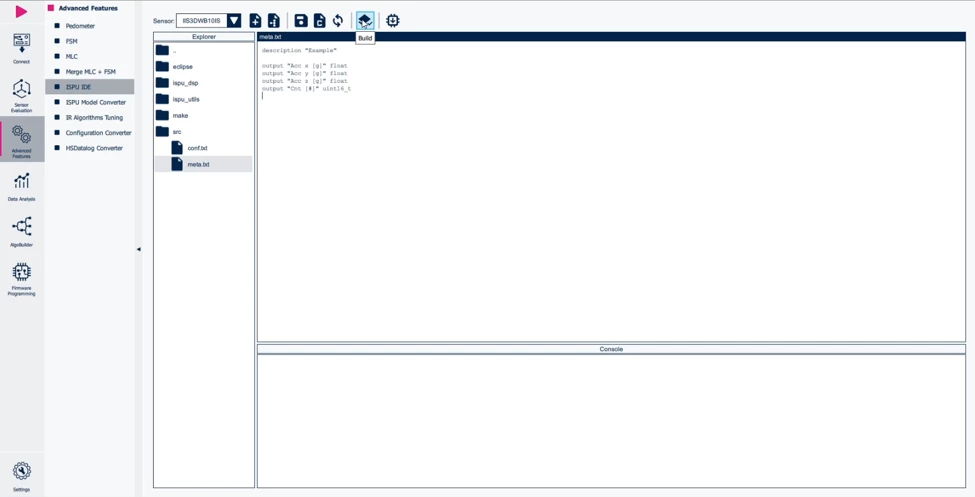
After all the modifications have been implemented, the project can be built through the “Build” button. A C header file and a JSON file are generated, which contain the configuration of the sensor including the algorithm embedded in the ISPU part.
Then the sensor can also be programmed through the “Program target” button, if any evaluation board is connected to the PC.
3. Test the new ISPU configuration in MEMS Studio
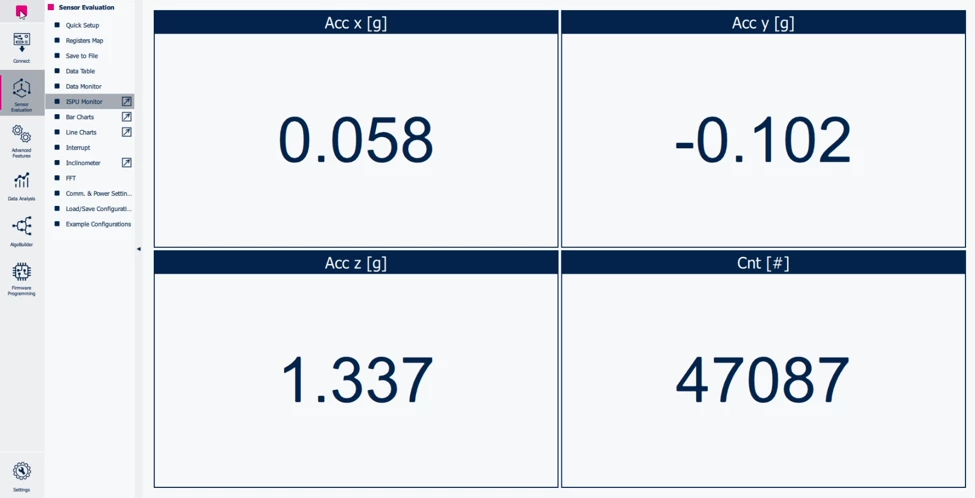
Once the sensor is programmed with the new configuration, MEMS Studio allows displaying data and testing the configuration. The evaluation board connected to the PC reads data from the ISPU output registers, and MEMS Studio interprets these values according to the information provided in the “meta.txt” file.
As shown in the screenshot of the “ISPU Monitor” in MEMS Studio, output data is displayed (in this case accelerometer data and a counter value). In this demonstration, only a simple counter value is configured, but the approach is the same for more complex algorithms.
Conclusion
STMicroelectronics MEMS sensors enable developers to run new algorithms at the edge. An ecosystem of tools, including boards and software, helps facilitate sensor evaluation and application development.
Explore the ISPU examples available on GitHub and use the C template to develop new sensor configurations for your application.
Related links
- Explore the ISPU examples on the GitHub repository: https://github.com/STMicroelectronics/st-mems-ispu
- Download MEMS Studio for development with MEMS sensors: https://www.st.com/en/development-tools/mems-studio.html
- Start your evaluation with STEVAL-MKI253KA (IIS3DWB10IS evaluation kit): https://www.st.com/en/evaluation-tools/steval-mki253ka.html
- Watch a webinar showing ISPU in IIS3DWB10IS: https://content.st.com/mems-vibration-sensors-webinar.html