2026-04-06 12:44 AM
Hello.
I created a project for the STM32F769I-DISCO board using CubeMX.
I am trying to follow an LVGL example, but the example uses BSP-based libraries, and they are not working in my project. After checking, I found that there is no BSP included anywhere in the generated project.
From what I understand, when selecting a board in CubeMX, the BSP should normally be included automatically. However, in my case, it is not.
I tried downloading the STM32F769I-DISCO BSP from GitHub and manually copying it into the Drivers folder. However, this caused many build errors, possibly due to missing dependencies or incomplete integration, so I reverted those changes.
Could you please advise how to properly include or enable BSP for this board when using CubeMX?
Thank you.
Solved! Go to Solution.
2026-04-06 1:21 AM - edited 2026-04-06 10:32 PM
Hello,
The BSP is not generated with CubeMx for this board for the moment. Some boards are supported and CubeMx asks the user to enable it at the project creation phase.
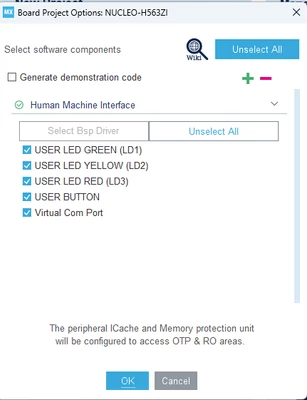
Example, for Nucleo-H563ZI, this message is shown:
And at the left side you have Bsp option:
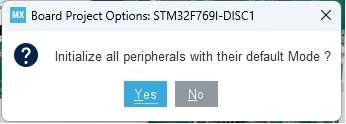
Which is not the case for STM32F769I-DISCO where you have only this message:
And the peripherals are configured by default by CubeMx.
You need to add the BSP drivers yourself to the IDE and manage the errors.
2026-04-06 1:21 AM - edited 2026-04-06 10:32 PM
Hello,
The BSP is not generated with CubeMx for this board for the moment. Some boards are supported and CubeMx asks the user to enable it at the project creation phase.
Example, for Nucleo-H563ZI, this message is shown:
And at the left side you have Bsp option:
Which is not the case for STM32F769I-DISCO where you have only this message:
And the peripherals are configured by default by CubeMx.
You need to add the BSP drivers yourself to the IDE and manage the errors.