

DM-SH
Associate
May 6, 2023
Solved

Where to find the gcc in STM32 directory? How (and in what place) is it correct to specify the path to gcc files? I changed the PATH for make and gcc separately

  • May 6, 2023
  • 7 replies
  • 15272 views

22:39:03 **** Incremental Build of configuration Debug for project c1 ****

make all

Building file: ../src/c1.c

Invoking: Cross GCC Compiler

gcc -O0 -g3 -Wall -c -fmessage-length=0 -MMD -MP -MF"src/c1.d" -MT"src/c1.o" -o "src/c1.o" "../src/c1.c"

c:/st/stm32cubeide_1.12.1/stm32cubeide/plugins/com.st.stm32cube.ide.mcu.externaltools.make.win32_2.0.200.202301161003/tools/bin/sh: gcc: not found

make: *** [src/subdir.mk:20: src/c1.o] Error 127

"make all" terminated with exit code 2. Build might be incomplete.

22:39:04 Build Failed. 1 errors, 0 warnings. (took 789ms)
This topic has been closed for replies.
Best answer by Pavel A.


_legacyfs_online_stmicro_images_0693W00000bjX9JQAU.png

7 replies

Pavel A.
May 6, 2023

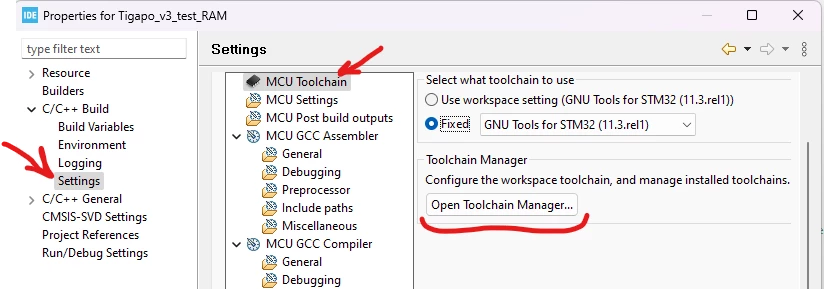
Just select the needed toolchain version in the CubeIDE project properties.

When CubeIDE runs build, it automatically adds the toolchain and make to the PATH.

There is no need to tinker with PATH manually.

DM-SH
DM-SHAuthor
Associate
May 6, 2023

Thanks.

But oooops... I can't find this item. Where is it?

Pavel A.
Pavel A.Best answer
May 7, 2023


_legacyfs_online_stmicro_images_0693W00000bjX9JQAU.png

DM-SH
DM-SHAuthor
Associate
May 7, 2023

Thanks! It is realy will be useful for me, but at the next step.

I am at this point, with very simlpe test of STM32CubeIDE: only "Hell-O World" as oldschool C. Before MCU, before Discovery.....
_legacyfs_online_stmicro_images_0693W00000bjXBKQA2.png

DM-SH
DM-SHAuthor
Associate
May 7, 2023

...The Tool Chain I have found also. And I don't know, does it need to be changed? :
_legacyfs_online_stmicro_images_0693W00000bjXBjQAM.png

Pavel A.
May 7, 2023

There's no "Tool Chain Editor" in CubeIDE. If you don't have CubeIDE, you have some other toolchain, right? Then you know where you installed it.

If you have common Eclipse CDT with Embedded C/C++ add-on, here is the documentation: https://eclipse-embed-cdt.github.io/

DM-SH
DM-SHAuthor
Associate
May 7, 2023

Perhaps there is a setup guide (as pdf) - from STM ?

AScha.3
Super User
May 7, 2023
"If you feel a post has answered your question, please click ""Accept as Solution""."
DM-SH
DM-SHAuthor
Associate
May 8, 2023

Thank you colleagues!

I will study this.

Visitor II
March 11, 2024

**Fault found, no reply required**

Hi there,

My project has ended up in the same state. As can be seen in the attached screenshot;

* it is stm32cubeide

* it does have the toolchain editor

* it cannot find gcc.exe.

ScottH_0-1710134888180.png

Any advice before I start reinstalling everything from ST?

Visitor II
March 11, 2024

...For anyone that gets into the same state: somehow or other, the project had been imported to stm32cubeide as a standard eclipse project. Importing it as an stm32cube project brought back full functionality.
