

EHugh.1
Associate
June 16, 2020
Solved

STM32H7B3 Discovery Kit - Clock/Flash Code in Cube IDE 1.3 in Incorrect - All Projects Crash
  • June 16, 2020
  • 7 replies
  • 5767 views

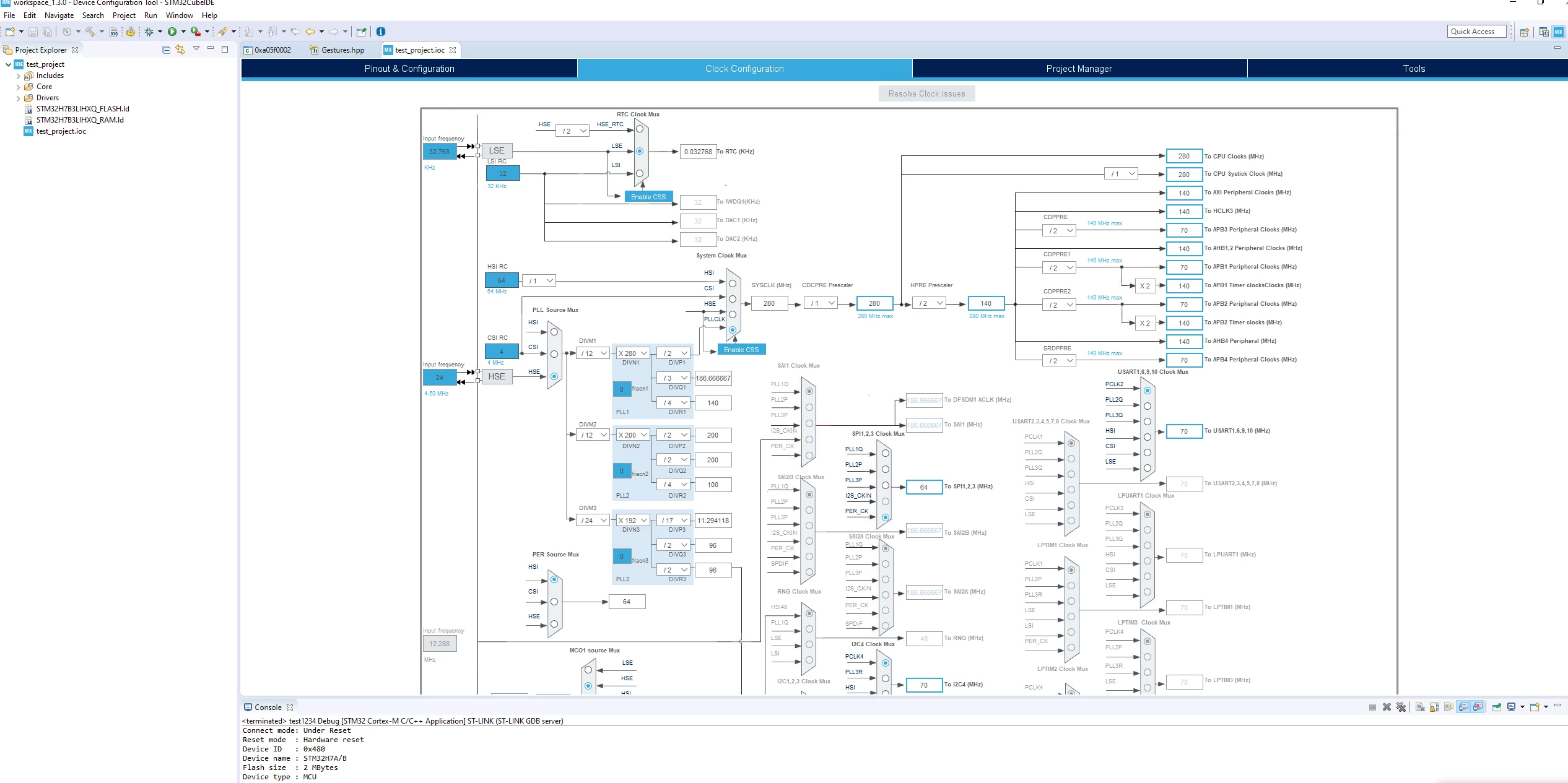
0693W000001qqOIQAY.pngI created a new project and selected the STM32H7B3 discovery kit. All default settings, no changes.

When I loaded code, it seems to crash on this line: (debugger connection is lost, etc.)

 if (HAL_RCC_ClockConfig(&RCC_ClkInitStruct, FLASH_LATENCY_3) != HAL_OK

which is in

void SystemClock_Config(void)


To recreate, simply create a new project in CubeIDE 1.3 and select all the defaults the wizard gives you.

If I select the HSI in the System Clock Mux, I can debug, etc and the CPU does not crash. There is a bug the default PLL setup for this board.

Also, i checked that the HSE was actually working. I observed a clean 24MHz signal. Looks like the PLL simply isn't working correctly.

------edit-------

I found a bunch of other examples under:

STM32Cube\Repository\STM32Cube_FW_H7_V1.7.0\Projects\STM32H7B3I-DK

Everyone one of them have the same bug.

Is this expected behavior for out of the box examples? Is there additional configuration required?
This topic has been closed for replies.
Best answer by EHugh.1

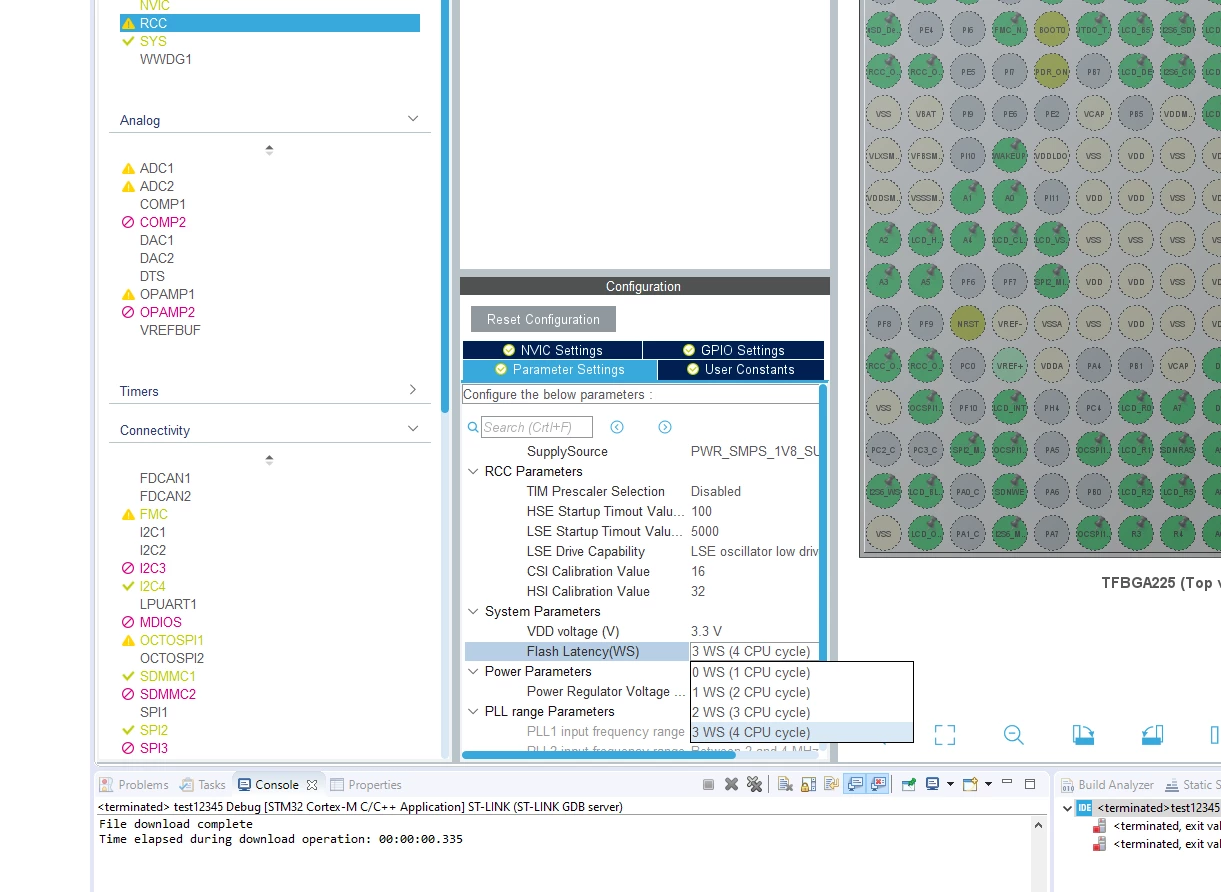
So, The flash latency is the problem. Al of the example and the default projects generated by CubeIDE1.3 use an incorrect value for the flash latency.

FLASH_LATENCY_7 is the correct value. Verified on the board I have. I noticed that the CubeIDE doesn't even have a option for it.

0693W000001r0SoQAI.png

0693W000001r0SPQAY.png

I'll post a link in the CubeIDE section. Maybe the developers can fix this. It is pretty difficult if you are starting fresh with the tools and the default configuration does not work.

7 replies

EHugh.1
EHugh.1Author
Associate
June 16, 2020

After some experimentation I discovered that I could make the examples in the V1.7 package work by decreasing the CPU clock to 200MHz from the default of 280MHz. I set DIVN1 to 200 and could get things working. Any value above that would cause erratic behavior.

waclawek.jan
Super User
June 16, 2020

> if (HAL_RCC_ClockConfig(&RCC_ClkInitStruct, FLASH_LATENCY_3) != HAL_OK

I don't think 3WS is valid for 280MHz sys_clk or even 200MHz.

Read the FLASH chapter in RM.

JW

EHugh.1
EHugh.1AuthorBest answer
Associate
June 18, 2020

So, The flash latency is the problem. Al of the example and the default projects generated by CubeIDE1.3 use an incorrect value for the flash latency.

FLASH_LATENCY_7 is the correct value. Verified on the board I have. I noticed that the CubeIDE doesn't even have a option for it.

0693W000001r0SoQAI.png

0693W000001r0SPQAY.png

I'll post a link in the CubeIDE section. Maybe the developers can fix this. It is pretty difficult if you are starting fresh with the tools and the default configuration does not work.

Amel NASRI
ST Technical Moderator
July 15, 2020

Hi @EHugh.1​ ,

By default, clock is set to 140 MHz for STM32H7B3 Discovery Kit. So FLASH_LATENCY_3 is a correct value.

If you update target frequency to a different value, Flash_Latency will be updated accordingly.

I am not able to reproduce the problem you describe, could you please share your .ioc file? I am using STM32CubeIDE 1.3.1 and STM32CubeMX 5.6.1.

-Amel

To give better visibility on the answered topics, please click on "Best Answer" on the reply which solved your issue or answered your question.
EHugh.1
EHugh.1Author
Associate
July 15, 2020

The attached project was generated with Cube IDE1.3.0. with V1.7 of the STM32H7 support package

1.3.1 is not publicly available. Please install the same version 1.3.0 and you will see the issue.

All of the examples in that version use 280Mhz Clock with a flash latency of 4. The configuration tool doesn't even let you select a flash latency greater than 4.

You will also see that all the examples under:

STM32Cube\Repository\STM32Cube_FW_H7_V1.7.0\Projects\STM32H7B3I-DK

Have incorrect flash latency settings and use 280MHz, not 140MHz.

Amel NASRI
ST Technical Moderator
July 16, 2020

Hi @EHugh.1​ ,

I checked that the difference between what I was doing and your project is that I am setting the input to AXI peripheral clock to 280 MHz, so the Flash_Latency is updated correctly.

In your case, you set HPRE prescaler to /2 , which provides the value of 140 MHz as input for AXI peripheral clock.

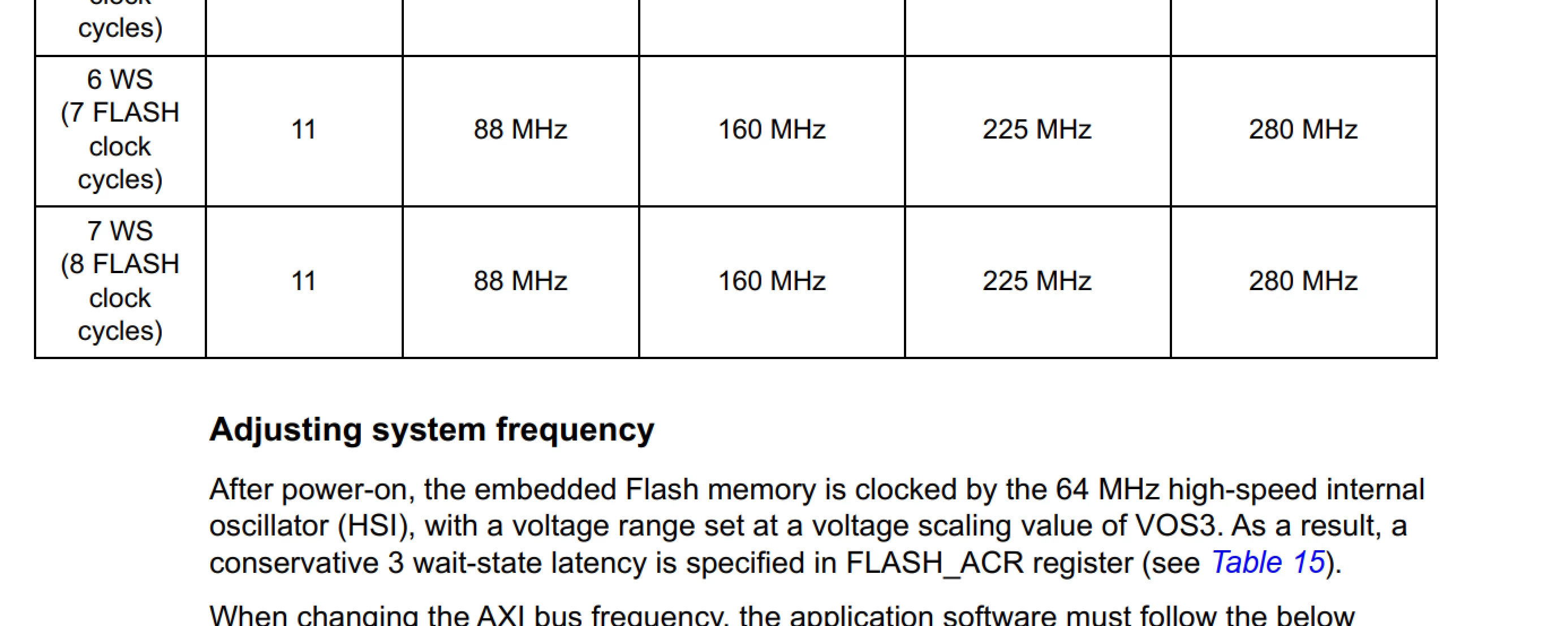
This is correct compared to the content of the table "FLASH recommended number of wait states and programming delay" as we speak about "AXI Interface clock frequency v.s. VCORE range". But it is strange why it crashes for you.

Regarding the examples of STM32CubeH7 package: I took as example STM32Cube_FW_H7_V1.7.0\Projects\STM32H7B3I-DK\Examples\ADC\ADC_DualModeInterleaved. Flash latency is set to 6 there.

-Amel

To give better visibility on the answered topics, please click on "Best Answer" on the reply which solved your issue or answered your question.
Amel NASRI
ST Technical Moderator
July 16, 2020

Hi @EHugh.1​ again,

I think that I found the root cause of the weird behavior you see.

In generated code, voltage scale is configured to VOS2: __HAL_PWR_VOLTAGESCALING_CONFIG(PWR_REGULATOR_VOLTAGE_SCALE2)

It has to be: __HAL_PWR_VOLTAGESCALING_CONFIG(PWR_REGULATOR_VOLTAGE_SCALE1).

Referring to the table "FLASH recommended number of wait states and programming delay", with 3WS, we need to use VOS1 or VOS0.

I'll report this error to our STM32CubeMX team.

-Amel

To give better visibility on the answered topics, please click on "Best Answer" on the reply which solved your issue or answered your question.
EHugh.1
EHugh.1Author
Associate
August 7, 2020

Hello:

I just downloaded and install a fresh copy of STM32 CubeIDE 1.4 with the V1.8 H7 firmware support package

*Projects generated with Cube IDE still have bad out of the box configuration*

I tested with the STM32H7B3DK and and created a basic project with CubeIDE. The default settings are:

1.) Setup the CPU for 280MHz

2.) Flash Latency of 4 (3WS)

3.) Voltage Scale of 0.

This configuration will crash the CPU. You can verify this by simply getting a STM32H7B3DK and creating a basic project from scratch.

It is possible to modify things manually to get it to work but the "stock" configuration is still broken. Please report this so it is fixed.

Also, there are still broken projects with similar issues in the V1.8 repository.

For example this project:

STM32Cube\Repository\STM32Cube_FW_H7_V1.8.0\Projects\STM32H7B3I-DK\Examples\DMA2D\DMA2D_RegToMemWithLCD

Crashes because a bad clock/flash latency voltage scale issue.

It can be easily recreated if you have a board and load the project as is.