


clock.1166
Senior
January 7, 2024
Solved

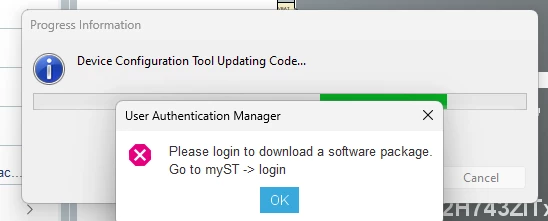
Please login to download a software package
  • January 7, 2024
  • 5 replies
  • 5551 views

clock1166_0-1704649196921.png

I cannot update my .ioc !

Why has this message suddenly appeared?

What software package????

I've been using Cubeide for years.

I have tried logging in etc. etc. as per all the forum posts.

I get an OK when I use 'check connection'

What is happening to ST?

Chris

    This topic has been closed for replies.
    Best answer by clock.1166
     
    arghon13    has the correct answer

    There is an option to login to STM32 IDE, on the top navigation bar right next to Window, Help, you should see a tab named MySt. Click on that, you will see an option to login, once you do so try to save again and see if that automatically downloads needed software package and generates the code.

    5 replies

    Tesla DeLorean
    Guru
    January 7, 2024

    They've added this "improvement" in recent times. Suggest you make sure you can log in and download Cube repositories. That whatever browser or proxy settings are required to download one of the updates.

    Tips, Buy me a coffee, or three.. PayPal Venmo (See Profile) Up vote any posts that you find helpful, it shows what's working..
    TDK
    January 7, 2024

    Within STM32CubeIDE, press Alt+L to login or select it from the menu bar.

    "If you feel a post has answered your question, please click ""Accept as Solution""."
    Associate II
    January 8, 2024

    Don't worry, it is not a bug, it is just a feature to improve the user experience !

    Are you trying to migrate your old project after an upgrade of STM32CubeIDE ?

    clock.1166
    Senior
    January 10, 2024

    Thanks All!

    I've just realised that the user code defines are a bit screwed. Repairing these solved the problems.

    Chris

    clock.1166
    clock.1166AuthorBest answer
    Senior
    January 10, 2024
     
    arghon13    has the correct answer

    There is an option to login to STM32 IDE, on the top navigation bar right next to Window, Help, you should see a tab named MySt. Click on that, you will see an option to login, once you do so try to save again and see if that automatically downloads needed software package and generates the code.