

FranzCreva
Associate II
January 30, 2024
Solved

No ST-LINK with the specified serial number detected!

  • January 30, 2024
  • 2 replies
  • 13462 views

Hi everyone,

I've been programming with various ST-LINK V2s for over a year now and have almost never had any problems.
A few days ago I started to encounter problems: that is, the various compilers and two STM32 programs to see the memory of the MCUs give me different errors, but with the STM32 compiler I received a new one "No ST-LINK with the specified serial number detected! Please connect ST-LINK and restart the debug session".

I tried restarting the computer, changing the serial port to which the ST-LINK was connected, changing ST_LINK, changing the cable but nothing, I'm always getting the same error.
What should I do?

Thanks for your availability and have a good time
Best answer by Andrew Neil

@FranzCreva wrote:

with the STM32 compiler I received a new one "No ST-LINK with the specified serial number detected! 


That's not the compiler - that's the debugger.

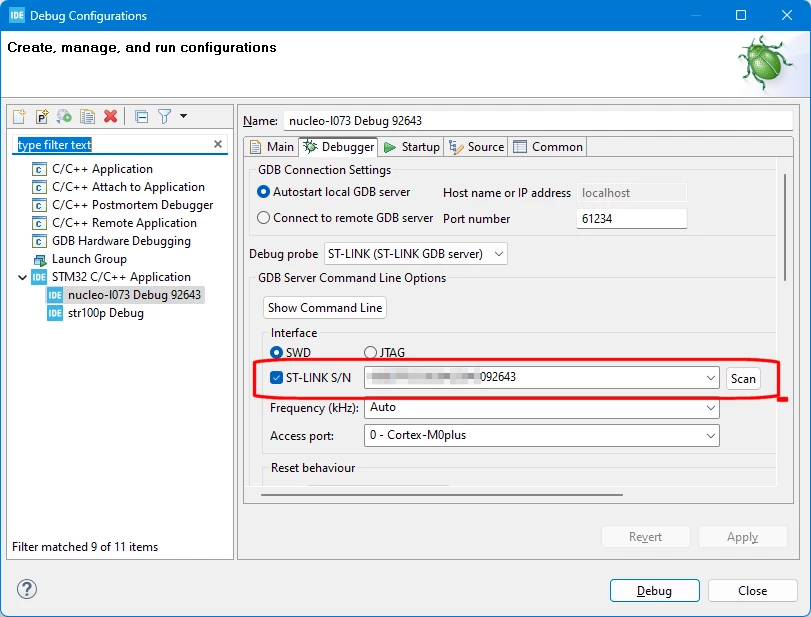
Sounds like you've set your Debug Configuration to require a specific ST-Link with a particular serial number:

AndrewNeil_0-1706635370456.png

That means that it will refuse to connect using any other ST-Link.

If that's not the behaviour you want, then uncheck the 'ST-LINK S/N' box.

Addendum:

If you do want to keep it so that it will only ever connect to one specific ST-Link, but want to use a different ST-Link (ie, different serial number), then use the 'Scan' button and select the serial number of the ST-Link you wish to use.

2 replies

Tesla DeLorean
Guru
January 30, 2024

Check with STM32 Cube Programmer, show screen there.

The ST-LINK's won't share well, so if open in another context or application they might not be available to other applications. Disconnect from Cube Programmer to release.

On Keil systems I often have to navigate into the Options and debugger settings to re-associate with the correct ST-LINK to the active project, as I often have multiple attached, and change boards around, change computers or have multiple instances open.

ST has also cracked down on counterfeit and bootleg ST-LINK devices, so watch that for being an issue

Tips, Buy me a coffee, or three.. PayPal Venmo (See Profile) Up vote any posts that you find helpful, it shows what's working..
FranzCreva
Associate II
February 5, 2024

Hi DeLorean,

The error I receive via STM32CubeProgrammer is the following: DEV_USB_COM_ERR.
I opened the program, I saw that ST-LINK was already selected and I tried to Connect to the device, but I received the first error.
I then disconnected the ST-LINK to the MCU and tried to refresh the ST-LINK list and it detected that there was no ST-LINK connected. Tried unplugging the USB and plugging it back in but nothing worked. This a couple of times.
After a while it detected the ST-LINK, I tried to connect to the MCU and it gave me the same error.


The ST-LINK is not seen by any program, not even the old STM32 ST-LINK Utility.
They always worked before

Andrew Neil
Andrew NeilBest answer
Super User
January 30, 2024

@FranzCreva wrote:

with the STM32 compiler I received a new one "No ST-LINK with the specified serial number detected! 


That's not the compiler - that's the debugger.

Sounds like you've set your Debug Configuration to require a specific ST-Link with a particular serial number:

AndrewNeil_0-1706635370456.png

That means that it will refuse to connect using any other ST-Link.

If that's not the behaviour you want, then uncheck the 'ST-LINK S/N' box.

Addendum:

If you do want to keep it so that it will only ever connect to one specific ST-Link, but want to use a different ST-Link (ie, different serial number), then use the 'Scan' button and select the serial number of the ST-Link you wish to use.

A complex system that works is invariably found to have evolved from a simple system that worked.A complex system designed from scratch never works and cannot be patched up to make it work.
FranzCreva
Associate II
February 5, 2024

You're totally right @Andrew Neil, I was hoping that the error that the STM32 Cube IDE was giving me was consistent with the errors that the other programs were giving me.
I unchecked the 'ST-LINK Y/N' item and the ST-LINk was seen.

I tried to upgrade the ST-LINK and it was seen by all programs.
How come @Tesla DeLorean? If I hadn't updated it would never have been seen properly again?

FranzCreva
Associate II
February 5, 2024

One thing I have now noticed is the fact that on STM32 Cube Programmer I get the Data Read Failed error when the MCU has active protection, while the STM32 ST-LINK Utility gives me the correct message.

It is incorrect for the STM32 Cube Programmer to indicate an error, correct?
