SKled.1
Senior
Mar 24, 2023 3:51 PM UTC
Solved

How to change the Repository directory (location)?

By default, in Windows, STM32CubeIDE downloads all firmware dev packages for all MCUs used into a Repository folder under the User folder for the user installing it, e.g.: C:\Users\User Name\STM32Cube\Repository.

I don't want it there, actually not even on that drive at all.

How do I change that Repository path?

This topic has been closed for replies.
Wijeden RHIMI
Wijeden RHIMIBest answer
ST Employee
Mar 27, 2023 10:36 AM UTC

Hi @Community member​ ,

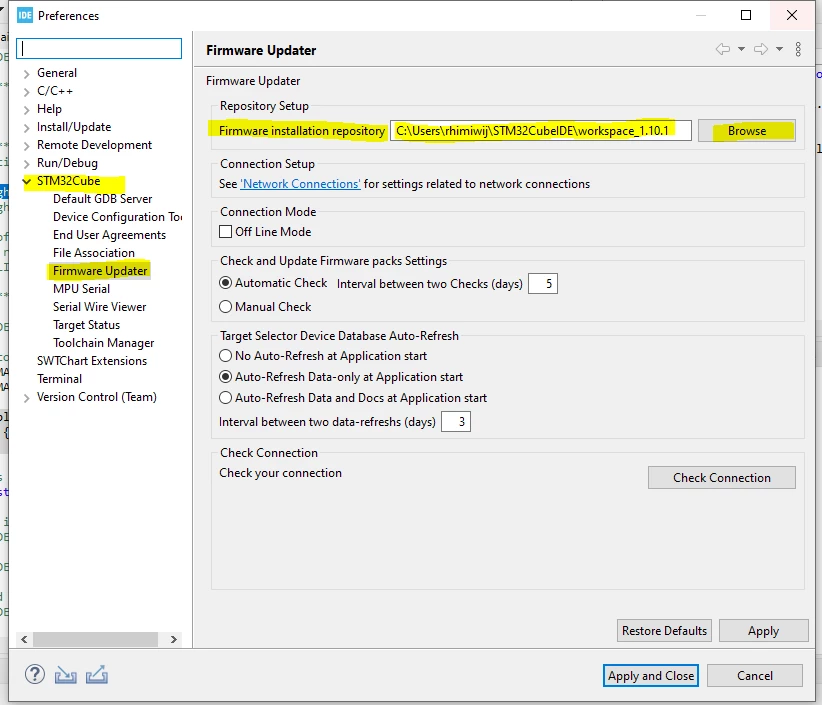
Under Window --> preferences , then try to do the same thing as shown in the screenshot bellow:

 0693W00000aJle0QAC.png 

Don't hesitate to ask more questions.

Thanks,

Wijeden,

5 replies

Bob S
Super User
Mar 24, 2023 4:01 PM UTC

I haven't tried this, and I don't run CubeMX from inside IDE, but....

In standalone CubeMX go to Help->Updater Settings. There is a field for repository folder. Try that.

Wijeden RHIMI
Wijeden RHIMIBest answer
ST Employee
Mar 27, 2023 10:36 AM UTC

Hi @Community member​ ,

Under Window --> preferences , then try to do the same thing as shown in the screenshot bellow:

 0693W00000aJle0QAC.png 

Don't hesitate to ask more questions.

Thanks,

Wijeden,

SKled.1
SKled.1Author
Senior
Mar 29, 2023 10:00 AM UTC

Ah, thanks. It's under Window here, not Project.

Wijeden RHIMI
ST Employee
Mar 29, 2023 11:04 AM UTC

Hi @SKled.1

Yes yes under window sorry :)

Does this solution solve your issue ?

Wijeden,

SKled.1
SKled.1Author
Senior
Mar 29, 2023 12:40 PM UTC

Yep ;)