Associate II
November 14, 2023
Solved

Generate and use an STM32 Hal library, can't override __io_putchar

  • November 14, 2023
  • 12 replies
  • 10593 views

Hi everyone,

I am currently trying to create a library from STM32 Hal driver (Name of this project is Nucleol073rzHalTest).
The aim for this library is to contain all pin configuration to be used in other projetcs.
For this I simply create a stm32 executable project with the desire board/micro and configure pin.
I then convert this project to library (by changing the type of project from "Executable" to "Static Library' and the output file extension from "elf" to "a"),
and call the function "main_app" in the main in order I call define it in other projects.
(I keep the .IOS file in order to modify at demand the pin configuration, but delete .ld and .s files which will depend on executable project)

I then create another stm32 project (or simple C/C++ project) executable project which will use this library (Name of this project is SandboxHal or SandBoxHalTest for the simple C/C++ project).
I add the path to search the library, and necessary header files from the library.
I delete the ioc file, source and driver files in the stm32 project because they are already compiled in the previous library.
I create my own c++ file and define in it the "main_app" function which simply toggle a led and print messages.

It works well (after some adjustement) and I can control the led on the demo board.
However when it comes to overwrite the function __io_putchar in order to get the uart output redirect to the terminal, I didn't suceed.
It works well in a standard project where all hal drivers are already in it, but not for my projects which are linked to the previous library.

In debug, the code doesn't stop into the function __io_putchar if I add breakpoint.
And __io_putchar is added in the section "Discarded input sections" in the map file after compilation for both the STM32 Executable project and the simple C/C++ Executable project.
I don't know why.

I can't succeed to get this function works in this situation, do you have suggestion about it ?

STM32CubeIDE version : Version: 1.13.2
Board used: Nucleo-L073rz

Here the code, and project view:
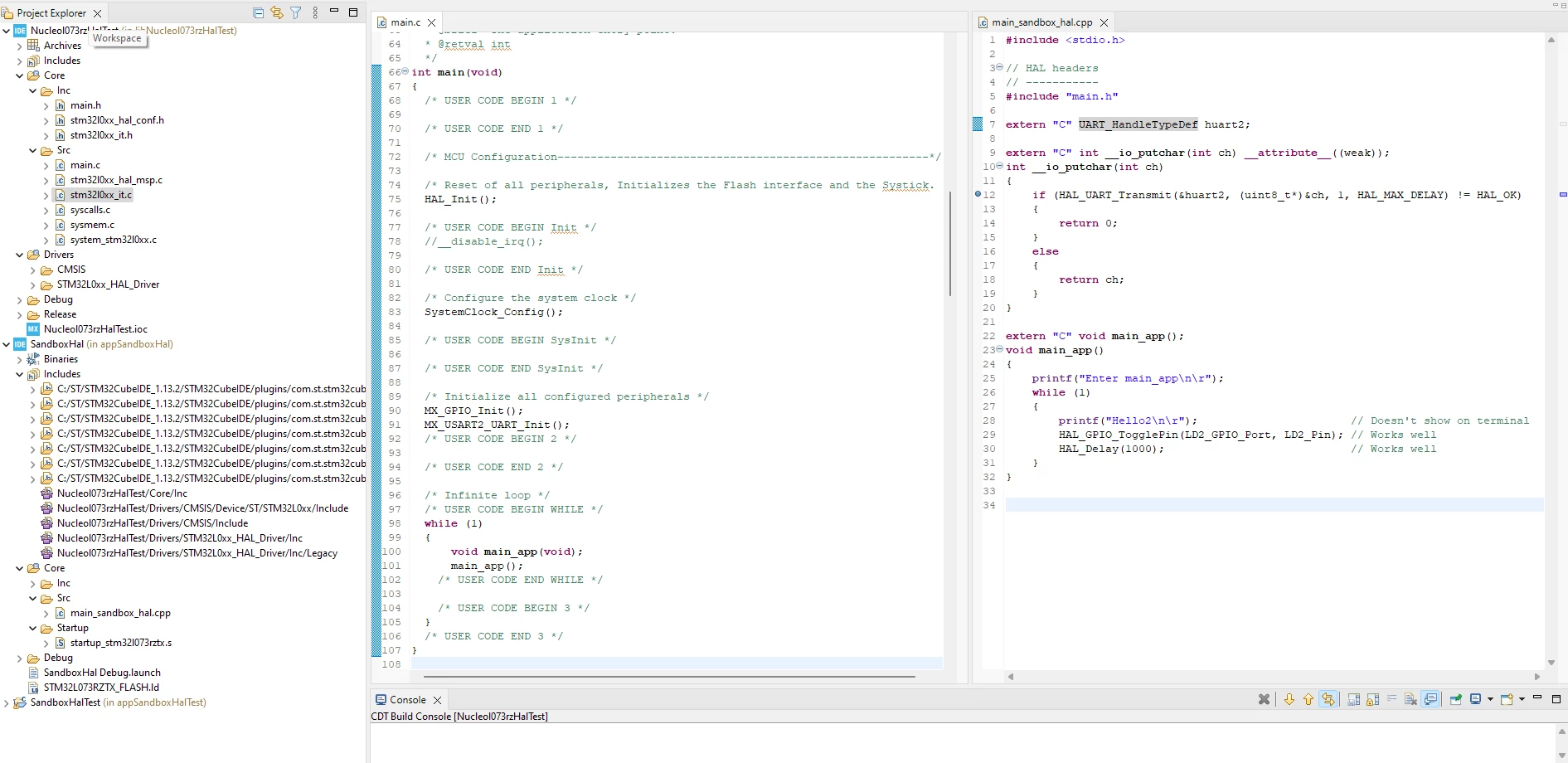
capture code test use hal library.png

    This topic has been closed for replies.
    Best answer by YohannDrc

    I finally found out a solution.
    In order the project use the good HAL_UART_MspInit.
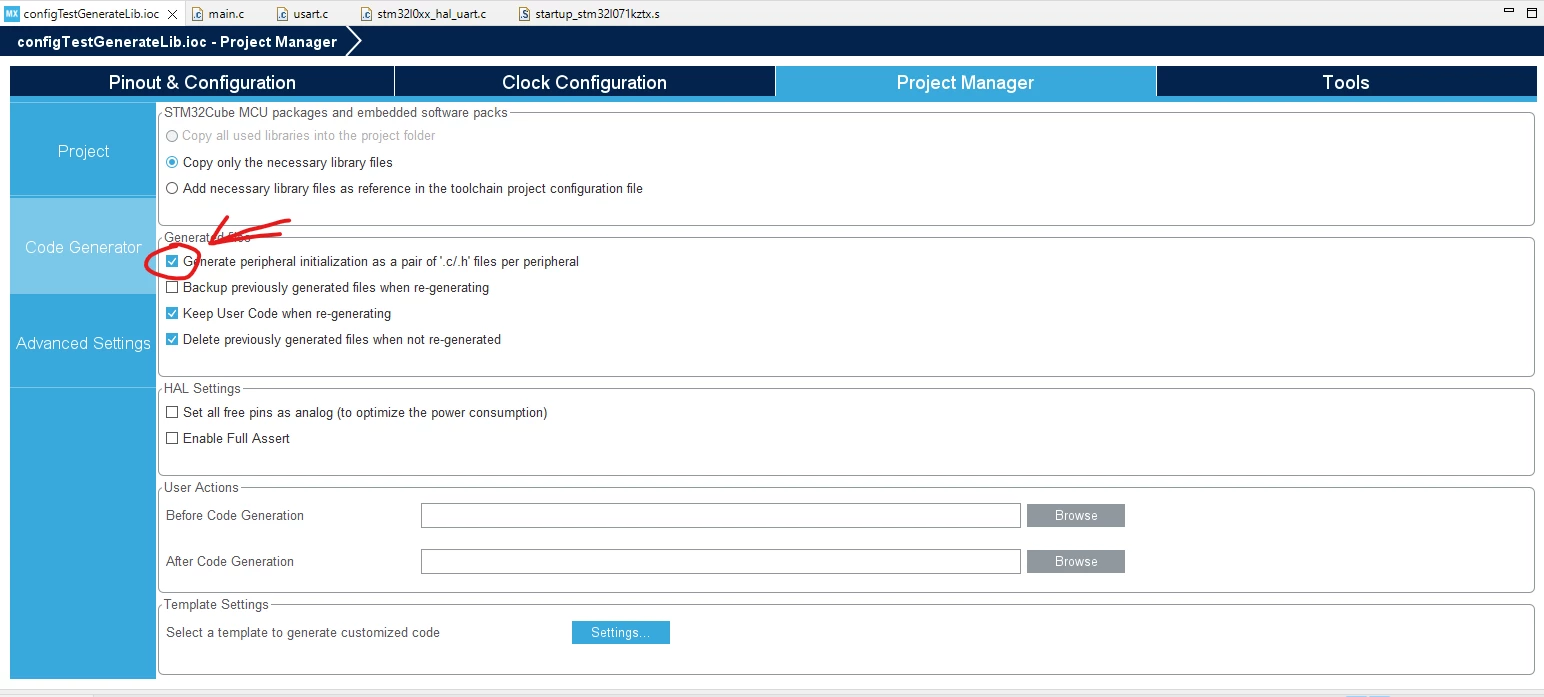
    I had to generate peripheral initialization as a pair of '.c/.h' files for each peripheral.
    It can simply be done by checking a box in the .ioc file of the library.
    Prject Manager > Code Generator > Check the box "Generate peripheral initialization as a pair of '.c/.h' files per peripheral"

    YohannDrc_0-1706006948724.png


    12 replies

    gbm
    Super User
    November 14, 2023

    Remove __attribute__ ((weak)) - it is and should be used only with the default empty definition. If you provide a definition, it must be normal symbol, not weak.

    My STM32 stuff on github - compact USB device stack and more: https://github.com/gbm-ii/gbmUSBdevice
    YohannDrcAuthor
    Associate II
    November 14, 2023

    Thanks for your reponse.

    I remove __attribute__ ((weak)) but it doesn't change anything.

    YohannDrcAuthor
    Associate II
    November 15, 2023

    I had to override the function _write to get into the __io_putchar function.

    This function is normally defined in the Nucleol073rzHalTest via the syscalls.c files, but I the file doesn't seem to be taken into account.

    extern "C" int _write(int file, char *ptr, int len);
    int _write(int file, char *ptr, int len)
    {
     int DataIdx;
    
     for (DataIdx = 0; DataIdx < len; DataIdx++)
     {
     __io_putchar(*ptr++);
     }
     return len;
    }


    I also notice some errors which appear only during the first compilation:
    (_write is no more in compilation error thanks to the previous definition)

    Capture erreur.png

    So now I enter the __io_putchar function when I call printf. 
    But I can't get something appear in the terminal.
    Whereas it works whith other other projects, so the terminal and uart used are OK.

    KDJEM.1
    ST Technical Moderator
    November 15, 2023

    Hello @YohannDrc and welcome to the Community :),

    Concerning the built errors issue, could you please try to downgrade the toolchain version to the GCC10.

    For more details, take a look at this post.

    I hope this help you.

    Thank you.

    Kaouthar

    To give better visibility on the answered topics, please click on "Best answer" on the reply which solved your issue or answered your question.
    YohannDrcAuthor
    Associate II
    November 15, 2023

    Hi KDJEM.1, thank you.

    I tried to downgrade and use the gnu toolchain 10 2021.10 in my current projects.

    But I now have this message :

    arm-none-eabi-g++: error: unrecognized command-line option '-fcyclomatic-complexity'

    Problème compilation gnu toolchain 10.png

    KDJEM.1
    ST Technical Moderator
    November 15, 2023

    Hi @YohannDrc ,

    Thank you for updating the post.

    Could you please check the Cyclomatic Complexity functionality.

    KDJEM1_0-1700046946592.png

    For more, details please refer to UM2609 Section 10. Cyclomatic complexity.

    Thank you.

    Kaouthar

    To give better visibility on the answered topics, please click on "Best answer" on the reply which solved your issue or answered your question.
    YohannDrcAuthor
    Associate II
    November 15, 2023

    So I uncheck the Cyclomatic Complexity functionality and I can no compile without error message.

    But still I didn't get any message print in the console.
    I tried just by calling 
    HAL_UART_Transmit, but it doesn't print anything either.

    extern "C" void main_app();
    void main_app()
    {
     while (1)
     {
     	uint8_t ch = 'a';
     	HAL_UART_Transmit(&huart2, &ch, 1, HAL_MAX_DELAY);
     	HAL_GPIO_TogglePin(LD2_GPIO_Port, LD2_Pin);	// Works well
     	HAL_Delay(1000);				// Works well
     }
    }


    Tesla DeLorean
    Guru
    November 15, 2023

    Is huart2 passed from your main code and suitably initialized? Check structure, RCC, GPIO, UART2 registers.

    Tips, Buy me a coffee, or three.. PayPal Venmo (See Profile) Up vote any posts that you find helpful, it shows what's working..
    Rim LANDOLSI
    ST Employee
    December 18, 2023

    Hello @YohannDrc ,


    You can refer to the UM2609 user manual for more information on redirecting printf() to UART output.
    Also, make sure that you have configured the usart2 pins in CubeMX correctly according to the UM1724. In the same way, ensure that the terminal emulator setup is connected to the board with the correct COM, same baud rate as in the pin configuration, data length = 7 bits, one stop bit, parity none and flow control disabled.

    Hope this help!


    Thanks,

    Rim

    YohannDrcAuthorBest answer
    Associate II
    January 23, 2024

    I finally found out a solution.
    In order the project use the good HAL_UART_MspInit.
    I had to generate peripheral initialization as a pair of '.c/.h' files for each peripheral.
    It can simply be done by checking a box in the .ioc file of the library.
    Prject Manager > Code Generator > Check the box "Generate peripheral initialization as a pair of '.c/.h' files per peripheral"

    YohannDrc_0-1706006948724.png