
cancel
Showing results for 
Search instead for 
Did you mean: 

After 2.0.0 to 2.1.0 update, CubeIDE always rebuilds *everything*

AlanJones
Associate

A few days ago I updated STM32CubeIDE from version 2.0.0 to 2.1.0. (Build: 27993_20260219_1630 (UTC))
Now there is a problem. There seems to be no longer any such thing as a "partial" build. Example: My project consists of about 50 ".c" and ".h" files. In the old version, if I edited one of the ".c" files and did a build, only the file that was edited got re-compiled, followed by (as expected) linker and hex file generator. Now, in this version, every build re-compiles ALL the files, even if nothing was touched since the last build. This is time-consuming. How can I stop this and get it to re-compile only the changed files? (If it matters, target CPU is STM32H753BIT6; using FreeRTOS and FATFS.)

1 ACCEPTED SOLUTION

Accepted Solutions
vaualbus
Associate III

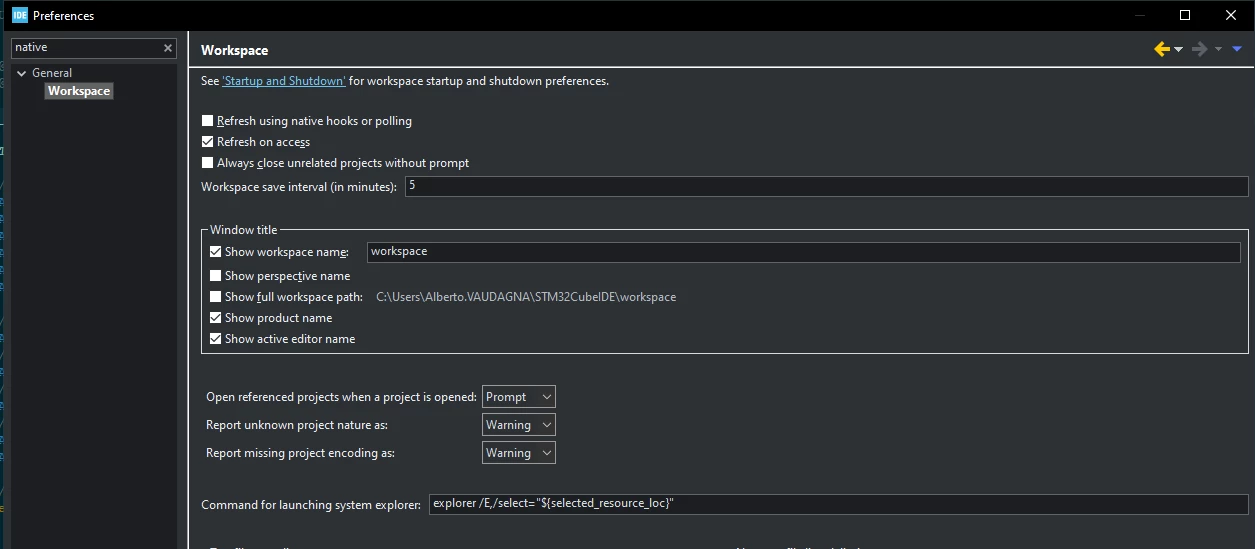
Disable "Refresh using native hooks or pooling" in workspace settings

When that was ticked also in previous version the issue happened. This was automatically re enable in new update, guess they didn't know it cause problem and enable it to on by default.

Untitled.png

View solution in original post

7 REPLIES 7
Souhaib MAZHOUD
ST Employee

Hello @AlanJones 

What did you mean by partial build? Did you use the 'build selected files' option?


To give better visibility on the answered topics, please click on Accept as Solution on the reply which solved your issue or answered your question.


@Souhaib MAZHOUD wrote:

What did you mean by partial build?


I think he's expecting the normal behaviour of a "make"-type build system, where only the files that actually need to be compiled get compiled?

ie, only compile those files which 

  1. Have changed, or
  2. Depend on on something which has changed.


@AlanJones If you do a 'Build', then immediately do 'Build' again - do you see this?

How, exactly, do you start a Build ?

Are your files on a network drive or share, or something like OneDrive ?

A complex system that works is invariably found to have evolved from a simple system that worked.
A complex system designed from scratch never works and cannot be patched up to make it work.
mƎALLEm
ST Employee

Hello,

Same issue described in this post: Problems with STM32CubeIDE 2.1.0

To give better visibility on the answered topics, please click on "Accept as Solution" on the reply which solved your issue or answered your question.
Andrew Neil
Super User

@AlanJones same question to you as here.

A complex system that works is invariably found to have evolved from a simple system that worked.
A complex system designed from scratch never works and cannot be patched up to make it work.
vaualbus
Associate III

Disable "Refresh using native hooks or pooling" in workspace settings

When that was ticked also in previous version the issue happened. This was automatically re enable in new update, guess they didn't know it cause problem and enable it to on by default.

Untitled.png


@vaualbus wrote:

Disable "Refresh using native hooks or pooling" in workspace settings


The help for that option says:

Image1.png

I wonder if they turned that ON to overcome the issues reported with v2.0.0 not seeing updates made externally by CubeMX ... ?

See this ?

A complex system that works is invariably found to have evolved from a simple system that worked.
A complex system designed from scratch never works and cannot be patched up to make it work.
Andrew Neil
Super User

@AlanJones 

STM32CubeIDE 2.1.1 released - last week; might be worth a try?

A complex system that works is invariably found to have evolved from a simple system that worked.
A complex system designed from scratch never works and cannot be patched up to make it work.