DFres.1
Associate
April 26, 2021
Solved

Has anyone got a working example for SD card with SDIO and FreeRTOS on STM32F413 with STM32CubeIDE version 1.6.1?

  • April 26, 2021
  • 4 replies
  • 8984 views

..

This topic has been closed for replies.
Best answer by DFres.1

Here is an example for all of you that are still stuck with the same problem.

In the example, you can find the project file for STM32CubeIDE and STM32CubeMX.

I'aware of the fact that the code is clumsy but it will give you an idea on how to set some of the parameters for the MCU.

The example works with SDIO 1 bit mode.

Few things to be aware of:

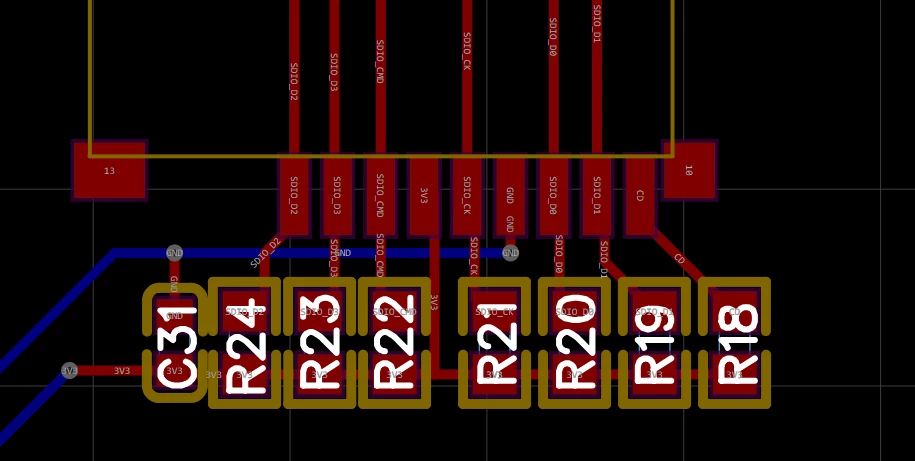
  • The code runs on a custom board where pull-up resistors of 10K are placed on the SD card pins :0693W00000AOMt6QAH.png

  • The SD card installed is 32GB, I first format the card with the PC and then plug it on the board. The first time f_open() gives an error, I reset the MCU and run the code again and from then on it works well, meaning I can create the file, write some text and read it back. Perhaps the time to set up the disk it too short the first time, I still have to debug it.
  • Be aware of the SD card that you are using, I have also been using a 16GB card without success, only to later find out the card was corrupted.

Hope it helps.

Once again, thanks to everybody for the answers, they have been of great help anyway.

4 replies

ST Technical Moderator
April 26, 2021

Hello @DFres.1​ 

Have a look at the SDIO library code and the examples within STM32CubeF4 MCU package:

STM32Cube_FW_F4_V1.26.1\Projects\STM32F413H-Discovery\Applications\FatFs

You can follow the guide to import Cube projects from SW4STM32 to STM32CubeIDE:

  • UM2579: Migration guide from System Workbench to STM32CubeIDE

Imen

In order to give better visibility on the answered topics, please click on 'Best answer' on the reply which solved your issue or answered your question. Thanks
DFres.1
DFres.1Author
Associate
April 27, 2021

Thank you for your prompt reply, I should have specified better the question.

What I am interested in, is the full project files including also the .ioc extension from CubeMX.

Meaning, the example starting from CubeMX to CubeIDE.

Osto
Senior
May 14, 2021

When you use C (not C++), you can generate the project with CubeMX, after generation is done, press open then the project will be imported to IDE and you can continue with IDE without using MX anmore. You can also import the project in IDE.

Walid ZRELLI
Visitor II
April 26, 2021

Hello @DFres.1​ ,

I have attached an SD card example with STM32CubeIDE.

I hope this help you.

Walid.

DFres.1
DFres.1Author
Associate
April 27, 2021

Thank you for your prompt reply Walid,

What I am interested in, is the full project files including also the .ioc extension from CubeMX.

Meaning, the example starting from CubeMX to CubeIDE.

I have however tried your example but without any success. The board I am using is the Nucleo-F413ZH.

I would like to see all the MX configuration if possible

Cartu38 OpenDev
Graduate II
April 26, 2021

Even easier ... let's rely on example browsing import and feature ...

Either from welcome page or from File > Import > General > Import STM32Cube Example

0693W00000AMYLRQA5.jpg

DFres.1
DFres.1Author
Associate
April 27, 2021

Thank you for your prompt reply, I should have specified better the question.

What I am interested in, is the full project files including also the .ioc extension from CubeMX.

Meaning, the example starting from CubeMX to CubeIDE.

I would like to see the MX configuration for clock settings and peripherals and then the code.

Cartu38 OpenDev
Graduate II
April 27, 2021

Unfortunately sounds no example supporting configuration

0693W00000AMhR9QAL.jpg

DFres.1
DFres.1AuthorBest answer
Associate
May 14, 2021

Here is an example for all of you that are still stuck with the same problem.

In the example, you can find the project file for STM32CubeIDE and STM32CubeMX.

I'aware of the fact that the code is clumsy but it will give you an idea on how to set some of the parameters for the MCU.

The example works with SDIO 1 bit mode.

Few things to be aware of:

  • The code runs on a custom board where pull-up resistors of 10K are placed on the SD card pins :0693W00000AOMt6QAH.png

  • The SD card installed is 32GB, I first format the card with the PC and then plug it on the board. The first time f_open() gives an error, I reset the MCU and run the code again and from then on it works well, meaning I can create the file, write some text and read it back. Perhaps the time to set up the disk it too short the first time, I still have to debug it.
  • Be aware of the SD card that you are using, I have also been using a 16GB card without success, only to later find out the card was corrupted.

Hope it helps.

Once again, thanks to everybody for the answers, they have been of great help anyway.