Visitor II
May 21, 2025 7:19 AM UTC
Solved

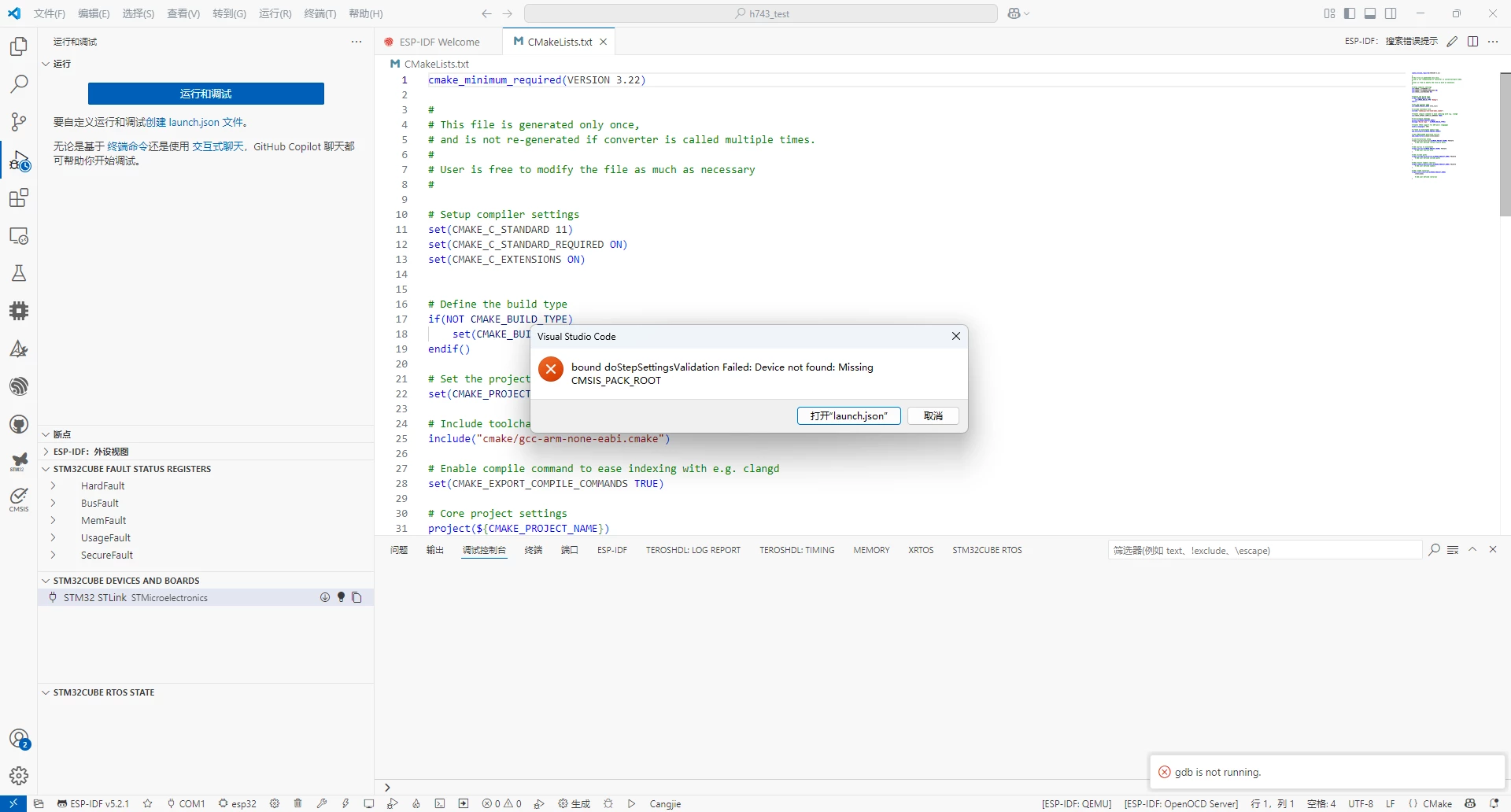
Missing CMSIS_PACK_ROOT

bound doStepSettingsValidation 失败:找不到设备:缺少CMSIS_PACK_ROOT

zhaojiying_0-1747811968136.png


Nawres GHARBI
Nawres GHARBIBest answer
ST Technical Moderator
May 26, 2025 12:59 PM UTC

hi @zhaojiying 

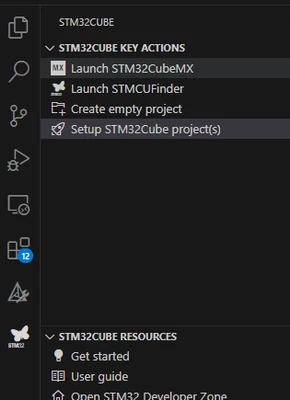
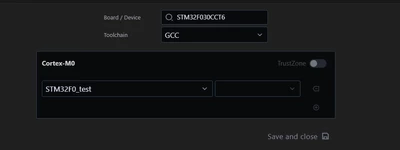
in the STM32Cube extension tab hit the "setup STM32Cube Project" and click then on save and close, your project will be configured with the right device

NawresGHARBI_0-1748264309890.png

NawresGHARBI_1-1748264324958.png


15 replies

Florent V
ST Employee
May 21, 2025 8:25 AM UTC

Hi Zhaojiying,

In the meantime, to determine why the CMSIS_PACK_ROOT is missing, you can manually define the following attributes to your debug configuration: 'deviceName', 'deviceCore' and 'svdPath'.

Could you please provide us with the name of your device?

Kind Regards

To give better visibility on the answered topics, please click on Accept as Solution on the reply which solved your issue or answered your question.
Nawres GHARBI
Nawres GHARBIBest answer
ST Technical Moderator
May 26, 2025 12:59 PM UTC

hi @zhaojiying 

in the STM32Cube extension tab hit the "setup STM32Cube Project" and click then on save and close, your project will be configured with the right device

NawresGHARBI_0-1748264309890.png

NawresGHARBI_1-1748264324958.png


Associate
Jul 16, 2025 2:05 AM UTC

Hello,


I am seeing the same error message, have followed the procedure in the solution, and continue to experience the error. 

VSCode: Version: 1.102.0 (Universal) 

OS: Darwin arm64 24.5.0

Extension: stmicroelectronics.stm32-vscode-extension
Version: 3.5.1


Screenshot 2025-07-15 at 18.59.28.png

Screenshot 2025-07-15 at 19.02.41.png

Julien D
ST Employee
Jul 17, 2025 9:20 AM UTC

Hello @sandwizard,

Could you restart VSCode to flush the output channels and paste here the content of STM32Cube core ?

Mine looks like:

JulienD_0-1752744035797.png


To give better visibility on the answered topics, please click on Accept as Solution on the reply which solved your issue or answered your question.
Associate
Jul 18, 2025 6:53 PM UTC

Hi @Julien D 

Here is the output of [STM32Cube core] after a restart.

2025-07-18 11:48:04.070 [Info] Adding STM32Cube CLI path to environment: /Users/sandwizard/.vscode/extensions/stmicroelectronics.stm32cube-ide-core-0.17.1/resources/binaries/darwin/aarch64
2025-07-18 11:48:04.194 [Info] Configuring CMSIS_PACK_ROOT environment: /Users/sandwizard/Library/Application Support/stm32cube/packs
2025-07-18 11:48:04.310 [Info] Configuring CUBE_BUNDLE_PATH environment: /Users/sandwizard/Library/Application Support/stm32cube/bundles
2025-07-18 11:48:05.182 [Info] Installing STM32Cube bundles prerequisites
2025-07-18 11:48:06.330 [Info] Syncing CMSIS-Pack metadata for /Users/sandwizard/Library/Application Support/stm32cube/packs
2025-07-18 11:48:06.330 [Info] NODE_EXTRA_CA_CERTS=undefined
2025-07-18 11:48:06.333 [Info] STM32Cube Core activated in 2282ms
2025-07-18 11:48:06.333 [Info] No need to sync metadata, since recently updated.


Associate
Sep 2, 2025 3:01 AM UTC

Hello,

I have an update that while the project I initially had this issue has been working without issue, we just tried to convert a second project out of cubeide and have the exact same issue recurring. We cannot get past it. Any further details of the root cause?

Julien D
ST Employee
Sep 2, 2025 12:43 PM UTC

Seems like CMSIS_PACK_ROOT variable gets somehow corrupted (emptied) between VSCode startup and your debug launch. Your log clearly states that the variable has been well registered at extension init with the expected value on OSX.

Do you have the issue directly after starting VSCode, or only after a period of time?

When it happens, are you able to open the "Setup STM32cube Project(s)" editor without having any errors?

To give better visibility on the answered topics, please click on Accept as Solution on the reply which solved your issue or answered your question.
Visitor II
Dec 22, 2025 11:27 AM UTC

The accepted solution did not help in my case (Windows 11, CubeMX generated default project, extension version 3.7.0), however, what helped was:

  • Checking STM32Cube core logs to see
"Configuring CMSIS_PACK_ROOT environment: C:\Users\<USER>\AppData\Local\stm32cube\packs"
  • Updating CMakePresets.json "default" preset to include:
"cacheVariables": {
"CMSIS_PACK_ROOT": "C:\\Users\\<USER>\\AppData\\Local\\stm32cube\\packs"
}


Cartu38 OpenDev
Graduate II
Dec 22, 2025 11:30 AM UTC

@one-green-apple please remind us what issue you're facing exactly ...very same popup windows at debug launch time ? or ?

Visitor II
Dec 22, 2025 11:45 AM UTC

Yes, the issue was that debug launch resulted in the "Missing CMSIS_PACK_ROOT" error window. Updating CMakePresets.json and restarting VSCode solved the issue, though it is possible that the issue was solved by some side effect of doing this.

Julien D
ST Employee
Dec 22, 2025 12:13 PM UTC

Hi @one-green-apple,

Looking at similar topic (https://community.st.com/t5/stm32cubeide-for-visual-studio/bound-dostepsettingsvalidation-failed-device-not-found-error/m-p/849087#M1285) it looks like conflicting extensions exist; CMSIS_PACK_ROOT defined at extensions init gets emptied later on.

Do you confirm that installing STM32Cube extensions in a separate VSCode profile help to workaround the problem ?

If so could you paste the list of extensions you installed within the default profile ? 

To give better visibility on the answered topics, please click on Accept as Solution on the reply which solved your issue or answered your question.
Julien D
ST Employee
Mar 9, 2026 9:58 AM UTC

Hi,

FYI a new release of the extensions containing a fix for this issue has just been published.

To give better visibility on the answered topics, please click on Accept as Solution on the reply which solved your issue or answered your question.