

Debugging often hangs (infinite loop of "Read 4 bytes @ address ...")
Hello,
I've been working with the new VS Code extensions for several weeks, and debugging feels quite unstable. I'm using a j-Link Plus. At random times, I suddenly can't debug anymore, everything seems to freeze, and in the Debug Console I see something like this:
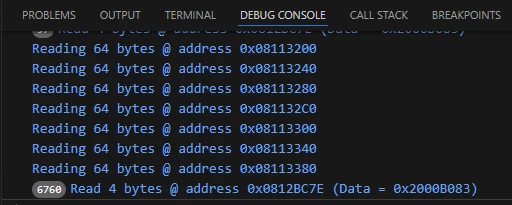
The number (6760 here) increases by hundreds per second and will never stop. Every time such a random debug freeze happens, I see this last line with the counting number box, always reading 4 bytes somewhere (different addresses), as if some read action hangs in an endless loop. Only way to get it working again is by closing the whole debug session and starting anew.
Sometimes I can debug for an hour without this issue, sometimes I get this every few minutes. It's not related to some code position, happens in different debug configurations (flash / attach to running), happens in different projects, with different (or no) watched variables, on different PCBs, with different cables to the debug probe, with different clang optimization levels. Restarting VS Code and reconnecting the probe USB cable don't seem to help much either. I see no systematic trigger at all.
Today I've updated jlink-gdbserver to 9.14.1+st1, but the issue continues.
Using the same probe and same ELF in SEGGER Ozone works without any such problem, have been using this probe and Ozone for years. So it must be something in VS Code or the GDB extensions.
My launch config is this:
{
	"name": "Build & Debug App (j-Link)",
	"type": "jlinkgdbtarget",
	"request": "launch",
	"origin": "snippet",
	"cwd": "${workspaceFolder}",
	"presentation": {
		"group": "j-Link",
		"order": 1
	},
	"preLaunchTask": "Build App",
	"imagesAndSymbols": [
		{
			"imageFileName": "${workspaceFolder}/build/Debug/APPLICATION.elf"
		}
	],
	"deviceName": "STM32H743II",
	"deviceCore": "Cortex-M7",
},
Any idea what could be the issue?
(I also tried an ST-Link for debugging, but that one has different problems like sometimes being extreeeemely slow, so it's not a good alternative either.)