Ara.1
Associate III
September 13, 2021
Solved

stm32mp1 reading the reset status watchdog driver

  • September 13, 2021
  • 3 replies
  • 1348 views

Hi

In my application we need to read the last rest status, whether its a POR or WDOG

      ret = ioctl(wdog, WDIOC_GETBOOTSTATUS, &status);

looks like this support is not available in

drivers/watchdog/stm32_iwdg.c

can anyone tell me how add a patch in stm32mp1 board ?

This topic has been closed for replies.
Best answer by Kevin HUBER

Hi @Ara.1​ 

Since your need seems to know if the last reset occurs because of POR of WDOG, something else seems more adapted to you.

I advise you to take a look in the sources of the TF-A at the function: "print_reset_reason"

This function is available in the file "plat/st/stm32mp1/bl2_plat_setup.c" and displays the reason of the reset by reading the register RCC_MP_RSTSCLRR

static void print_reset_reason(void)
{
	uint32_t rstsr = mmio_read_32(stm32mp_rcc_base() + RCC_MP_RSTSCLRR);
 
	if (rstsr == 0U) {
		WARN("Reset reason unknown\n");
		return;
	}
 
	INFO("Reset reason (0x%x):\n", rstsr);
	if ((rstsr & RCC_MP_RSTSCLRR_PADRSTF) == 0U) {
		if ((rstsr & RCC_MP_RSTSCLRR_STDBYRSTF) != 0U) {
			INFO("System exits from STANDBY\n");
			return;
		}

This register is accessible from application, so you can read its value.

To make a test on your board, you can try to read the register by using devmem. Details to install and use it are on the wiki: https://wiki.st.com/stm32mpu/wiki/How_to_read_or_write_peripheral_registers#Installing_Devmem_on_your_target_board

The address to read is the one read in "print_reset_reason",

stm32mp_rcc_base() + RCC_MP_RSTSCLRR

on my board STM32MP157F-DK2 with the developer package, the address is:

#define RCC_BASE			U(0x50000000)

+

#define RCC_MP_RSTSCLRR			U(0x408)

So the final address is 0x5000408

Once you use devmem, you get the value like this:
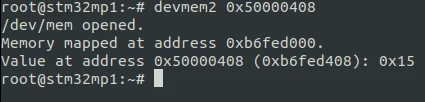
0693W00000FA7qnQAD.png 

Then you interpret this value by using the reference manual that details all the possible values: https://www.st.com/resource/en/reference_manual/rm0436-stm32mp157-advanced-armbased-32bit-mpus-stmicroelectronics.pdf#page=996

Hope it help you,

Regards,

Kevin

3 replies

Ara.1
Ara.1Author
Associate III
September 15, 2021

any one faced this scenario ?

Kevin HUBER
Kevin HUBERBest answer
ST Employee
September 22, 2021

Hi @Ara.1​ 

Since your need seems to know if the last reset occurs because of POR of WDOG, something else seems more adapted to you.

I advise you to take a look in the sources of the TF-A at the function: "print_reset_reason"

This function is available in the file "plat/st/stm32mp1/bl2_plat_setup.c" and displays the reason of the reset by reading the register RCC_MP_RSTSCLRR

static void print_reset_reason(void)
{
	uint32_t rstsr = mmio_read_32(stm32mp_rcc_base() + RCC_MP_RSTSCLRR);
 
	if (rstsr == 0U) {
		WARN("Reset reason unknown\n");
		return;
	}
 
	INFO("Reset reason (0x%x):\n", rstsr);
	if ((rstsr & RCC_MP_RSTSCLRR_PADRSTF) == 0U) {
		if ((rstsr & RCC_MP_RSTSCLRR_STDBYRSTF) != 0U) {
			INFO("System exits from STANDBY\n");
			return;
		}

This register is accessible from application, so you can read its value.

To make a test on your board, you can try to read the register by using devmem. Details to install and use it are on the wiki: https://wiki.st.com/stm32mpu/wiki/How_to_read_or_write_peripheral_registers#Installing_Devmem_on_your_target_board

The address to read is the one read in "print_reset_reason",

stm32mp_rcc_base() + RCC_MP_RSTSCLRR

on my board STM32MP157F-DK2 with the developer package, the address is:

#define RCC_BASE			U(0x50000000)

+

#define RCC_MP_RSTSCLRR			U(0x408)

So the final address is 0x5000408

Once you use devmem, you get the value like this:

0693W00000FA7qnQAD.png 

Then you interpret this value by using the reference manual that details all the possible values: https://www.st.com/resource/en/reference_manual/rm0436-stm32mp157-advanced-armbased-32bit-mpus-stmicroelectronics.pdf#page=996

Hope it help you,

Regards,

Kevin

In order to give better visibility on the answered topics, please click on 'Best answer' on the reply which solved your issue or answered your question.
Olivier GALLIEN
ST Technical Moderator
October 13, 2021

In order to give better visibility on the answered topics, please click on 'Select as Best' on the reply which solved your issue or answered your question. See also 'Best Answers'

In order to give better visibility on the answered topics, please click on 'Accept as Solution' on the reply which solved your issue or answered your question.
