

How to use the input capture feature
- 6 replies
- 36073 views
Introduction
Input capture is one of the advanced timer features available on the STM32 microcontrollers. This article guides you through the theoretical aspects of input capture, provide a practical example, and discuss troubleshooting common issues. In this article we use the STM32H563 microcontroller.
1. Input capture basics
Input capture is a feature that allows the timer to record the time at which an external event occurs. This is particularly useful for measuring an input signal's frequency, period, or pulse width. The timer captures the value of its counter at the moment an edge (rising or falling) is detected on a specific input pin.
2. Key components
- Timer counter: A register that increments (or decrements) based on the timer clock.
- Capture/compare register (CCR): Stores the counter value when an input capture event occurs.
- Input capture channel: The specific pin and associated circuitry used to detect the input signal.
3. Configuration parameters
- Edge selection: Determines whether the capture occurs on a rising edge, falling edge, or both.
- Prescaler: Divides the timer clock to adjust the counter frequency.
- Filter: Filters out noise by requiring a stable signal for a specified duration before capturing.
4. Practical example
This example aims to measure the frequency of an external signal using timer 2 on the STM32H563.
Hardware setup: Connect the external signal to the timer 2 channel 1 input pin (PA0).
Step 1: Configure the clock
In this example, the HCLK clock is set to 125MHz. Timer2 is connected to APB1 (always refer to the block diagram in the datasheet to check the timer clock).
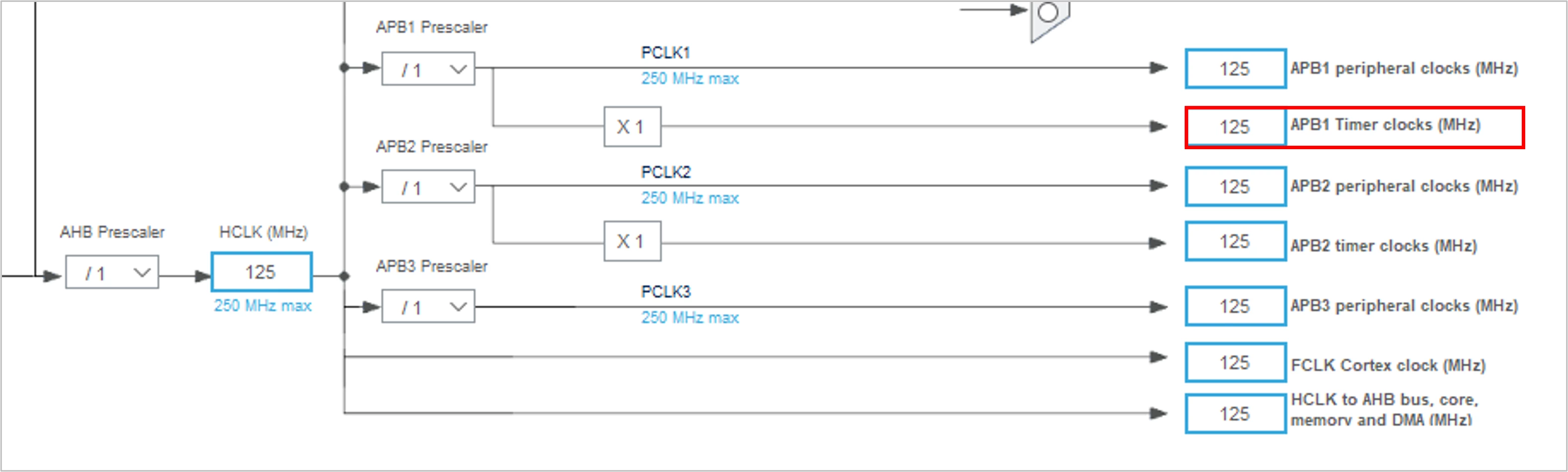 Clock configuration
Step 2: Configure the timer settings
- Click on the Configuration tab.
- Select TIM2 and choose Input capture direct mode for Channel 1.
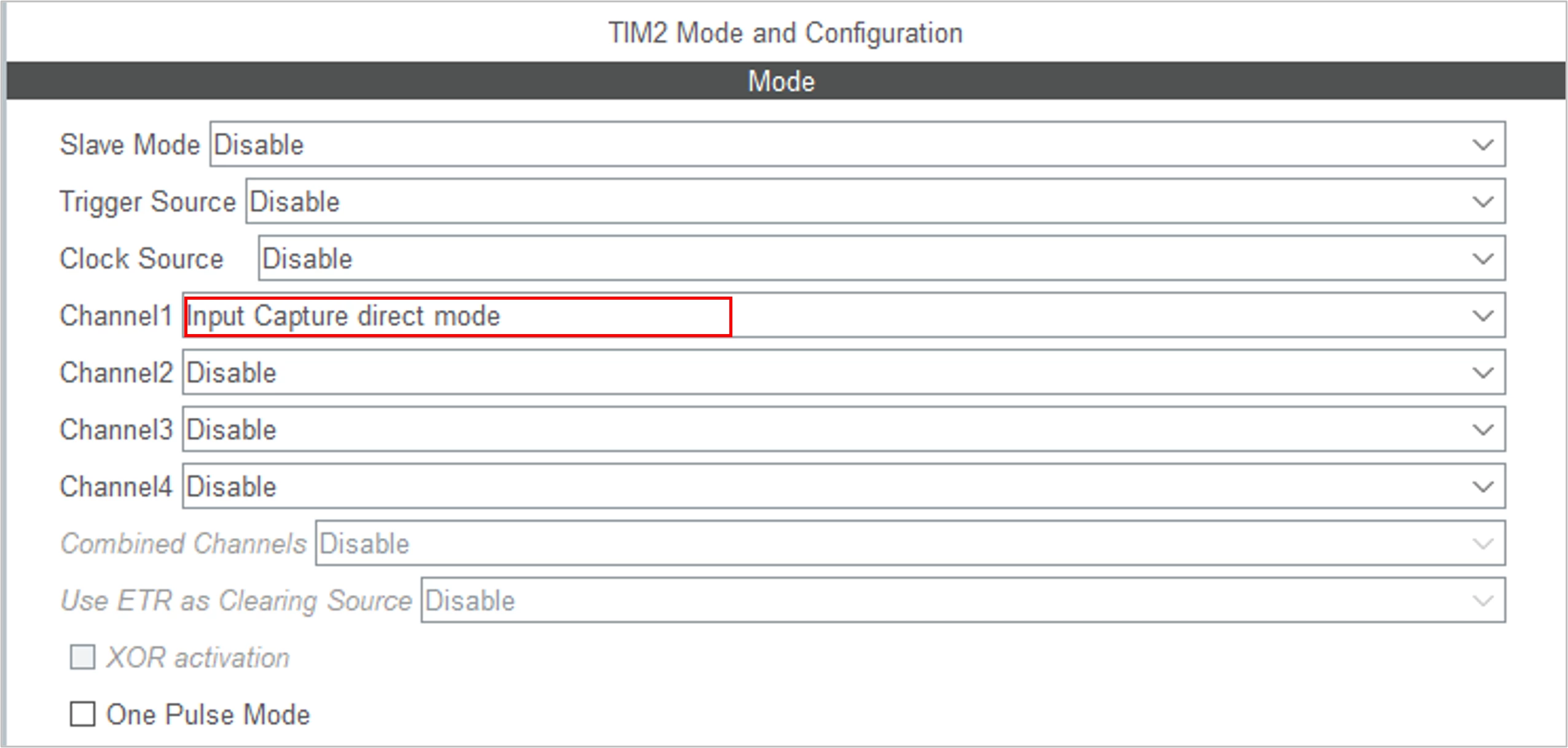 Choose input capture mode
- Set the Prescaler to adjust the timer clock frequency.
- Set the Counter Mode to Up.
- Set the Period value.
- In the Channel 1 settings, set the IC Polarity to Rising (or Falling depending on your requirement).
- Set the IC Selection to Direct.
- Set the IC Prescaler to No division.
- Set the IC Filter to 0 (or adjust as needed to filter noise).
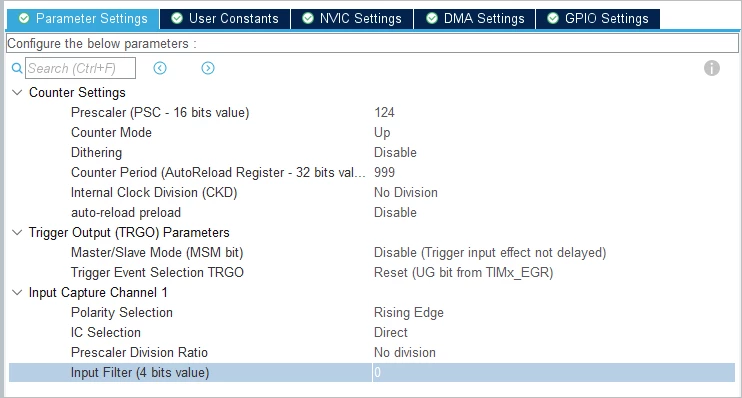 TIM2 configuration
The formula below determines the timer's counter clock frequency (CK_CNT):
CK_CNT= HCLK / (PSC+1)
Where:
- HCLK is the system clock frequency (125 MHz in this case).
- PSC is the prescaler value.
The timer period is determined by the auto-reload register (ARR) value and the counter clock frequency, the formula is:
Period = (ARR+1) * (1/ CK_CNT)
Where:
- ARR is the auto-reload register value.
- CK_CNT is the counter clock frequency.
For a desired period of 1 ms for example, and CK_CNT=1MHz, we can choose PSC=124, this divides the clock by 125. Using the period formula, ARR=1000-1 =999.
Step 3: Enable the Timer interrupt
 TIM2 interrupt
Step 4: Configure GPIO pins
- In the Pinout & Configuration tab, select the pin connected to the input signal (PA0 for TIM2_CH1).
- Ensure that the pin is configured as Alternate Function PP and is set to the correct timer channel.
Step 5: Generate the project code
Start Input Capture in Interrupt mode
void TIM2_Start_IC(void) {
 HAL_TIM_IC_Start_IT(&htim2, TIM_CHANNEL_1);
}
The variable we used are:
- captureValue: Stores the current captured value of the timer counter.
- previousCaptureValue: Stores the previously captured value of the timer counter. It is used to calculate the time difference between two consecutive capture events.
- frequency: Stores the calculated frequency of the input signal based on the captured values.
Handle Input Capture Interrupt
uint32_t captureValue = 0;
uint32_t previousCaptureValue = 0;
uint32_t frequency = 0;

void HAL_TIM_IC_CaptureCallback(TIM_HandleTypeDef *htim) {
 if (htim->Channel == HAL_TIM_ACTIVE_CHANNEL_1) {
 captureValue = HAL_TIM_ReadCapturedValue(htim, TIM_CHANNEL_1);
 frequency = HAL_RCC_GetPCLK1Freq() / (captureValue - previousCaptureValue);
 previousCaptureValue = captureValue;
 }
}
5. Troubleshooting known issues
The following issues are the most likely encountered by users, with the most probable root causes.
5.1. No capture event is detected
- Check pin configuration: Ensure the input pin is correctly configured as an alternate function for the timer.
- Verify signal integrity: Ensure the input signal is clean and meets the voltage levels required by the microcontroller. If the signal is noisy, consider using a filter.
5.2. Incorrect frequency measurement
- Adjust prescaler: If the measured frequency is too high or too low, adjust the prescaler to bring the counter value within a measurable range.
- Debounce the input signal: Use the input filter feature to debounce noisy signals.
5.3. Interrupt not triggering
- Enable NVIC: Ensure that the NVIC is configured to handle the timer interrupt.
- Check the timer clock: Verify that the timer clock is enabled and running.
5.4. Overflows and wraparounds
- Handle overflows: Implement logic to handle counter overflows if the input signal period is longer than the timer period.