

How to use the HAL2 structure and project format
- March 24, 2026
- 1 reply
- 1121 views
Summary
This article describes how to use the HAL2 project format when developing STM32 applications. It explains what changes with HAL2 compared to the HAL1 framework, how the new project structure affects user code, and how to work safely with code generation. The article shows that, under HAL2, main.c becomes the central user code area and is no longer overwritten by code generation. The generated layer becomes more portable and easier to reuse. The article also shows how to use the code generation menu and the Code Preview feature to protect user code, how the new format maps into a VS Code workspace, and how drivers, handles and interrupt handlers are organized in HAL2.
- Summary
- Introduction
- Prerequisites
- 1. File structure
- 1.1 HAL1
- 1.2 HAL2
- 1.3 Comparison between HAL1 and HAL2
- Conclusion
- Related links
Introduction
The introduction of HAL2 marks a significant evolution in the STM32Cube software ecosystem. From a driver point of view, HAL2 improves performance and memory footprint, introduces clearer state machines for peripheral handles, and systematically relies on LL services for register access. From a project point of view, HAL2 changes how the generated code is structured and how user code is expected to be integrated.
This article explains the differences between HAL1 and HAL2 project format and structure.
Prerequisites
Install the following tools:
- STM32CubeMX2
- The latest STM32C5 HAL2 driver
- STM32CubeIDE extension for Visual Studio Code
1. File structure
1.1 HAL1
On the HAL1 side:
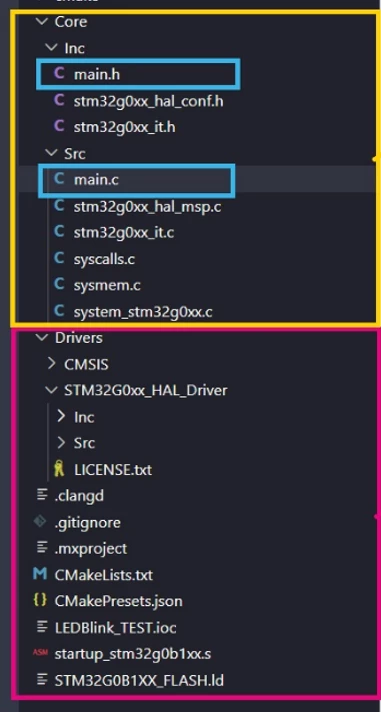
The yellow block is the Core folder:
- Core/Inc with headers such as:
- main.h
- stm32zyxx_hal_conf.h
- stm32zyxx_it.h
- Core/Src with sources such as:
- main.c
- stm32zyxx_hal_msp.c
- stm32zyxx_it.c
- syscalls.c, sysmem.c
- system_stm32zyxx.c
The pink block is the Drivers folder:
- Drivers/CMSIS/...
- Drivers/STM32ZYxx_HAL_Driver/Inc
- Drivers/STM32ZYxx_HAL_Driver/Src
In this layout, main.c is in Core/Src, mixed in with all the other generated files. The HAL drivers are "project local" inside Drivers and there is no explicit separation between:
- generator‑owned code,
- device/driver packages,
- user‑owned code.
The tool typically regenerates the contents of Core, including main.c and stm32zyxx_it.c, and you rely on /* USER CODE */ regions inside these files.
1.2 HAL2
On the HAL2 side, the project is split into three clear layers.
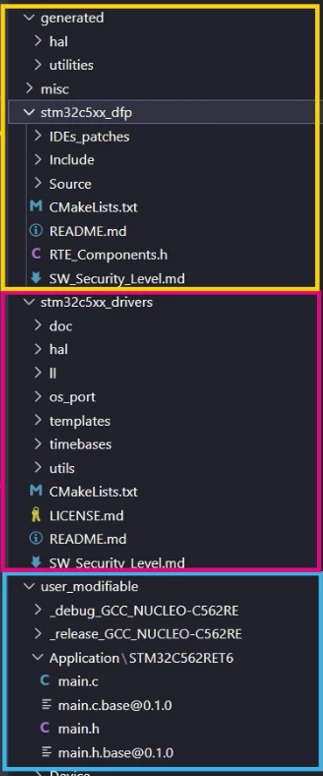
Generated layer and DFP (yellow box)
The yellow box covers a top‑level generated directory (with hal, utilities, misc, etc.) and the stm32c5xx_dfp directory.
This is the generator + Device Family Pack layer:
- generated/ contains code produced from your configuration:
- HAL init and setup code (mx_... sources, helper utilities).
- stm32c5xx_dfp/ (name is family‑specific) contains the DFP:
- Include/ and Source/ with device headers and startup.
- CMakeLists.txt and RTE_Components.h.
- IDE patches and metadata.
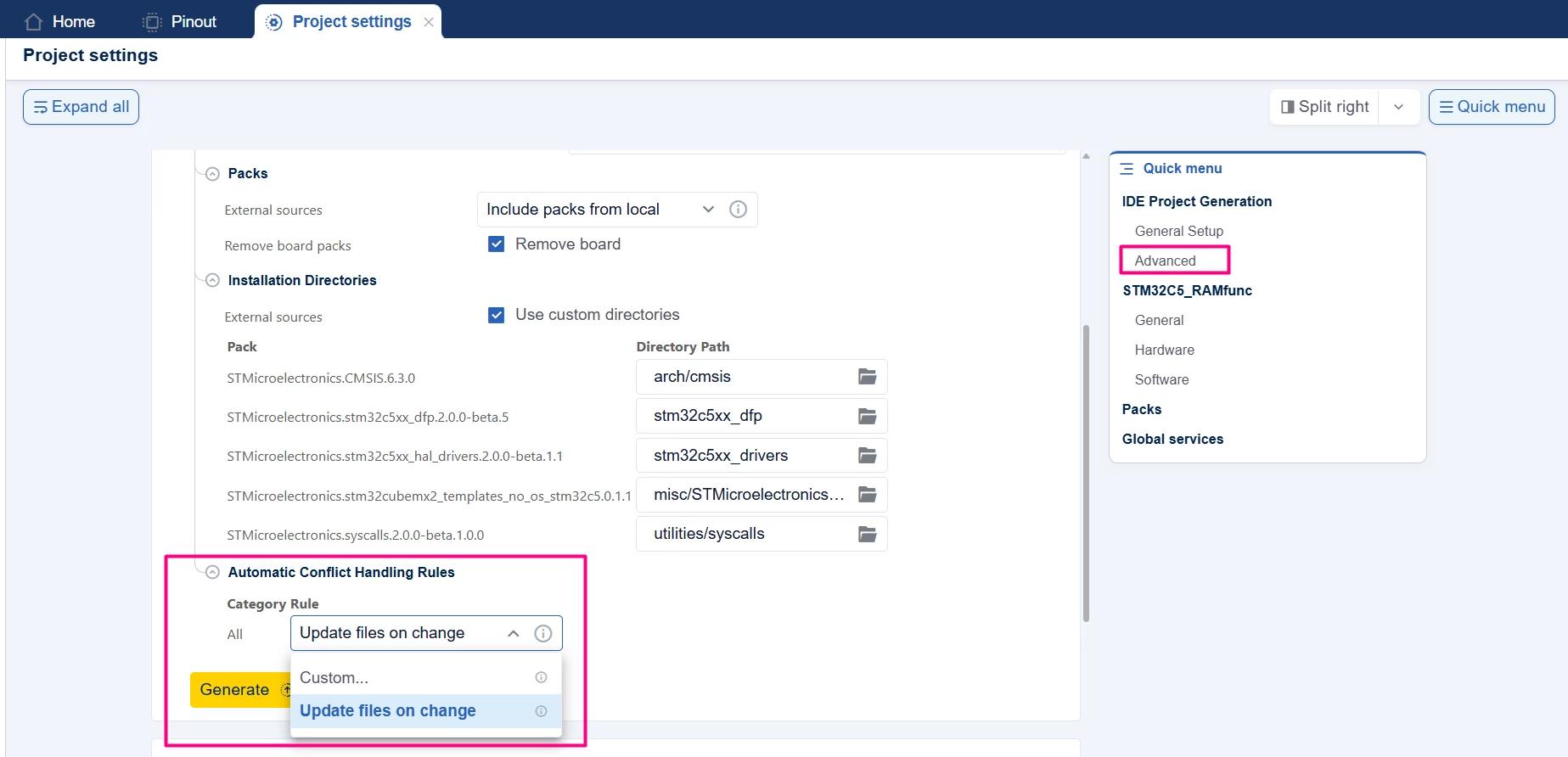
This area is considered tool‑owned: STM32CubeMX2 can regenerate or update it without touching your application logic. There is an option to show the difference when regenerating the code.
In the "Project settings" tab of STM32CubeMX2, click [Advanced] and specify the Category Rule for the generation.
HAL driver package (pink box)
The pink box surrounds stm32c5xx_drivers:
- Inside you see:
- hal/, ll/
- os_port/, timebases/, templates/, utils/
- CMakeLists.txt, LICENSE.md, README.md
This is the HAL2 driver pack for the family, separated from the project itself:
- It behaves like a package that your project uses.
- It is not meant for per‑project editing.
- It can be shared across different projects targeting the same family.
This is roughly the evolution of what used to be Drivers/STM32ZYxx_HAL_Driver in HAL1, but now clearly packaged and versioned.
User‑modifiable application code (blue box)
The blue box is where the biggest conceptual change shows up. It contains a user_modifiable directory.
- Build directories (_debug_GCC_NUCLEO..., _release_GCC_NUCLEO...).
- The Application\STM32C5xx... folder.
- Crucially, several versions of main.c:
- main.c
- main.base@0.1.0
- main.h
- main.base@0.1.0.h
This area is explicitly marked as user_modifiable:
- main.c here is your file.
- The main.base@... versions are backing copies / templates created by the tools to help with migration or comparison, but not where you build your logic.
- When you edit application code, you do it in:
- user_modifiable/main.c
- Any other sources that you add under the user area.
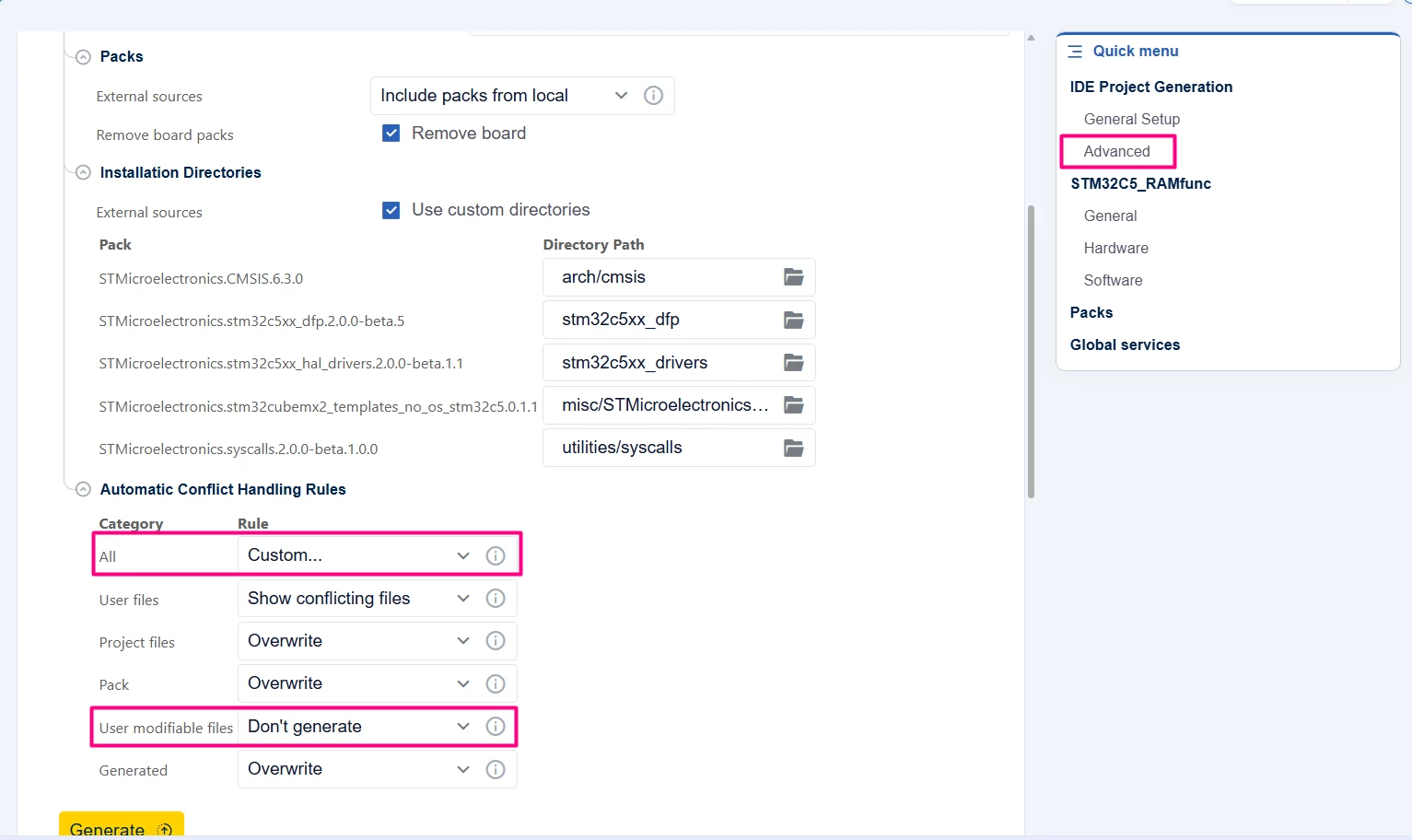
To prevent an overwrite in the main.c file, it is recommended changing the category rule to [Custom]. Set "User Modifiable files" to [Don’t generate] or [Backup].
The important difference from HAL1 is that main.c is no longer buried inside a generator‑owned Core/Src tree. Instead, it sits in a separate, clearly labeled user area, and the HAL2 tooling is designed not to overwrite this file on regeneration.
1.3 Comparison between HAL1 and HAL2
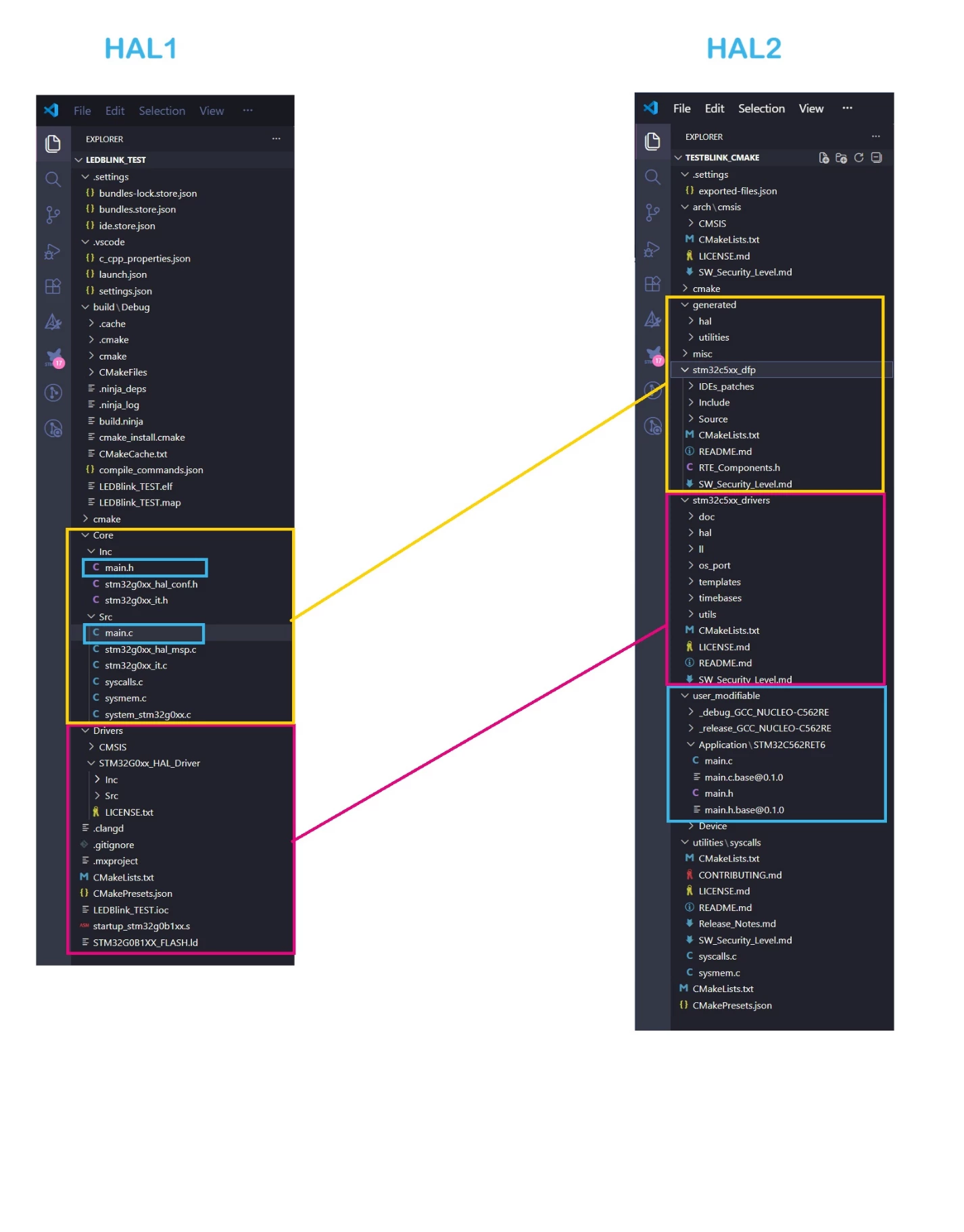
HAL1
- Project code, generated code, and user modifications are all intertwined under Core and Drivers.
- main.c is generated and regenerated, with user code living in USER CODE markers.
- The HAL driver code is “just another folder” under Drivers.
HAL2
- The tree is split into three clean layers:
- generated + stm32c5xx_dfp: configuration‑dependent, generator‑owned code.
- stm32c5xx_drivers: the HAL2/LL driver package for that family.
- user_modifiable: the application layer, including main.c, which is treated as user code.
- Regeneration focuses on generated and package metadata; your user_modifiable sources are preserved.
- It is immediately apparent from the VS Code explorer which folders are intended for modification and which should remain unchanged.
In short, the image shows how HAL2 turns what used to be a single mixed project tree (HAL1) into a layered structure: device package, generated HAL, and a clearly isolated, user‑owned application area with main.c at its core.
Conclusion
The comparison between HAL1 and HAL2 shows a clear shift from a mixed project tree to a clean, layered structure. In HAL1, main.c, generated code and HAL drivers all exist under Core and Drivers, so regeneration can easily touch files that also contain user logic.
HAL2 separates these concerns. Configuration-dependent code is located in a generated area. The device and HAL2 drivers are packaged in stm32c5xx_dfp and stm32c5xx_drivers. User files, especially main.c, are moved into a dedicated user area, such as user_modifiable. This makes it obvious which folders the tools control and which belong to the application.
As a result, code generation becomes safer and updates are easier to absorb. Porting a project to a new board or MCU largely means regenerating the HAL2 layer and reusing the same application sources. HAL2 delivers better drivers, and a more robust and maintainable project format.
Related links
- STM32Cube for Visual Studio Code
- STM32CubeMX2
- STM32 embedded software documentation
- STM32CubeMX2 software documentation
