

WSH
Associate II
July 19, 2021
Question

ST-LINK Utility connects then disconnects with "Unexpected error" with STM32WB

  • July 19, 2021
  • 5 replies
  • 4325 views

Hello!

I'm working with a custom STM32WB55CCU6 board I've created. I made it to where the only interface is the SWD PA14/PA13.

I'm 99% sure my schematic is fine as I used the STM32WB design guidelines and sample schematics as my reference. (BOOT0 - Tied to ground with 10K resistor, NRST tied to 3.3V with 100K resistor and 100nF cap in between).

I'm using a 32MHz crystal.
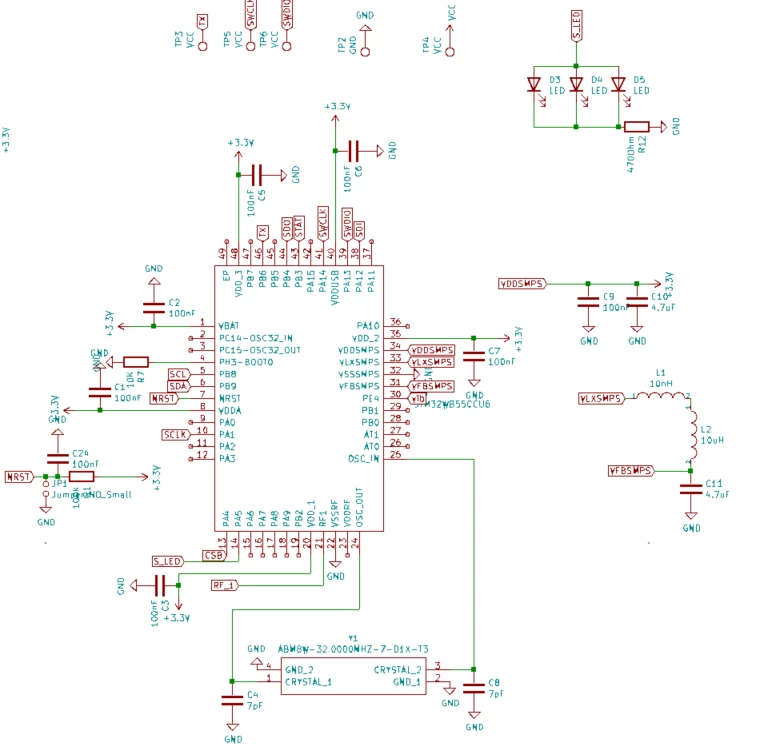
0693W00000D01HtQAJ.png 

Here is my schematic.

I'm using a generic STM-LINK/V2 with firmware version V2J37S7.

I'm connecting 3.3V, GND, SWCLK, SWDIO, and NRST to the STM-LINK.

In the ST-Link utility I've tried all the modes but seem to be getting the same result:

10:07:42 : ST-LINK SN : 3100450002000031354E4E4E
10:07:42 : V2J37S7
10:07:42 : Connected via SWD.
10:07:42 : SWD Frequency = 4,0 MHz.
10:07:42 : Connection mode : HotPlug.
10:07:42 : Debug in Low Power mode enabled.
10:07:43 : Can not connect to the target!
 Please select "Connect Under Reset" mode from Target->Settings menu and try again.
10:07:44 : Unexpected error

What am I doing wrong here?

Thanks!

This topic has been closed for replies.

5 replies

Mike_ST
ST Technical Moderator
July 19, 2021

Hello,

Please try with STM32CubeProgrammer.

In order to give better visibility on the answered topics, please click on 'Best answer' on the reply which solved your issue or answered your question. 
Tesla DeLorean
Guru
July 19, 2021

ST-LINK Utilities is deprecated, use STM32 Cube Programmer.

Most issues are caused by Connectivity or Power, an un-powered scan chain isn't going to function. Check state of NRST pin, check power supply, look at with scope.

Code on device using LOW POWER or STANDBY type modes?

Should VDDRF be powered?

Tips, Buy me a coffee, or three.. PayPal Venmo (See Profile) Up vote any posts that you find helpful, it shows what's working..
WSH
WSHAuthor
Associate II
July 19, 2021

Thanks! I'm trying to utilize the Cube programmer as well, but that is freezing as soon as I click "Connect"

I have a feeling the issue is VDDRF... Looks like that powers the HSE which the STM32WB is reliant upon... It's weird because my oscilloscope is showing the SDWDIO interface working without the ST-Link connected.

Tesla DeLorean
Guru
July 19, 2021

What would alternative uses of SWDIO/SWCLK be in a normal application of the IC? They are general GPIO, and if they're are reconfigured early in the post-reset code this can block connectivity within the thousands of cycles needed for control to be wrestled by the debugger.

Also NRST has to make it to the debug interface for "Connect Under Reset" strategy to be viable.

Pulling BOOT0 HIGH can take user code interfering with the interface out of the question

Tips, Buy me a coffee, or three.. PayPal Venmo (See Profile) Up vote any posts that you find helpful, it shows what's working..
WSH
WSHAuthor
Associate II
July 19, 2021

There is no usage for them outside of SWD.

I tried connecting NRST to the debugger and pulling BOOT0 high to put it in DFU mode. None of those solutions worked.

WSH
WSHAuthor
Associate II
July 19, 2021

Update: I ran a jumper from 3.3V to VDDRF. Still not working. Double checked on my oscilloscope and SWDIO is definitely outputting signal

Does CubeProgrammer work with the generic ST-Link-V2 modules? When I click "Connect" nothing happens.

Tesla DeLorean
Guru
July 19, 2021

Generic ones or boot-leg ones?

STM32 Cube Programmer should work just fine with authentic ST-LINK V2, V2-1 and V3 pods, either the standalone models, or those integrated on NUCLEO, DISCO or EVAL series boards.

Make sure it sees the ST-LINK, and that you don't have any secondary tools (IDE, etc) that has an open connection to the hardware, or otherwise has ownership.

Tips, Buy me a coffee, or three.. PayPal Venmo (See Profile) Up vote any posts that you find helpful, it shows what's working..
WSH
WSHAuthor
Associate II
July 19, 2021

Boot-leg... I ordered a real one that will be here tomorrow. I tried rebooting and going directly to cube programmer. It sees the ST-Link, gives it Serial Number "1". Then when I click connect, the loading bar at the bottom starts pinging. Yet nothing happens and the lights on the programmer don't change colors like they do the ST Link utility.

Maybe I'll have better results tomorrow with the genuine ST Link. Is there anything else I can try? I may try to solder jumpers to the USB +/- then see if I can access DFU mode. I'd like to rule out my schematic as being faulty.

RMieh.1
Visitor II
January 12, 2022

WSH,

I am having the same issue! Did you solve yours?

Regards,