

Javier1
Principal
September 8, 2021
Solved

CubeProgrammer firmware upgrade, Error: firmware not authentic (P-NUCLEOWB55)

  • September 8, 2021
  • 7 replies
  • 14750 views

I am trying to follow this video: because i think i bricked my coprocessor (m0+ ), same thing happens in two different boards.✌�?

STM32WB Getting Started Series: Part 9, Stack Loading

https://www.youtube.com/watch?v=wheGvdXsi4o

When i click firmware upgrade

\STM32Cube\Repository\STM32Cube_FW_WB_V1.12.1\Projects\STM32WB_Copro_Wireless_Binaries\STM32WB5x\stm32wb5x_BLE_Stack_full_fw.bin

i get this Error: Firmware not authentic!0693W00000DmWwUQAV.pngthe firmware start addr in the video is outdated, with fw v1.12.1 the correct addr is 0x080CA000 but still same result:
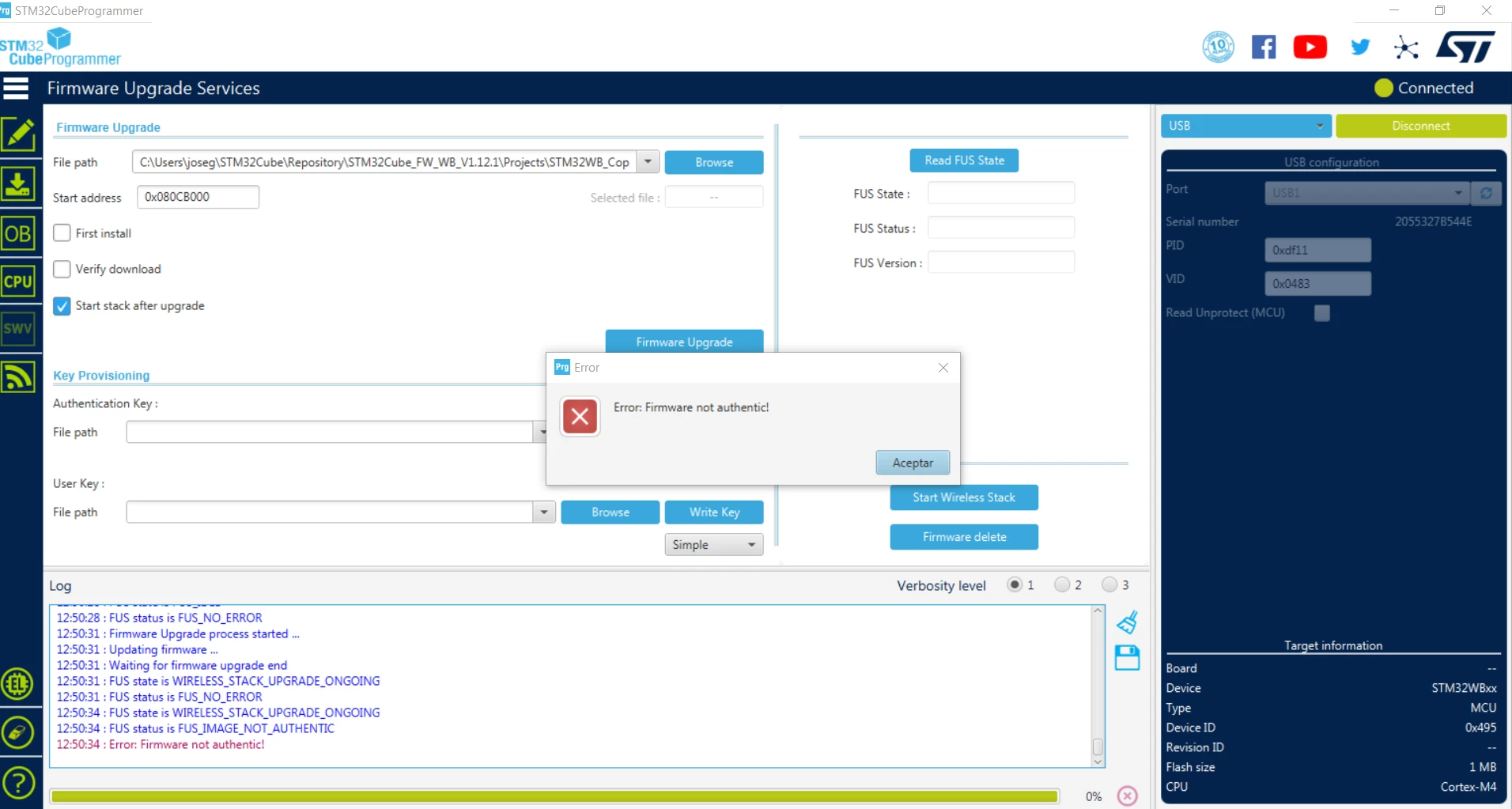
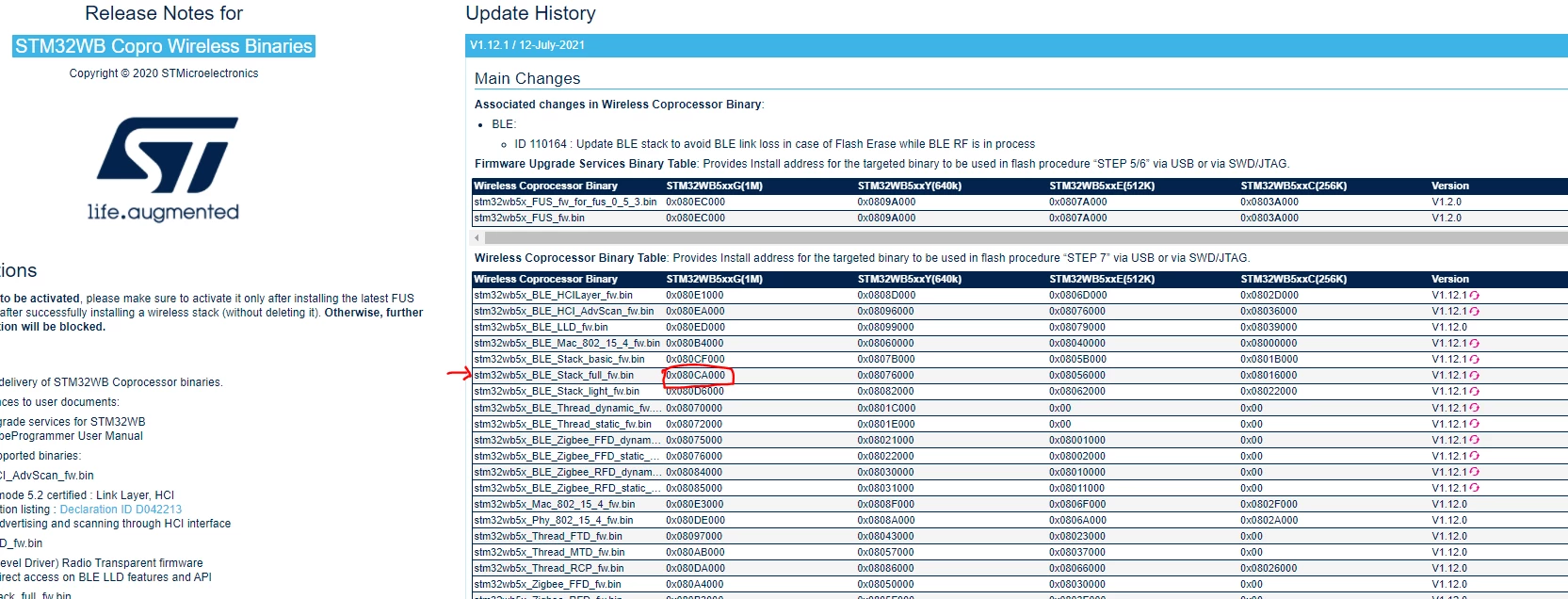
0693W00000DmX6oQAF.pnglogs:

13:06:53 : FUS state is FUS_IDLE
 13:06:53 : FUS status is FUS_NO_ERROR
 13:06:53 : Read FUS state command execution finished
 13:06:53 : UPLOADING ...
 13:06:53 : Size : 4 Bytes
 13:06:53 : Address : 0x20030030
 13:06:53 : Read progress:
 13:06:53 : Data read successfully
 13:06:53 : Time elapsed during the read operation is: 00:00:00.004
 13:06:58 : FUS state is FUS_IDLE
 13:06:58 : FUS status is FUS_NO_ERROR
 13:07:00 : Old Firmware delete ...
 13:07:00 : Deleting firmware ...
 13:07:01 : Firmware delete finished
 13:07:01 : FUS state is FUS_SERVICE_ONGOING
 13:07:01 : FUS status is FUS_IMAGE_NOT_FOUND
 13:07:03 : FUS state is FUS_IDLE
 13:07:03 : FUS status is FUS_NO_ERROR
 13:07:06 : Download Stack/FUS image at address 0x80ca000 ...
 13:07:06 : Memory Programming ...
 13:07:06 : Opening and parsing file: stm32wb5x_BLE_Stack_full_fw.bin
 13:07:06 : File : stm32wb5x_BLE_Stack_full_fw.bin
 13:07:06 : Size : 170804 Bytes
 13:07:06 : Address : 0x080CA000 
 13:07:06 : Erasing memory corresponding to segment 0:
 13:07:06 : Erasing internal memory sectors [202 243]
 13:07:06 : erasing sector 0202 @: 0x080ca000 done
 13:07:06 : erasing sector 0203 @: 0x080cb000 done
 13:07:06 : erasing sector 0204 @: 0x080cc000 done
 13:07:06 : erasing sector 0205 @: 0x080cd000 done
 13:07:06 : erasing sector 0206 @: 0x080ce000 done
 13:07:06 : erasing sector 0207 @: 0x080cf000 done
 13:07:06 : erasing sector 0208 @: 0x080d0000 done
 13:07:06 : erasing sector 0209 @: 0x080d1000 done
 13:07:06 : erasing sector 0210 @: 0x080d2000 done
 13:07:06 : erasing sector 0211 @: 0x080d3000 done
 13:07:06 : erasing sector 0212 @: 0x080d4000 done
 13:07:06 : erasing sector 0213 @: 0x080d5000 done
 13:07:06 : erasing sector 0214 @: 0x080d6000 done
 13:07:06 : erasing sector 0215 @: 0x080d7000 done
 13:07:06 : erasing sector 0216 @: 0x080d8000 done
 13:07:06 : erasing sector 0217 @: 0x080d9000 done
 13:07:06 : erasing sector 0218 @: 0x080da000 done
 13:07:06 : erasing sector 0219 @: 0x080db000 done
 13:07:06 : erasing sector 0220 @: 0x080dc000 done
 13:07:06 : erasing sector 0221 @: 0x080dd000 done
 13:07:06 : erasing sector 0222 @: 0x080de000 done
 13:07:06 : erasing sector 0223 @: 0x080df000 done
 13:07:06 : erasing sector 0224 @: 0x080e0000 done
 13:07:06 : erasing sector 0225 @: 0x080e1000 done
 13:07:06 : erasing sector 0226 @: 0x080e2000 done
 13:07:07 : erasing sector 0227 @: 0x080e3000 done
 13:07:07 : erasing sector 0228 @: 0x080e4000 done
 13:07:07 : erasing sector 0229 @: 0x080e5000 done
 13:07:07 : erasing sector 0230 @: 0x080e6000 done
 13:07:07 : erasing sector 0231 @: 0x080e7000 done
 13:07:07 : erasing sector 0232 @: 0x080e8000 done
 13:07:07 : erasing sector 0233 @: 0x080e9000 done
 13:07:07 : erasing sector 0234 @: 0x080ea000 done
 13:07:07 : erasing sector 0235 @: 0x080eb000 done
 13:07:07 : erasing sector 0236 @: 0x080ec000 done
 13:07:07 : erasing sector 0237 @: 0x080ed000 done
 13:07:07 : erasing sector 0238 @: 0x080ee000 done
 13:07:07 : erasing sector 0239 @: 0x080ef000 done
 13:07:07 : erasing sector 0240 @: 0x080f0000 done
 13:07:07 : erasing sector 0241 @: 0x080f1000 done
 13:07:07 : erasing sector 0242 @: 0x080f2000 done
 13:07:07 : erasing sector 0243 @: 0x080f3000 done
 13:07:07 : Download in Progress:
 13:07:10 : File download complete
 13:07:10 : Time elapsed during download operation: 00:00:03.843
 13:07:10 : FUS state is FUS_IDLE
 13:07:10 : FUS status is FUS_NO_ERROR
 13:07:12 : Firmware Upgrade process started ...
 13:07:12 : Updating firmware ...
 13:07:12 : Waiting for firmware upgrade end
 13:07:12 : FUS state is WIRELESS_STACK_UPGRADE_ONGOING
 13:07:12 : FUS status is FUS_NO_ERROR
 13:07:15 : FUS state is WIRELESS_STACK_UPGRADE_ONGOING
 13:07:15 : FUS status is FUS_IMAGE_NOT_AUTHENTIC
 13:07:15 : Error: Firmware not authentic!

This topic has been closed for replies.
Best answer by Javier1

The main issue was, i was using cubeProgrammer v2.6 instead of v2.8, all the documentation made no sense to me because of that.

But i managed to do it with v2.6 :

AFTER TWO DAYS I found the correct rain-dance

https://electronics.stackexchange.com/questions/532179/stm32wb55-nucleo-fus-state-img-not-found-error/532227

first i needed to download a previous FW package flash the Fus firmware 1.0.2

C:\Users\joseg\STM32Cube\Repository\STM32Cube_FW_WB_V1.10.1\Projects\STM32WB_Copro_Wireless_Binaries\STM32WB5x\stm32wb5x_FUS_fw_1_0_2.bin

After that i was able to flash stm32wb5x_FUS.bin in 0x080EC000

\STM32Cube\Repository\STM32Cube_FW_WB_V1.12.1\Projects\STM32WB_Copro_Wireless_Binaries\STM32WB5x\stm32wb5x_FUS_fw.bin

.......
09:45:45 : File download complete
 09:45:45 : Time elapsed during download operation: 00:00:00.675
 09:45:45 : Firmware Upgrade process started ...
 09:45:46 : Application is running
 09:45:56 : Reconnecting...
 09:45:56 : Reconnected !
 09:45:56 : Firmware Upgrade Success

After the correct FUS was in place now i could load

STM32Cube\Repository\STM32Cube_FW_WB_V1.12.1\Projects\STM32WB_Copro_Wireless_Binaries\STM32WB5x\stm32wb5x_BLE_Stack_full_fw.bin

09:50:18 : File download complete
 09:50:18 : Time elapsed during download operation: 00:00:03.774
 09:50:18 : Firmware Upgrade process started ...
 09:50:18 : Application is running
 09:50:29 : Reconnecting...
 09:50:29 : Reconnected !
 09:50:29 : Firmware Upgrade Success

7 replies

Javier1
Javier1Author
Principal
September 8, 2021

Fus update returns same error

hit me up in https://www.linkedin.com/in/javiermuñoz/
Javier1
Javier1Author
Principal
September 8, 2021

When trying to flash fus binary the same thing happens: Error: Firmware not authentic!

0693W00000DmX8zQAF.png 

0693W00000DmX8aQAF.pnglogs:

 13:09:26 : USB speed : Full Speed (12MBit/s)
 13:09:26 : Manuf. ID : STMicroelectronics
 13:09:26 : Product ID : DFU in FS Mode
 13:09:26 : SN : 2055327B544E
 13:09:26 : FW version : 0x011a
 13:09:26 : Device ID : 0x0495
 13:09:27 : UPLOADING OPTION BYTES DATA ...
 13:09:27 : Bank : 0x00
 13:09:27 : Address : 0x1fff8000
 13:09:27 : Size : 128 Bytes
 13:09:27 : UPLOADING ...
 13:09:27 : Size : 1024 Bytes
 13:09:27 : Address : 0x8000000
 13:09:27 : Read progress:
 13:09:27 : Data read successfully
 13:09:27 : Time elapsed during the read operation is: 00:00:00.006
 13:09:30 : FUS state is FUS_IDLE
 13:09:30 : FUS status is FUS_NO_ERROR
 13:09:30 : Read FUS state command execution finished
 13:09:30 : UPLOADING ...
 13:09:30 : Size : 4 Bytes
 13:09:30 : Address : 0x20030030
 13:09:30 : Read progress:
 13:09:30 : Data read successfully
 13:09:30 : Time elapsed during the read operation is: 00:00:00.005
 13:10:43 : FUS state is FUS_IDLE
 13:10:43 : FUS status is FUS_NO_ERROR
 13:10:45 : Old Firmware delete ...
 13:10:45 : Deleting firmware ...
 13:10:46 : Firmware delete finished
 13:10:46 : FUS state is FUS_SERVICE_ONGOING
 13:10:46 : FUS status is FUS_IMAGE_NOT_FOUND
 13:10:49 : FUS state is FUS_IDLE
 13:10:49 : FUS status is FUS_NO_ERROR
 13:10:51 : Download Stack/FUS image at address 0x80ec000 ...
 13:10:51 : Memory Programming ...
 13:10:51 : Opening and parsing file: stm32wb5x_FUS_fw_for_fus_0_5_3.bin
 13:10:51 : File : stm32wb5x_FUS_fw_for_fus_0_5_3.bin
 13:10:51 : Size : 24492 Bytes
 13:10:51 : Address : 0x080EC000 
 13:10:51 : Erasing memory corresponding to segment 0:
 13:10:51 : Erasing internal memory sectors [236 241]
 13:10:51 : erasing sector 0236 @: 0x080ec000 done
 13:10:51 : erasing sector 0237 @: 0x080ed000 done
 13:10:51 : erasing sector 0238 @: 0x080ee000 done
 13:10:51 : erasing sector 0239 @: 0x080ef000 done
 13:10:51 : erasing sector 0240 @: 0x080f0000 done
 13:10:51 : erasing sector 0241 @: 0x080f1000 done
 13:10:51 : Download in Progress:
 13:10:52 : File download complete
 13:10:52 : Time elapsed during download operation: 00:00:00.534
 13:10:52 : FUS state is FUS_IDLE
 13:10:52 : FUS status is FUS_NO_ERROR
 13:10:54 : Firmware Upgrade process started ...
 13:10:54 : Updating firmware ...
 13:10:54 : Waiting for firmware upgrade end
 13:10:54 : FUS state is WIRELESS_STACK_UPGRADE_ONGOING
 13:10:54 : FUS status is FUS_NO_ERROR
 13:10:57 : FUS state is WIRELESS_STACK_UPGRADE_ONGOING
 13:10:57 : FUS status is FUS_IMAGE_NOT_AUTHENTIC
 13:10:57 : Error: Firmware not authentic!

hit me up in https://www.linkedin.com/in/javiermuñoz/
Javier1
Javier1Author
Principal
September 8, 2021

if i use stlink interface i get Error: FUS_STATE_IMG_NOT_AUTHENTIC

13:16:19 : ST-LINK SN : 0669FF303430484257144011
 13:16:19 : ST-LINK FW : V2J38M27
 13:16:19 : Board : P-NUCLEO-WB55
 13:16:19 : Voltage : 3.27V
 13:16:19 : SWD freq : 4000 KHz
 13:16:19 : Connect mode: Under Reset
 13:16:19 : Reset mode : Hardware reset
 13:16:19 : Device ID : 0x495
 13:16:19 : Revision ID : Rev Y
 13:16:19 : UPLOADING OPTION BYTES DATA ...
 13:16:19 : Bank : 0x00
 13:16:19 : Address : 0x58004020
 13:16:19 : Size : 96 Bytes
 13:16:19 : Bank : 0x01
 13:16:19 : Address : 0x58004080
 13:16:19 : Size : 8 Bytes
 13:16:19 : UPLOADING ...
 13:16:19 : Size : 1024 Bytes
 13:16:19 : Address : 0x8000000
 13:16:19 : Read progress:
 13:16:19 : Data read successfully
 13:16:19 : Time elapsed during the read operation is: 00:00:00.007
 13:16:36 : Download Stack/FUS image at address 0x80ec000 ...
 13:16:36 : Memory Programming ...
 13:16:36 : Opening and parsing file: stm32wb5x_FUS_fw_for_fus_0_5_3.bin
 13:16:36 : File : stm32wb5x_FUS_fw_for_fus_0_5_3.bin
 13:16:36 : Size : 24492 Bytes
 13:16:36 : Address : 0x080EC000 
 13:16:36 : Erasing memory corresponding to segment 0:
 13:16:36 : Erasing internal memory sectors [236 241]
 13:16:36 : Download in Progress:
 13:16:36 : File download complete
 13:16:36 : Time elapsed during download operation: 00:00:00.651
 13:16:36 : Verifying ...
 13:16:36 : Read progress:
 13:16:36 : Download verified successfully 
 13:16:36 : Firmware Upgrade process started ...
 13:16:36 : Warning: Option Byte: nSWboot0, value: 0x0, was not modified.
 13:16:36 : Warning: Option Byte: nboot0, value: 0x1, was not modified.
 13:16:36 : Warning: Option Byte: nboot1, value: 0x1, was not modified.
 13:16:36 : Warning: Option Bytes are unchanged, Data won't be downloaded
 13:16:36 : Succeed to set nSWboot0=0 nboot1=1 nboot0=1 
 13:16:36 : Memory Programming ...
 13:16:36 : Opening and parsing file: 0x495_FUS_Operator.bin
 13:16:36 : File : 0x495_FUS_Operator.bin
 13:16:36 : Size : 11584 Bytes
 13:16:36 : Address : 0x08000000 
 13:16:36 : Erasing memory corresponding to segment 0:
 13:16:36 : Erasing internal memory sectors [0 2]
 13:16:36 : Download in Progress:
 13:16:37 : File download complete
 13:16:37 : Time elapsed during download operation: 00:00:00.375
 13:16:37 : Application is running
 13:16:47 : Reconnecting...
 13:16:47 : Reconnected !
 13:16:47 : Error: FUS_STATE_IMG_NOT_AUTHENTIC

hit me up in https://www.linkedin.com/in/javiermuñoz/
Javier1
Javier1Author
Principal
September 9, 2021

Same error when trying v1.10.1 in addr 0x080CB000

\STM32Cube\Repository\STM32Cube_FW_WB_V1.10.1\Projects\STM32WB_Copro_Wireless_Binaries\STM32WB5x\stm32wb5x_BLE_Stack_full_fw.bin

hit me up in https://www.linkedin.com/in/javiermuñoz/
Javier1
Javier1Author
Principal
September 9, 2021
hit me up in https://www.linkedin.com/in/javiermuñoz/
Javier1
Javier1AuthorBest answer
Principal
September 9, 2021

The main issue was, i was using cubeProgrammer v2.6 instead of v2.8, all the documentation made no sense to me because of that.

But i managed to do it with v2.6 :

AFTER TWO DAYS I found the correct rain-dance

https://electronics.stackexchange.com/questions/532179/stm32wb55-nucleo-fus-state-img-not-found-error/532227

first i needed to download a previous FW package flash the Fus firmware 1.0.2

C:\Users\joseg\STM32Cube\Repository\STM32Cube_FW_WB_V1.10.1\Projects\STM32WB_Copro_Wireless_Binaries\STM32WB5x\stm32wb5x_FUS_fw_1_0_2.bin

After that i was able to flash stm32wb5x_FUS.bin in 0x080EC000

\STM32Cube\Repository\STM32Cube_FW_WB_V1.12.1\Projects\STM32WB_Copro_Wireless_Binaries\STM32WB5x\stm32wb5x_FUS_fw.bin

.......
09:45:45 : File download complete
 09:45:45 : Time elapsed during download operation: 00:00:00.675
 09:45:45 : Firmware Upgrade process started ...
 09:45:46 : Application is running
 09:45:56 : Reconnecting...
 09:45:56 : Reconnected !
 09:45:56 : Firmware Upgrade Success

After the correct FUS was in place now i could load

STM32Cube\Repository\STM32Cube_FW_WB_V1.12.1\Projects\STM32WB_Copro_Wireless_Binaries\STM32WB5x\stm32wb5x_BLE_Stack_full_fw.bin

09:50:18 : File download complete
 09:50:18 : Time elapsed during download operation: 00:00:03.774
 09:50:18 : Firmware Upgrade process started ...
 09:50:18 : Application is running
 09:50:29 : Reconnecting...
 09:50:29 : Reconnected !
 09:50:29 : Firmware Upgrade Success

hit me up in https://www.linkedin.com/in/javiermuñoz/
Remi QUINTIN
ST Technical Moderator
September 9, 2021

The mandatory steps to properly upgrade the FUS (and the the FW stack) is described in the releases notes of the wireless stacks under the \Projects\STM32WB_Copro_Wireless_Binaries\STM32WB5x directory.

Javier1
Javier1Author
Principal
September 9, 2021

The Mandatory steps didnt helped me at all and this is why:

0693W00000DmgovQAB.png 

What i think happened here is there is a hash identifying Fw versions, at some point of ST development that hash was changed, and now i need to flash an old FUS firmware -> to flash the new FUs firmware -> to flash the BLE stack firmware.

hit me up in https://www.linkedin.com/in/javiermuñoz/
Remi QUINTIN
ST Technical Moderator
September 9, 2021

Please use the CubeProgrammer V2.8 version which ahs the "Start FUS" button and is able to read the FUS state even via the SWD port. This was not the case with version 2.6 or earlier.

Now the binary file to use depends on the GFUS version currently available on your board.

For this, you need to read the FUS version either via the User USB port in DFU mode or via the STLINK USB connector (=SWD port) but only with CubeProgrammer v.8.

One hint you can use is to read the SFSA option byte: If it is 0xF6, then it is v0.5.3. If it is 0xF4 then it is a more recent version.

If it is v0.5.3 then use the FUS_fw_for_fus_0_5_3.bin file. If not use the other one.

“Firmware not authentic�? error message can absolutely result from the fact that an old version of FUS is installed on your board with an old decryption key that does not match a new one used to encrypt the new FW stack .

Javier1
Javier1Author
Principal
September 9, 2021

>Please use the CubeProgrammer V2.8 version which ahs the "Start FUS" button and is able to read the FUS state even via the SWD port. This was not the case with version 2.6 or earlier.

I am using a 2.6 version (7months old), i missed the two last updates ,my bad.

I downloaded the 2.8 version all buttons are there.

 >“Firmware not authentic�? error message can absolutely result from the fact that an old version of FUS is installed on your board with an old decryption key that does not match a new one used to encrypt the new FW stack .

It sounds plausible,thanks this solves my issues

hit me up in https://www.linkedin.com/in/javiermuñoz/
DPars.2
Associate II
December 15, 2021

I'm having a similar issue...

https://community.st.com/s/question/0D53W00001Fmu49SAB/unable-to-successfully-load-ble-firmware-because-of-fusimagenotauthentic-so-my-code-is-failing-in-shcic2bleinit

I tried reverting back to 1.0.2 but it just tells me that I already have a newer version installed.

0693W00000HojIrQAJ.png@Remi QUINTIN​ , if I have one of those old decryption keys that does not match the new stack how do I update that key?

Javier1
Javier1Author
Principal
December 16, 2021

@DPars.2​ what version of cubeProgrammer do you have? my problems were solved by upgrading to latest version

hit me up in https://www.linkedin.com/in/javiermuñoz/
DPars.2
Associate II
December 16, 2021

Thank you for the response @Javier Muñoz​ . I am using CubeProgrammer v2.9. I did notice that my command line programming was still using an earlier version so I updated that but it didn't change anything.

One thing I did notice during command line programming that I hadn't be before is that for the STM32WB5xxE (512K part I'm using) the FUS for 1.12.1 is supposed to be placed at 0x0807A000. I'm loading stm32wb5x_BLE_Stack_full_fw.bin which is 170804 bytes so it takes up 42 memory segments. If I place it at the recommended location of 0x08056000 it erases and programs through section 0x0807F000. Obviously this just writes over the FUS code. So I moved the BLE firmware to 0x0804F000 so that it ends before the FUS. It actually worked on one of the boards that I'm having an issue with but on a couple of others I'm not getting a flash write error (FUS_IMAGE_WRTERROR).

Here's the command line printout:

0693W00000HorTEQAZ.png0693W00000HorTiQAJ.png0693W00000HorU7QAJ.png

DPars.2
Associate II
December 16, 2021

I actually don't think this is how this works, but I was able to successfully write the BLE firmware by trying different start addresses and different size files (full, light and basic versions of BLE).

Javier1
Javier1Author
Principal
December 17, 2021

@DPars.2​ im afraid i cannot help you here

I worked on this issue briefly 2 months ago, gladly never had to come back to it.

I hope you the remaining two boards, stm32's BLE developing experience is a bit messy

hit me up in https://www.linkedin.com/in/javiermuñoz/