

ypiotrp
Associate III
June 15, 2021
Solved

Lost connection with STM32H7 after adding new component to the screen

  • June 15, 2021
  • 4 replies
  • 1592 views

Hi

I have a problem with TouchGFX on STM32H7B0 with external flash memory through OCTOSPI and TouchGFX 4.16. I try to make a screen with a debug console. It supposed to show debug logs from my application. The screen consists of 18 TextArea objects (lines of the console), one CustomContainer (4 TextAreas) and a fullscreen Box (background). I wanted to add one more object (SlideMenu). When I did it my application broke up - after startup I get this kind of random image: 0693W00000Bb2efQAB.jpgThen the debugger looses the connection to STM32 and I can't do anything. I tried increasing the stack size of the task running TouchGFX but it didn't help.
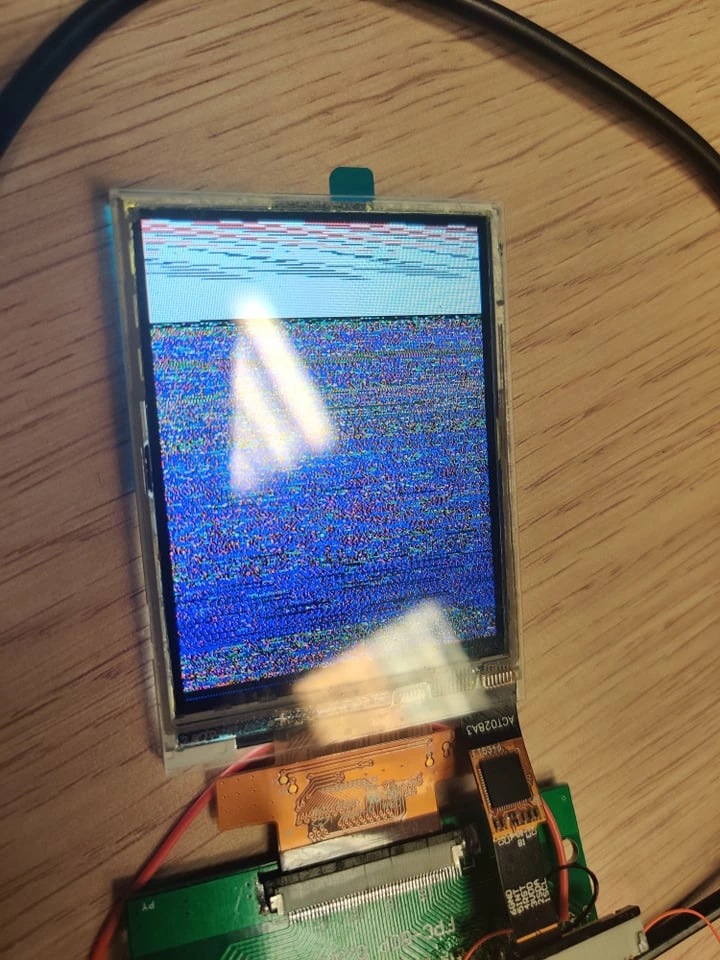
Can you please help me?

Regards,

Piotr

This topic has been closed for replies.
Best answer by ypiotrp

Hi Martin,

thank you for your answer. I managed to resolve my issue. In the future I will be using FMC to connect NAND flash memory but for now I have all the pins loose with the FMC turned on. It turned out that pulling the FMC_NWAIT pin high or just turning off the whole peripheral resolves my issue. The application starts normally now.

Regards,

Piotr

4 replies

ypiotrp
ypiotrpAuthor
Associate III
June 16, 2021

@Romain DIELEMAN​ , @Martin KJELDSEN​ , @Alexandre RENOUX​  can you please help me solve this issue?

Martin KJELDSEN
Principal III
June 22, 2021

Hi @Community member​ - I'll try to get back to this asap - in the middle of a new release.

It looks very strange, your issue. I can't imagine the application is actually running; it probably crashed. Did you check your stack sizes? Sometimes when applications grow you need to adjust.

/Martin

ypiotrp
ypiotrpAuthorBest answer
Associate III
June 23, 2021

Hi Martin,

thank you for your answer. I managed to resolve my issue. In the future I will be using FMC to connect NAND flash memory but for now I have all the pins loose with the FMC turned on. It turned out that pulling the FMC_NWAIT pin high or just turning off the whole peripheral resolves my issue. The application starts normally now.

Regards,

Piotr

Martin KJELDSEN
Principal III
June 23, 2021

Ah, that's a nice find on your part :) Great.

/Martin