PFlor.2
Senior II
June 1, 2023
Solved

How do I trigger a new virtual function when a touch button (flexButton) is released instead of pressed?

  • June 1, 2023
  • 3 replies
  • 6928 views

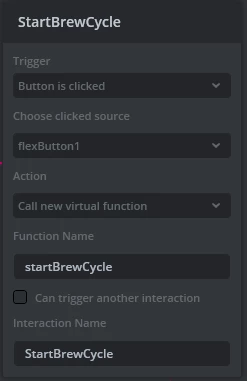
I'm fairly new to TouchGFX as well as C++ inheritance so trying to understand how to implement a custom virtual function when a key is released. I see when I create an interaction in touchGFX so when a key is pressed it calls a virtual function...


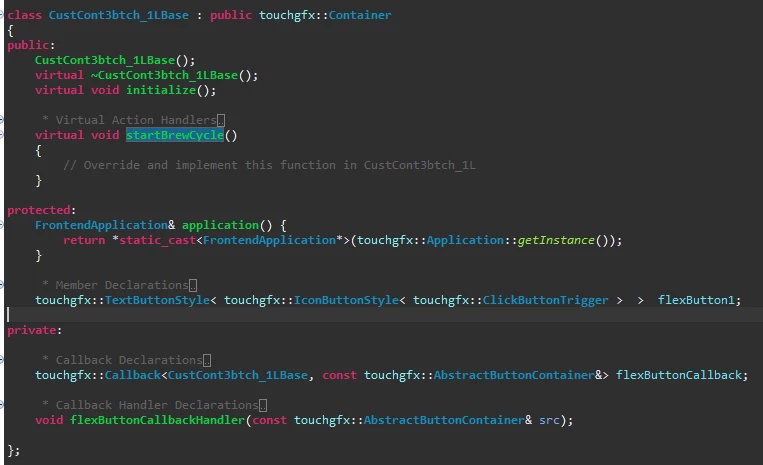
_legacyfs_online_stmicro_images_0693W00000blHmxQAE.pngWhich creates the following in the base class of the custom container...


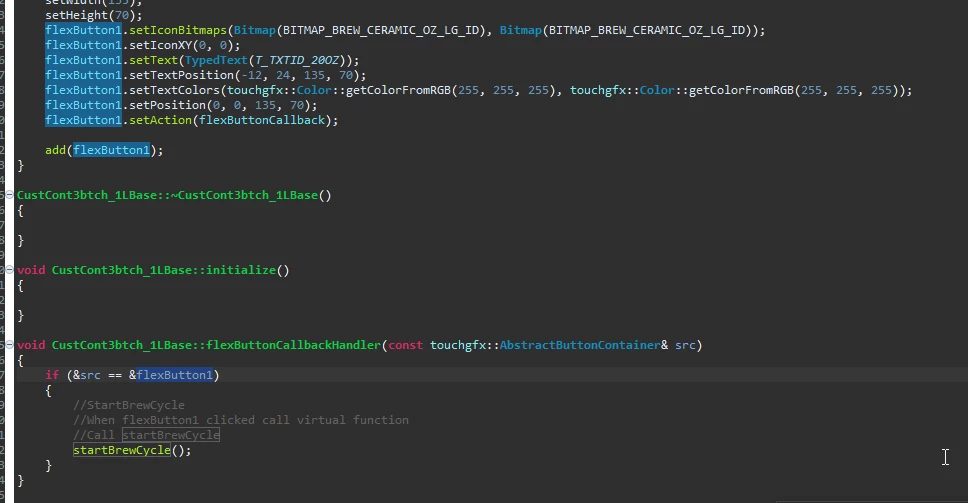
_legacyfs_online_stmicro_images_0693W00000blHiSQAU.pngI understand how to override the startBrewCycle() virtual function in the non-base cpp file which is called with the pressed even in the callback below...


_legacyfs_online_stmicro_images_0693W00000blHoPQAU.pngHow can I implement another virtual function stopBrewCycle() when the same button is released?

This topic has been closed for replies.
Best answer by JTP1

Hello

I found my old example, just modify it for flexbutton, maybe this helps. The flexButton click handler is bit more tricky than other button types. Here in the example flexbutton has just Box with border- element.

------

One way is to create ClickListener to the FlexButton, so set it on at Mixins of your flexButton:
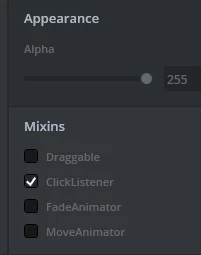
0693W00000aIb0cQAC.pngThen add the callback definitions to the screen1.hpp (or whatever you have)

class Screen1View : public Screen1ViewBase
{
public:
 Screen1View();
 virtual ~Screen1View() {}
 virtual void setupScreen();
 virtual void tearDownScreen();
 
 // Add this public function definition:
 void flexButtonClickHandler(const touchgfx::BoxWithBorderButtonStyle< touchgfx::TouchButtonTrigger > & ,const ClickEvent& e);
 
 // int16_t pressCount=0;
 // int16_t releaseCount=0;
 
protected:
 
 // And add this protected function definition:
 Callback<Screen1View, const touchgfx::BoxWithBorderButtonStyle< touchgfx::TouchButtonTrigger > &,const ClickEvent&> flexButtonClickedCallback;
 
};

and then in screen1.cpp:

#include <gui/screen1_screen/Screen1View.hpp>
#include <touchgfx/Utils.hpp>
 
// Add this callback to the constructor:
Screen1View::Screen1View():
flexButtonClickedCallback(this,&Screen1View::flexButtonClickHandler)
{
 
}
 
void Screen1View::setupScreen()
{
 Screen1ViewBase::setupScreen();
 // This sets the click action for flexButton1 !!
 flexButton1.setClickAction(flexButtonClickedCallback);
}
 
void Screen1View::tearDownScreen()
{
 Screen1ViewBase::tearDownScreen();
}
 
// Add this function
void Screen1View::flexButtonClickHandler(const touchgfx::BoxWithBorderButtonStyle< touchgfx::TouchButtonTrigger >& b,const ClickEvent& e)
{
	if(&b==&flexButton1) // button1 -> your button name
	{
		switch(e.getType())
		{
			case ClickEvent::PRESSED:
				touchgfx_printf("Pressed flexButton1 \r\n");
				//pressCount++;
			break;
 
			//case ClickEvent::RELEASED:
			//case ClickEvent::CANCEL:
			default:
				touchgfx_printf("Released or Cancel flexButton1 \r\n");
				//releaseCount++;
				// this handles REALEASED and CANCEL- events !
			break;
		}
 
//This is just debug print to display, since its tested also in device :
		//Unicode::snprintf(CounterBuffer, COUNTER_SIZE, "press:%3u release:%3u",pressCount,releaseCount);
		//Counter.invalidate();
	}
}

Please note that this works only with flexButton that has only Box with border. If you have some other elements, check in screen1base.hpp the inheritance structure of your flexButton

/* Screen1ViewBase.hpp
 * Member Declarations
 */
 
// HERE !!:
 touchgfx::ClickListener< touchgfx::BoxWithBorderButtonStyle< touchgfx::TouchButtonTrigger > > flexButton1;

Only BoxWithBorder:

touchgfx::ClickListener< touchgfx::BoxWithBorderButtonStyle< touchgfx::TouchButtonTrigger > > flexButton1;

All 4 elements:

 touchgfx::ClickListener< touchgfx::IconButtonStyle< touchgfx::TextButtonStyle< touchgfx::ImageButtonStyle< touchgfx::BoxWithBorderButtonStyle< touchgfx::TouchButtonTrigger > > > > > flexButton1;

This case you must replace the callback and clickHandler function parameters to match your flexbutton elements at in Screen1.cpp and .hpp !

Example is tested with Simulator and F769IDisco evalkit. BTW what hardware you are using ?

3 replies

JTP1Best answer
Graduate II
June 1, 2023

Hello

I found my old example, just modify it for flexbutton, maybe this helps. The flexButton click handler is bit more tricky than other button types. Here in the example flexbutton has just Box with border- element.

------

One way is to create ClickListener to the FlexButton, so set it on at Mixins of your flexButton:

0693W00000aIb0cQAC.pngThen add the callback definitions to the screen1.hpp (or whatever you have)

class Screen1View : public Screen1ViewBase
{
public:
 Screen1View();
 virtual ~Screen1View() {}
 virtual void setupScreen();
 virtual void tearDownScreen();
 
 // Add this public function definition:
 void flexButtonClickHandler(const touchgfx::BoxWithBorderButtonStyle< touchgfx::TouchButtonTrigger > & ,const ClickEvent& e);
 
 // int16_t pressCount=0;
 // int16_t releaseCount=0;
 
protected:
 
 // And add this protected function definition:
 Callback<Screen1View, const touchgfx::BoxWithBorderButtonStyle< touchgfx::TouchButtonTrigger > &,const ClickEvent&> flexButtonClickedCallback;
 
};

and then in screen1.cpp:

#include <gui/screen1_screen/Screen1View.hpp>
#include <touchgfx/Utils.hpp>
 
// Add this callback to the constructor:
Screen1View::Screen1View():
flexButtonClickedCallback(this,&Screen1View::flexButtonClickHandler)
{
 
}
 
void Screen1View::setupScreen()
{
 Screen1ViewBase::setupScreen();
 // This sets the click action for flexButton1 !!
 flexButton1.setClickAction(flexButtonClickedCallback);
}
 
void Screen1View::tearDownScreen()
{
 Screen1ViewBase::tearDownScreen();
}
 
// Add this function
void Screen1View::flexButtonClickHandler(const touchgfx::BoxWithBorderButtonStyle< touchgfx::TouchButtonTrigger >& b,const ClickEvent& e)
{
	if(&b==&flexButton1) // button1 -> your button name
	{
		switch(e.getType())
		{
			case ClickEvent::PRESSED:
				touchgfx_printf("Pressed flexButton1 \r\n");
				//pressCount++;
			break;
 
			//case ClickEvent::RELEASED:
			//case ClickEvent::CANCEL:
			default:
				touchgfx_printf("Released or Cancel flexButton1 \r\n");
				//releaseCount++;
				// this handles REALEASED and CANCEL- events !
			break;
		}
 
//This is just debug print to display, since its tested also in device :
		//Unicode::snprintf(CounterBuffer, COUNTER_SIZE, "press:%3u release:%3u",pressCount,releaseCount);
		//Counter.invalidate();
	}
}

Please note that this works only with flexButton that has only Box with border. If you have some other elements, check in screen1base.hpp the inheritance structure of your flexButton

/* Screen1ViewBase.hpp
 * Member Declarations
 */
 
// HERE !!:
 touchgfx::ClickListener< touchgfx::BoxWithBorderButtonStyle< touchgfx::TouchButtonTrigger > > flexButton1;

Only BoxWithBorder:

touchgfx::ClickListener< touchgfx::BoxWithBorderButtonStyle< touchgfx::TouchButtonTrigger > > flexButton1;

All 4 elements:

 touchgfx::ClickListener< touchgfx::IconButtonStyle< touchgfx::TextButtonStyle< touchgfx::ImageButtonStyle< touchgfx::BoxWithBorderButtonStyle< touchgfx::TouchButtonTrigger > > > > > flexButton1;

This case you must replace the callback and clickHandler function parameters to match your flexbutton elements at in Screen1.cpp and .hpp !

Example is tested with Simulator and F769IDisco evalkit. BTW what hardware you are using ?

PFlor.2
PFlor.2Author
Senior II
June 6, 2023

Thanks for this information, I think this is exactly what I need. I've been working on other aspects but will try this out shortly.

I also need to be able to trigger a virtual function once the button has been held down for 2 seconds as well but think I could use aspects of this for that as well. Maybe wait 2 seconds after the initial press then check to see if still isPressed or not.

Using STM32H643 on custom hardware.

Graduate II
June 6, 2023

Note also that you can do this system without new callbacks, just use handleTickEvent. This handleTickEvent will be called automatically with in every frame. This is not the most elegant way but it does it job:

// add to view.hpp:
 void handleTickEvent();
 
 bool exButtonPressed=0;
 uint32_t ButtonPressedTimeCounter=0;
// add to view.cpp:
void Screen1View::handleTickEvent()
{
	bool buttonPressedNow;
 
	buttonPressedNow=yourFlexButton.getPressed();
 
	if(buttonPressedNow)
	{
		if(exButtonPressed==0)
		{
			// handle button pressed down if needed
			ButtonPressedTimeCounter=0;
		}
		else // also last time was pressed
		{
 			// note that this increment can overflow, it takes years
 			// of continuos press but anyway.
 			// It could have some protection like
 			// if(ButtonPressedTimeCounter<0xFFFFFFFF)
			ButtonPressedTimeCounter++;
 
			//replace '120' with your 2 sec frame rate
			if(ButtonPressedTimeCounter==120)
			{
				// handle 2 sec button pressed
			}
		}
	}
	else // not pressed now
	{
		// last time was ?
		if(exButtonPressed)
		{
			// handle button released
		}
	}
	exButtonPressed=buttonPressedNow;
}

Osman SOYKURT
Technical Moderator
June 6, 2023

Hello PFlor.2,

This thread also treats this subject, but it's pretty much what JTP wrote, I think his answer is good.

Basically, you'll need to get the event type of your click and this is what he's doing in here :

switch(e.getType())
{
	case ClickEvent::PRESSED:
...

/Osman

Osman SOYKURTST Software Developer | TouchGFX
Graduate II
July 7, 2023

Hello. Hmm...did you put 'setAction' - call to the 'initialize' - function ? Otherwise it looks ok with quick review.

You can also test the functionality by changing trigger to 'click' instead of repeat, i have never use click callbacks with repeat button.

Br. J.T

PFlor.2
PFlor.2Author
Senior II
August 9, 2023

Thanks JTP1...I was missing the setAction.  Totally missed you had sent a reply on 7/6.  Thanks again for the assistance!