


ferro
Lead
February 1, 2024
Solved

GFX 4.23.1 window closes but TouchGFXDesigner-4.23.1.exe stay running in background

  • February 1, 2024
  • 6 replies
  • 3209 views

Hi,

When I close GFX Designer its window disappears, however, the TouchGFXDesigner-4.23.1.exe stays running in the backround - for every opened/closed *.touchgfx project.
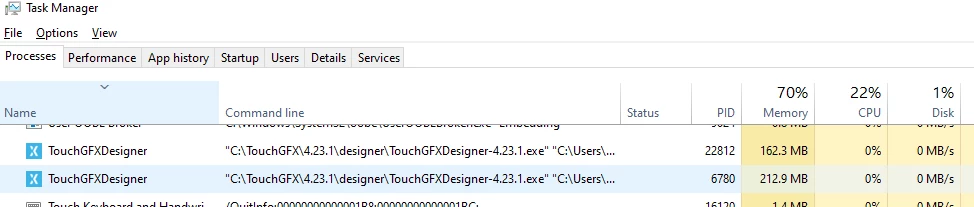
ferro_0-1706801912448.png


Does anyone experiences this GFX misbehaviour ?

Best regards

Ferro

    This topic has been closed for replies.
    Best answer by Mohammad MORADI ESFAHANIASL

    No worries at all,
    Yes, we are investigating on this matter. Thank you for helping us :folded_hands:

    Best regards,

    6 replies

    ST Employee
    February 6, 2024

    Hello @ferro ,

    Thank you for reporting the issue,
    When does it happen specifically? Is it when you create a new project? Or when you open a previously created project? Do you need to run the simulator or anything similar?

    It would be amazing if you could send us the log file that TouchGFX generates. It is available at
    C:\Users\[user]\AppData\Roaming\TouchGFX-4.23.1

    You can quickly access that folder by searching %appdata% in the Windows search menu.


    Thanks a lot for your help

    Mohammad MORADIST Software Developer | TouchGFX
    ferro
    ferroAuthor
    Lead
    February 12, 2024

    Sorry for my slow reply @Mohammad MORADI ESFAHANIASL 


    > "Or when you open a previously created project?"
    Yes, it happens every time I open the same project.


    Here, someone has got the same behaviour and your colleague @Osman SOYKURT  is on it as well:
    https://community.st.com/t5/stm32-mcus-touchgfx-and-gui/touchgfx-4-231-task-doesn-t-close-and-remain-open-on-multiple/td-p/636336

    ST Employee
    February 13, 2024

    No worries at all,
    Yes, we are investigating on this matter. Thank you for helping us :folded_hands:

    Best regards,

    Mohammad MORADIST Software Developer | TouchGFX
    ST Employee
    March 15, 2024

    Hello @ferro ,

    We have fixed this issue in the latest version of TouchGFX (4.23.2). 

    Is it possible for you to check whether the problem persists or not? 

    Thank you so much for your help.


    Mohammad MORADIST Software Developer | TouchGFX