

aroni525
Associate III
November 2, 2021
Question

Error in code generation for TouchGFX

  • November 2, 2021
  • 10 replies
  • 8129 views

Hi,

When I generate the code with STM32CubeMX version 6.3 for STM32H747XIHx something like this happens:
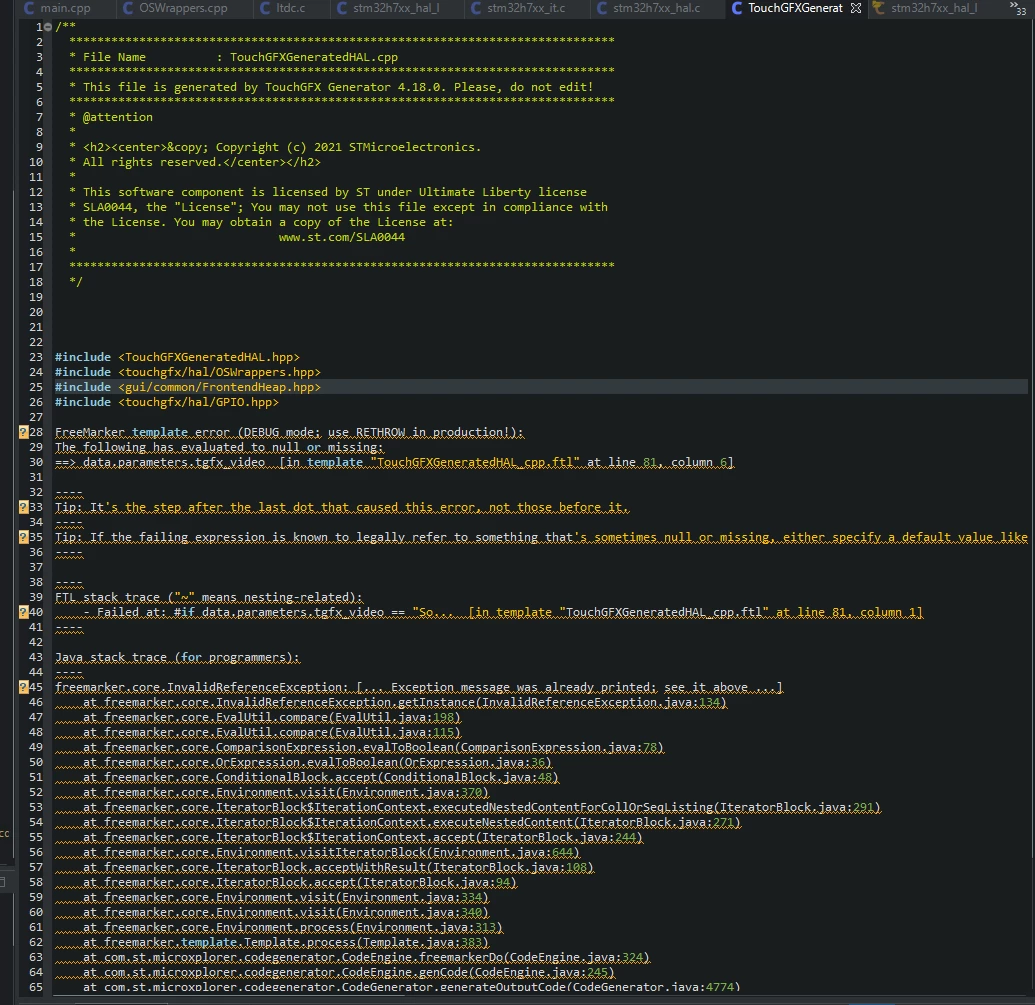
0693W00000GWFLvQAP.png 

I have also noticed that when I chose TouchGFX component I am able to use it only with M4 core (this configuration was forced by CubeMX) what is also weird. This shouldn't matter which core uses LTDC/DSI and GFX library...

This is full "log"

FreeMarker template error (DEBUG mode; use RETHROW in production!):
The following has evaluated to null or missing:
==> data.parameters.tgfx_video [in template "TouchGFXGeneratedHAL_cpp.ftl" at line 81, column 6]
 
----
Tip: It's the step after the last dot that caused this error, not those before it.
----
Tip: If the failing expression is known to legally refer to something that's sometimes null or missing, either specify a default value like myOptionalVar!myDefault, or use [#if myOptionalVar??]when-present[#else]when-missing[/#if]. (These only cover the last step of the expression; to cover the whole expression, use parenthesis: (myOptionalVar.foo)!myDefault, (myOptionalVar.foo)??
----
 
----
FTL stack trace ("~" means nesting-related):
	- Failed at: #if data.parameters.tgfx_video == "So... [in template "TouchGFXGeneratedHAL_cpp.ftl" at line 81, column 1]
----
 
Java stack trace (for programmers):
----
freemarker.core.InvalidReferenceException: [... Exception message was already printed; see it above ...]
	at freemarker.core.InvalidReferenceException.getInstance(InvalidReferenceException.java:134)
	at freemarker.core.EvalUtil.compare(EvalUtil.java:198)
	at freemarker.core.EvalUtil.compare(EvalUtil.java:115)
	at freemarker.core.ComparisonExpression.evalToBoolean(ComparisonExpression.java:78)
	at freemarker.core.OrExpression.evalToBoolean(OrExpression.java:36)
	at freemarker.core.ConditionalBlock.accept(ConditionalBlock.java:48)
	at freemarker.core.Environment.visit(Environment.java:370)
	at freemarker.core.IteratorBlock$IterationContext.executedNestedContentForCollOrSeqListing(IteratorBlock.java:291)
	at freemarker.core.IteratorBlock$IterationContext.executeNestedContent(IteratorBlock.java:271)
	at freemarker.core.IteratorBlock$IterationContext.accept(IteratorBlock.java:244)
	at freemarker.core.Environment.visitIteratorBlock(Environment.java:644)
	at freemarker.core.IteratorBlock.acceptWithResult(IteratorBlock.java:108)
	at freemarker.core.IteratorBlock.accept(IteratorBlock.java:94)
	at freemarker.core.Environment.visit(Environment.java:334)
	at freemarker.core.Environment.visit(Environment.java:340)
	at freemarker.core.Environment.process(Environment.java:313)
	at freemarker.template.Template.process(Template.java:383)
	at com.st.microxplorer.codegenerator.CodeEngine.freemarkerDo(CodeEngine.java:324)
	at com.st.microxplorer.codegenerator.CodeEngine.genCode(CodeEngine.java:245)
	at com.st.microxplorer.codegenerator.CodeGenerator.generateOutputCode(CodeGenerator.java:4774)
	at com.st.microxplorer.codegenerator.CodeGenerator.generateSpecificCode(CodeGenerator.java:4133)
	at com.st.microxplorer.codegenerator.CodeGenerator.generateSpecificCodeFile(CodeGenerator.java:1435)
	at com.st.microxplorer.codegenerator.CodeGenerator.generateCodeFiles(CodeGenerator.java:1666)
	at com.st.microxplorer.codegenerator.CodeGenerator.generateCode(CodeGenerator.java:1285)
	at com.st.microxplorer.plugins.projectmanager.engine.ProjectBuilder.generateCode(ProjectBuilder.java:2347)
	at com.st.microxplorer.plugins.projectmanager.engine.ProjectBuilder.createCode(ProjectBuilder.java:1939)
	at com.st.microxplorer.plugins.projectmanager.engine.ProjectBuilder.createProject(ProjectBuilder.java:618)
	at com.st.microxplorer.plugins.projectmanager.engine.GenerateProjectThread.run(GenerateProjectThread.java:54)

Arek

This topic has been closed for replies.

10 replies

MM..1
Chief III
November 2, 2021

Seems as your JAVA is corrupted, try update or reinstall.

Sara BEN HADJ YAHYA
ST Technical Moderator
November 3, 2021

Hi @aroni525​ ,

Could you please share your .ioc file?

Thanks,

Sara.

In order to give better visibility on the answered topics, please click on 'Best answer' on the reply which solved your issue or answered your question.
aroni525
aroni525Author
Associate III
November 4, 2021

Hi!

I don't think my Java is corrupted, it would probably crash more often. The problem is only with one file - TouchGFXGeneratedHAL.cpp and with one processor - STM32H747XI. I have tried to do the same on a few different uC and it worked.

I generated minimal project for this purpose and the generated file is still corrupted. I attached the .ioc file

Sara BEN HADJ YAHYA
ST Technical Moderator
November 4, 2021

Hi @aroni525​ ,

Did you generate the code without verifying the dependencies in TouchGFX configuration ?

I checked your .ioc file and I found that the TouchGFX generator and the clock are not configured.

Regards,

Sara.

0693W00000GWUhIQAX.png

In order to give better visibility on the answered topics, please click on 'Best answer' on the reply which solved your issue or answered your question.
aroni525
aroni525Author
Associate III
November 4, 2021

Ahhh, ok. I though you just want to look at the file if it is corrupted or something.

You can try this one - it has all parameters set properly.

Nevertheless, code should be generated even when some parameters are not correct - this happens for other MCUs.

Sara BEN HADJ YAHYA
ST Technical Moderator
November 5, 2021

Hi @aroni525​ ,

In the LTDC configuration you forgot to change the layer 0 pixel Format, if you set it to RGB888, the TouchGFXGeneratedHAL.cpp file will no longer have errors.

And if you want to use M7 core for TouchGFX component you just need to select Cortex-M7 in Show components for context in the Software Packs Component Selector ( Please refer to the figure below ).

Regards,

Sara.

0693W00000GWYOZQA5.png0693W00000GWYPIQA5.png

In order to give better visibility on the answered topics, please click on 'Best answer' on the reply which solved your issue or answered your question.
aroni525
aroni525Author
Associate III
November 5, 2021

Thank you very much, it works indeed.

I didn't expect I have a wrong setting for Pixel Format, because everything was working fine (except code generation). But good that you have noticed this mistake.

Thanks,

Arek

RLarr.1
Associate III
November 23, 2021

I have the same issue too. However I need the ARGB8888 format. I am using the STM32F429IIT6. I have tried several combinations and nothing seems to work when ARGB8888 is selected in the TouchGFX Framebuffer Pixel Format. Selecting RGB888 generates code that compiles and will fill the framebuffer with RGB data so it appears everything is working.

I did notice the "Video Decoding" option goes away when Framebuffer Pixel Format ARGB8888 is selected. The variable this would generate appears to be related to the first error: (full details of the error are already listed above in an earlier post)

"The following has evaluated to null or missing:

==> data.parameters.tgfx_video [in template "TouchGFXGeneratedHAL_cpp.ftl" at line 81, column 6]"

Line 82 in the template file above is:

"

[#if data.parameters.tgfx_video == "Software" || data.parameters.tgfx_video == "Hardware"]"

Thanks,

Raymond

MM..1
Chief III
November 23, 2021

For what you need ARGB8888? In real one layer usage is background one color and alpha set transparency to this background color.

TouchGFX dont need alpha here.

RLarr.1
Associate III
November 23, 2021

I have had an issue I was unable to resolve otherwise. My SDRAM needed to be written in 32 bit words. However the RGB888 attempted to write in less than 32 bit and the data was useless. The code around writing to the Framebuffer is not provided in source code so I could not edit it. I assumed ARGB8888 in an attempt to be efficient would write in 32 bit words and I was correct! :) Been working on this way too long...

RLarr.1
Associate III
November 23, 2021

FIX!!!

Turns out the "Video Decoding" going away when ARGB8888 was selected is the issue (with the tool). The template used to generate the code as written requires "data.parameters.tgfx_video" to be defined or an error is generated. I changed all the places this error was generated, about a dozen, and code generation works, compiles and runs as needed!

Looks like the STM32CubeMX tool needs updated to fix this bug. Please fix, I spent way too many hours trying to make this work.

Raymond

Sara BEN HADJ YAHYA
ST Technical Moderator
November 24, 2021

Hello @RLarr.1​ ,

Could you please tell me where did you find exactly this line [#if data.parameters.tgfx_video == "Software" || data.parameters.tgfx_video == "Hardware"]". I looked everywhere and I couldn't find it.

And what did you do exactly to fix the issue. I need some details to reproduce the scenario and figure out the source of the issue.

Thanks,

Sara.

In order to give better visibility on the answered topics, please click on 'Best answer' on the reply which solved your issue or answered your question.
RLarr.1
Associate III
November 24, 2021

The full error message is in the first entry at the top. The file name shown in the error is "TouchGFXGeneratedHAL_cpp.ftl". This is the template file used to create dynamic source code. On my computer I find this file in "C:\Users\YourUserName\STM32Cube\Repository\Packs\STMicroelectronics\X-CUBE-TOUCHGFX\4.18.0\CubeMX\templates\Target". Substitute "YourUserName" with the user name used to log into your computer.

In the template file I replaced [#if data.parameters.tgfx_video == "Software" || data.parameters.tgfx_video == "Hardware"]" with "[#if BitsPerPixel == "2"]". BitsPerPixel is defined and not "2" so it skips the code that would be inserted if using tgfx video. This replacement was made in several places in the template file.

To get the errors to happen:

  1. Open STM32CubeMX in the STM32CubeIDE.
  2. Under Software Packs /TouchGFX select ARGB8888.
  3. Generate code.
  4. Attempt to compile. You will get a list of errors.

To clear the errors:

  1. Replace the tgfx_video references with an expression that returns false.
  2. Repeat steps used to generate errors above. No errors will be generated.

What I see is when ARGB8888 is selected in STM32CubeMX the options for "Video Decoding" disappear. I suspect this causes data.parameters.tgfx_video to be not defined.

I have attached my modified file. I had to change the file name to end with a ".c" as an ".ftl" file was not allowed to be uploaded by this system.

Sara BEN HADJ YAHYA
ST Technical Moderator
November 26, 2021

Hello @RLarr.1​ ,

I reported the issue internally to be checked (I already mentioned it in this thread Design limited to 32 bit Writes to SDRAM, uint16_t* frameBuffer0 in HAL.hpp is configured as uint16_t).

Regards,

Sara.

In order to give better visibility on the answered topics, please click on 'Best answer' on the reply which solved your issue or answered your question.