Associate II
December 2, 2024
Solved

CubeIDE don't generate C Files at all

  • December 2, 2024
  • 10 replies
  • 4589 views

Hello, at first im new in the STM32 world.

Yesterday I set up the Touch GFX as

"How to TouchGFX: Installing TouchGFX Designer for STM32 GUI applications" tells me.

For that i delete all STM Programm tha i install pervius. Download lates Version and start install process as discript in the Video.I follow all steps and pass with no errors. Than i try to start a new STM32 project. But the IDE dont generate any c-file at all.

en.stm32cubemx-win-v6-13-0
en.stm32cubeprg-win64-v2-18-0
en.st-stm32cubeide_1.17.0_23558_20241125_2245_x86_64.exe
en.x-cube-touchgfx.4.24.1

I'm not a beginner with this stuff, I'm working for long time with Arduino and ESP32.

The IDE is very complex and may be I'm only set one checkbox to much



This topic has been closed for replies.
Best answer by mƎALLEm

Hello,

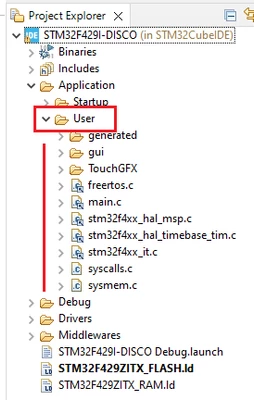
This is the CubeIDE explorer screenshot of your project:

SofLit_1-1733229143889.png

I don't see any issue on it. The user code is under User folder.

The project is compiling without errors!

10 replies

mƎALLEm
ST Technical Moderator
December 2, 2024

Hello @Peter57 and welcome to the community,

The video doesn't show how to generate the code. You need to watch the next video: How to TouchGFX: Creating my first GUI with TouchGFX Designer for STM32 GUI applications 

What board are you using?

To give better visibility on the answered topics, please click "Best answer" on the reply which solved your issue or answered your question.
Peter57Author
Associate II
December 3, 2024

Hello SifLit, thank you for the reply. My Board ist the F429i-DISC1 type. After play a litle bit with the softwar i notice that afer set up the fils in the order form the Video, the STMCubeMX ist the part that don't work. Now, after the new install, the MX generates the code for me, but the set up is wrong. in the Project Mamager the Toolchain was wrong, the ewarm was set, not the STM32CubeIDE and "Generate Under Root" was tick. I fix that and start a new projekt. But now the Application->User folder is missing. Yes, as you wrote, I see the second Vide "Creating my first GUI with TouchGFX Designer for STM32 GUI applications" and try to finish it. but still missing same code Parts. Peter

Peter57Author
Associate II
December 3, 2024

Hello, I try to send you the TouchGFX Folder itself.

When I import it to CubeIDE there ist no xxx.ioc file to setup pins of the device at self.

The Structure of the Project Explorer is total different. I dont know how to set up the IOpin

And by the way, whwere i put my code?

I hope it's getting more clear whats the problem, Peter