Gregory3
Associate III
April 7, 2021
Question

Use of an external SDRAM (IS42S16320F) with STM32H753

  • April 7, 2021
  • 10 replies
  • 7378 views

Hello!

I'm trying to use an external SDRAM (IS42S16320F) with an STM32H753 but no luck till now.

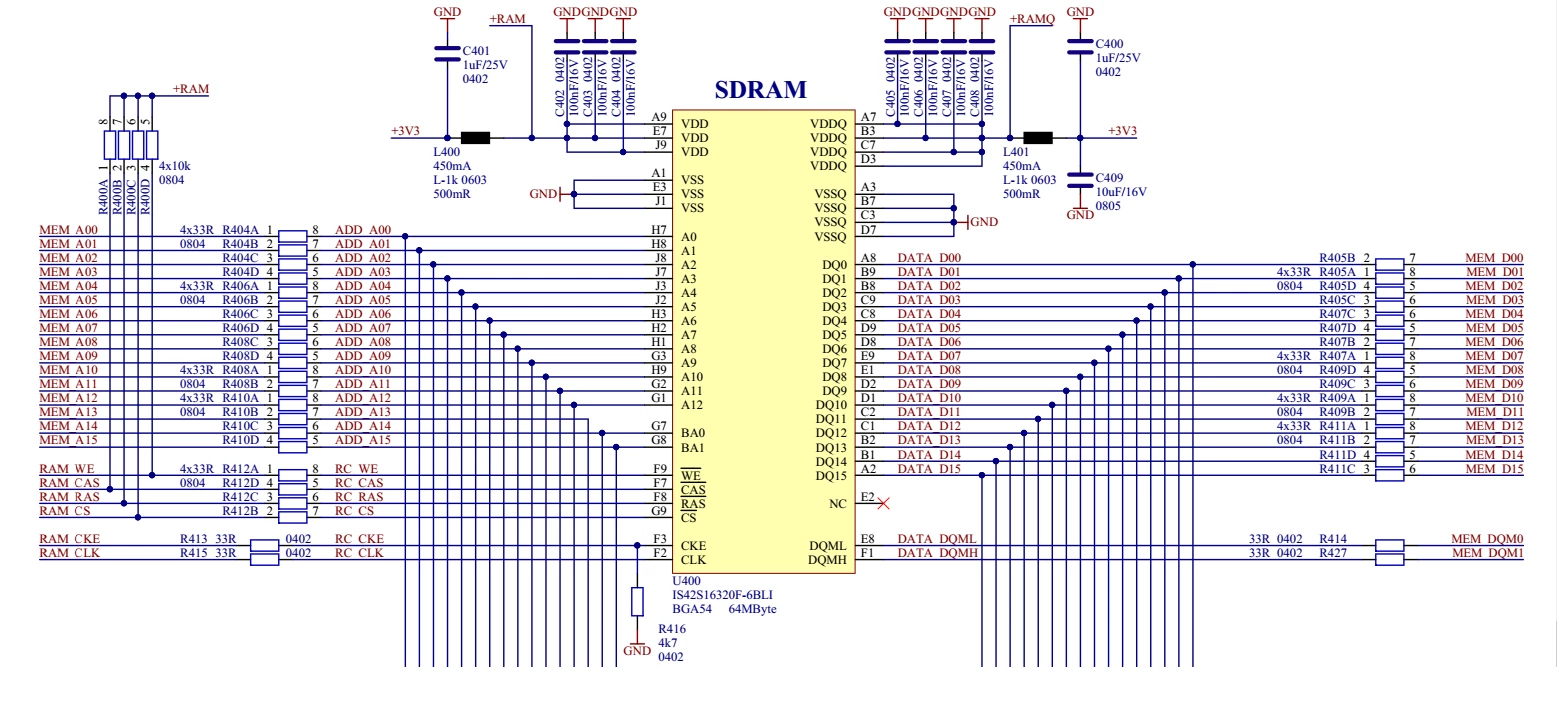
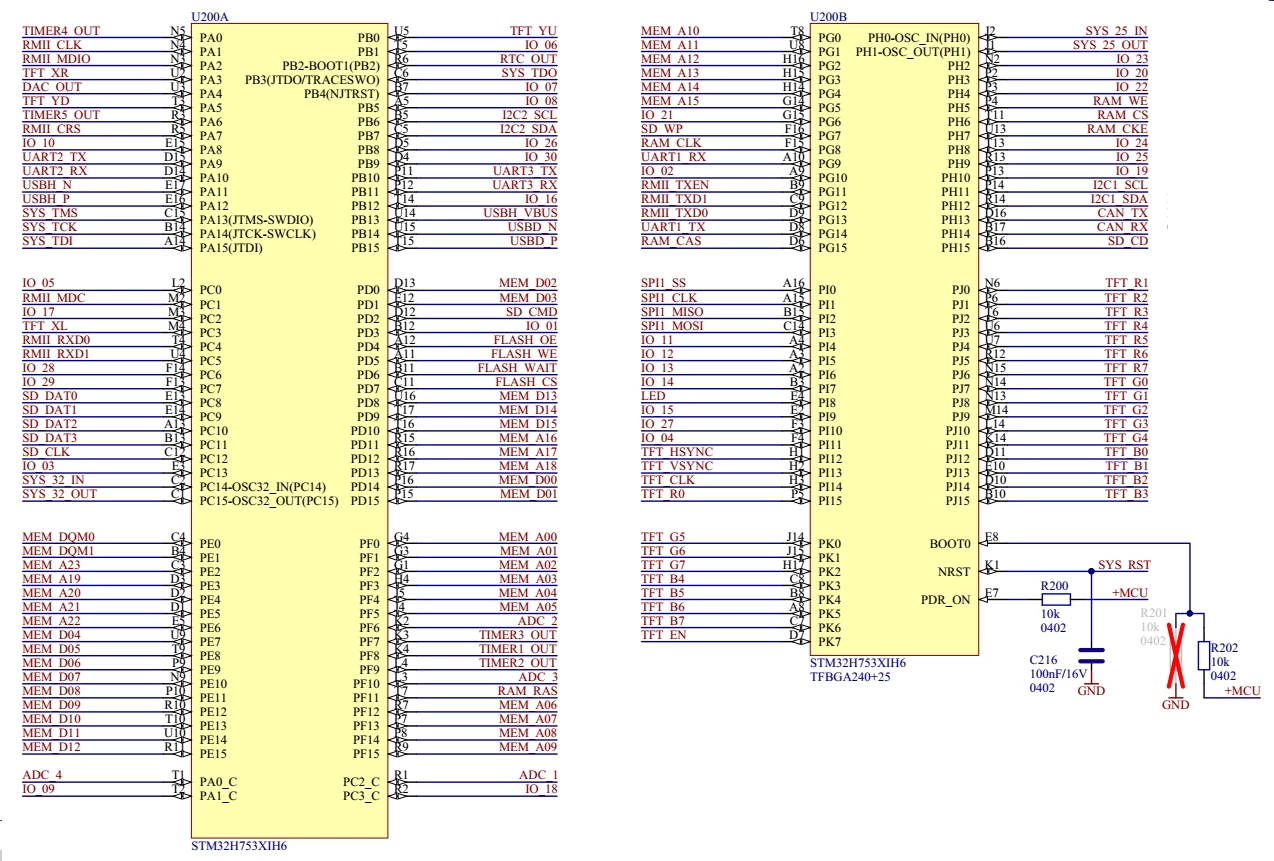
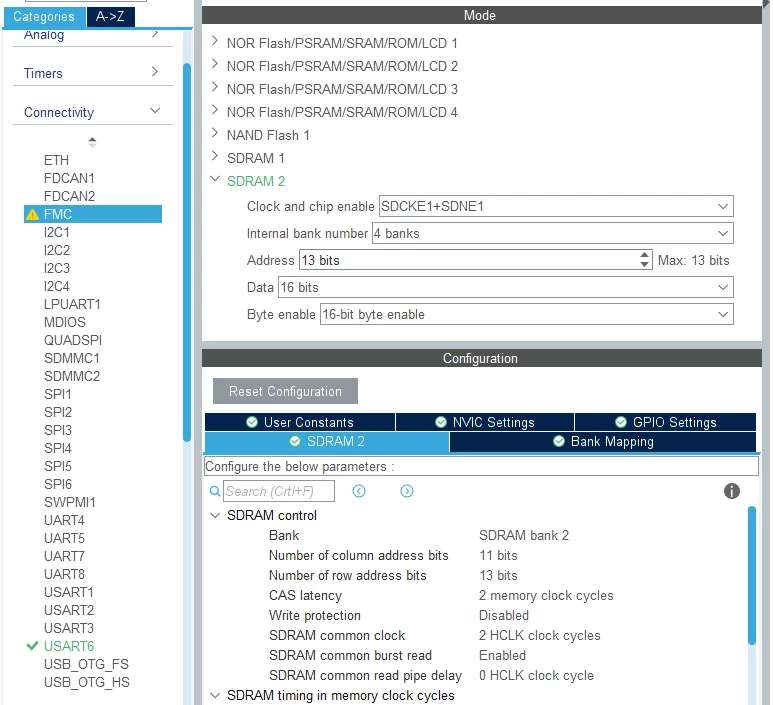
Could please anyone check if my settings are correct because I don't know if I made a bug here.
0693W000008yud1QAA.png 

0693W000008yudBQAQ.png0693W000008yudGQAQ.png 

For that I have attached the FMC configuration and the schematic parts with the SDRAM and uC.

I would be very greatefull for that.

Regards,

Gregor

This topic has been closed for replies.

10 replies

PMath.4
Senior III
April 7, 2021

Based on very quick scan - column address bits should be 10 not 11 for IS42S16320F and start by running CAS 3 and slow timings until working

Gregory3
Gregory3Author
Associate III
April 7, 2021

Thank you for the quick reply!

I have changed the number of column bits to 10 and the CAS 3 to make sure.

After check with the memory viewer I still can't see any valid address for the standard range 0xC000000:

0693W000008yunQQAQ.png0693W000008yul1QAA.png 

Also if I check the alternative address mode for 0xD000 0000 I also don't get any valid address:

0693W000008yunfQAA.png 

Here are my clock settings (in case I have also made anything wrong also here):

0693W000008yup7QAA.png0693W000008yupHQAQ.png 

Regards,

Gregor

PMath.4
Senior III
April 7, 2021

Have you started up the refresh?

Tesla DeLorean
Guru
April 7, 2021

Wouldn't SDRAM2 be at 0xD0000000 ?

Tips, Buy me a coffee, or three.. PayPal Venmo (See Profile) Up vote any posts that you find helpful, it shows what's working..
Gregory3
Gregory3Author
Associate III
April 7, 2021

@Community member​ : yes, that is why I have checked both addresses, the 0xC000 0000 (default for SDRAM1) and the 0xD000 0000 jsut to make sure. But as you can see from the pictures none of them are available.

@Community member​ : My "main" code looks like this:

int main(void)
{
 /* USER CODE BEGIN 1 */
 /* USER CODE END 1 */
 
 /* MCU Configuration--------------------------------------------------------*/
 /* Reset of all peripherals, Initializes the Flash interface and the Systick. */
 HAL_Init();
 
 /* USER CODE BEGIN Init */
 /* USER CODE END Init */
 
 /* Configure the system clock */
 SystemClock_Config();
 
 /* USER CODE BEGIN SysInit */
 /* USER CODE END SysInit */
 
 /* Initialize all configured peripherals */
 MX_GPIO_Init();
 MX_USART6_UART_Init();
 MX_FMC_Init();
 /* USER CODE BEGIN 2 */
 
 BSP_SDRAM_Init();			//Initialize the external SDRAM
 	 	 	 	 	 	 	 //(FMC driver and GPIO's are initialized by the FMC function)
 
 debugPrintln(&huart6, "some text");

I'm using the standard libraries:

#include "fmc.h"

The FMC takes care of the pins and the driver initializations.

The SDRAM initialization is done by the BSP_SDRAM_Init(), that basically contains only this function:

void SDRAM_Initialization_Sequence(SDRAM_HandleTypeDef *hsdram, FMC_SDRAM_CommandTypeDef *Command)
{
 __IO uint32_t tmpmrd =0;
 /* Step 1: Configure a clock configuration enable command */
 Command->CommandMode = FMC_SDRAM_CMD_CLK_ENABLE;
 Command->CommandTarget = FMC_SDRAM_CMD_TARGET_BANK2;;
 Command->AutoRefreshNumber = 1;
 Command->ModeRegisterDefinition = 0;
 
 /* Send the command */
 HAL_SDRAM_SendCommand(hsdram, Command, SDRAM_TIMEOUT);
 
 /* Step 2: Insert 100 us minimum delay */
 /* Inserted delay is equal to 1 ms due to systick time base unit (ms) */
 HAL_Delay(1);
 
 /* Step 3: Configure a PALL (precharge all) command */
 Command->CommandMode = FMC_SDRAM_CMD_PALL;
 Command->CommandTarget = FMC_SDRAM_CMD_TARGET_BANK2;
 Command->AutoRefreshNumber = 1;
 Command->ModeRegisterDefinition = 0;
 
 /* Send the command */
 HAL_SDRAM_SendCommand(hsdram, Command, SDRAM_TIMEOUT);
 
 /* Step 4 : Configure a Auto-Refresh command */
 Command->CommandMode = FMC_SDRAM_CMD_AUTOREFRESH_MODE;
 Command->CommandTarget = FMC_SDRAM_CMD_TARGET_BANK2;
 Command->AutoRefreshNumber = 8;
 Command->ModeRegisterDefinition = 0;
 
 /* Send the command */
 HAL_SDRAM_SendCommand(hsdram, Command, SDRAM_TIMEOUT);
 
 /* Step 5: Program the external memory mode register */
 tmpmrd = (uint32_t)SDRAM_MODEREG_BURST_LENGTH_1 |
 SDRAM_MODEREG_BURST_TYPE_SEQUENTIAL |
 SDRAM_MODEREG_CAS_LATENCY_3 |
 SDRAM_MODEREG_OPERATING_MODE_STANDARD |
 SDRAM_MODEREG_WRITEBURST_MODE_SINGLE;
 
 Command->CommandMode = FMC_SDRAM_CMD_LOAD_MODE;
 Command->CommandTarget = FMC_SDRAM_CMD_TARGET_BANK2;
 Command->AutoRefreshNumber = 1;
 Command->ModeRegisterDefinition = tmpmrd;
 
 /* Send the command */
 HAL_SDRAM_SendCommand(hsdram, Command, SDRAM_TIMEOUT);
 
 /* Step 6: Set the refresh rate counter */
 /* Set the device refresh rate */
 HAL_SDRAM_ProgramRefreshRate(hsdram, REFRESH_COUNT);
 
}

So at the end of it the refresh rate is set. This is why I think that the refresh shall be ok, or is there something that I miss?

Regards,

Gregor

Tesla DeLorean
Guru
April 7, 2021

Ok, so ?? ?? indicates the peripheral isn't even clocking.

You're going to want to double check where exactly you're break-pointing this, and then unpack the RCC clocks and FMC peripheral settings, and confirm they make sense.

Ideally, just do some printf/dumping after you've initialized the memory interface.

Have the Hard Fault Handler output some actionable data, and if it still faults when touching SDRAM2 (0xD0000000), then again suggests the peripheral's not setup/clocked. Getting the odd parameter wrong will yield random data, not ?? ??

On the F4 or F7 I seem to recall that SDRAM1 needed some nominal settings along with SDRAM2, for the latter to work. Perhaps look at the F429I-DISCO examples.

Tips, Buy me a coffee, or three.. PayPal Venmo (See Profile) Up vote any posts that you find helpful, it shows what's working..
Gregory3
Gregory3Author
Associate III
April 7, 2021

Thank you for all the usefull hints. I will check them and post the progress.

Vangelis Fortounas
Associate II
April 8, 2021

Hello

You didn't published the timings

Check if REFRESH_COUNT is calculated properly for this memory. This sdram chip refreshes every about 8μsec (8K/64msec) for comercial temp range.

Recalculate the counts by multiply 8.192μs *100MHz/2 =820/2 , remove some counts for safety , eg, 15 => 400.0693W000008ywLDQAY.jpg

Tesla DeLorean
Guru
April 8, 2021

The side of the barn is pretty broad here, not really presenting as a timing or geometry issue.

Tips, Buy me a coffee, or three.. PayPal Venmo (See Profile) Up vote any posts that you find helpful, it shows what's working..
Gregory3
Gregory3Author
Associate III
April 8, 2021

Hi!

Here some update for the topic.

I was trying to change the refresh rate according to the proposal to 400:

#define REFRESH_COUNT ((uint32_t)0x0190) /* SDRAM refresh counter (100Mhz SD clock) */

which is set by the last step in the initialization function:

 /* Step 6: Set the refresh rate counter */
 /* Set the device refresh rate */
 HAL_SDRAM_ProgramRefreshRate(hsdram, REFRESH_COUNT);

that runs this one:

HAL_StatusTypeDef FMC_SDRAM_ProgramRefreshRate(FMC_SDRAM_TypeDef *Device, uint32_t RefreshRate)
{
 /* Check the parameters */
 assert_param(IS_FMC_SDRAM_DEVICE(Device));
 assert_param(IS_FMC_REFRESH_RATE(RefreshRate));
 
 /* Set the refresh rate in command register */
 MODIFY_REG(Device->SDRTR, FMC_SDRTR_COUNT, (RefreshRate << FMC_SDRTR_COUNT_Pos));
 
 return HAL_OK;
}

So it should set the SDRTR register to the value 0x0190.

After setting a breakpoint just after this function, the register has a value of 0x0:

0693W000008z2WIQAY.png 

Now I' checking why this is so, but this dosen't supose to look like this...

Gregory3
Gregory3Author
Associate III
April 9, 2021

Hello!

I have found the problem. The reason, why the register was not set, was very easy: I forgot to change in the SDRAM initialization function the number of the SDRAM to 2 (since I'm using the SDRAM2).

You can see here the sdramHandle is set to hsdram2 and everything works fine :)

void BSP_SDRAM_Init(void)
{
	sdramHandle = hsdram2;
 
 /* Program the SDRAM external device */
 SDRAM_Initialization_Sequence(&sdramHandle, &command);
 
 
}
 
 
/**
 * @brief Perform the SDRAM external memory inialization sequence
 * @param hsdram: SDRAM handle
 * @param Command: Pointer to SDRAM command structure
 * @retval None
 */
void SDRAM_Initialization_Sequence(SDRAM_HandleTypeDef *hsdram, FMC_SDRAM_CommandTypeDef *Command)
{
 __IO uint32_t tmpmrd =0;
 /* Step 1: Configure a clock configuration enable command */
 Command->CommandMode = FMC_SDRAM_CMD_CLK_ENABLE;
 Command->CommandTarget = FMC_SDRAM_CMD_TARGET_BANK2;;
 Command->AutoRefreshNumber = 1;
 Command->ModeRegisterDefinition = 0;
 
 /* Send the command */
 HAL_SDRAM_SendCommand(hsdram, Command, SDRAM_TIMEOUT);

I have checked the registers and they are set now correctly.

I also wrote a simple code to do a first test:

  • fill Tx Buffer with some numbers
  • write Tx_Buffer to SDRAM starting at 0xD000 0000
  • read the SDRAM into a Rx_Buffer starting from 0xD000 0000

The result is fine in memory view and variable check:

0693W000008z9JLQAY.png0693W000008z9JQQAY.png

Thank you all for all the help!

Now I can continue to write my test code.

Regards,

Gregor