
Associate
April 10, 2024
Solved

UART TX and RX pin issue

  • April 10, 2024
  • 3 replies
  • 3412 views

Hello,

I am using "NUCLEO-H743Zi2" eval board. I am using it for UART communication. I had configured UART4 in it as following;

  • PA0 as UART4_TX
  • PA1 as UART4_RX

When I tried to transmit, it is not transmitting more than 2 bytes. While receiving, it is not at all consistent (random values are received).

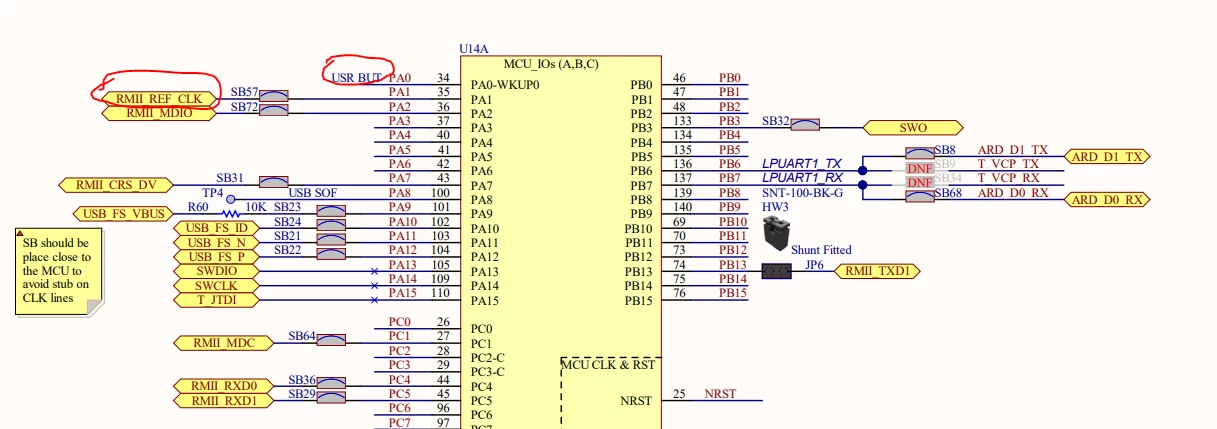
So I checked board's schematic as following;
adithya_sharma_0-1712761586212.png

I saw that PA1 and PA0 are not directly connected to CN11 connector in the board. 

Is it causing UART4's transmission and reception error? 

Also if I want to operate UART4 using GPIO's PA0 and PA1 only, what is the solution?

This topic has been closed for replies.
Best answer by mƎALLEm

Before going further, you can test with another alternate function not mapped on PA0 even it will not be your final design and check if the problem persist.

Ps: I think there is a capacitor connected to PA0 used for for button debouncing it could introduce some communication issues and does a signal filtering.

3 replies

mƎALLEm
ST Technical Moderator
April 10, 2024

You need at least to remove SB57.

Seems your UART is disturbed by the clock coming from ETH PHY.


To give better visibility on the answered topics, please click "Best answer" on the reply which solved your issue or answered your question.
Associate
April 11, 2024

Thank you for replying.

I understood that for PA1 (rx pin) I might have to desolder SB57.

But what might be problem in PA0 (tx pin)?

mƎALLEm
mƎALLEmBest answer
ST Technical Moderator
April 11, 2024

Before going further, you can test with another alternate function not mapped on PA0 even it will not be your final design and check if the problem persist.

Ps: I think there is a capacitor connected to PA0 used for for button debouncing it could introduce some communication issues and does a signal filtering.

To give better visibility on the answered topics, please click "Best answer" on the reply which solved your issue or answered your question.