
MFara.4
Associate III
December 13, 2022
Solved

Stm32 to Python

  • December 13, 2022
  • 6 replies
  • 10926 views

I would be happy if you share with me some example codes about transmitting data from stm32 to python via serial!

    This topic has been closed for replies.
    Best answer by RomainR.

    Sorry.

    I made a typo error in line below (/r/n vs \r\n):

    adc_len = sprintf(adc_buf, "ADC Value=%d/r/n", readValue);

    Change it as follow:

    adc_len = sprintf(adc_buf, "ADC Value=%d\r\n", readValue);

    Otherwise this code works very well (see screenshot below)

    Check your hardware connection.

    Check your terminal settings baudrate, word length, parity and stop bit must be aligned between USART Initialization and your terminal.
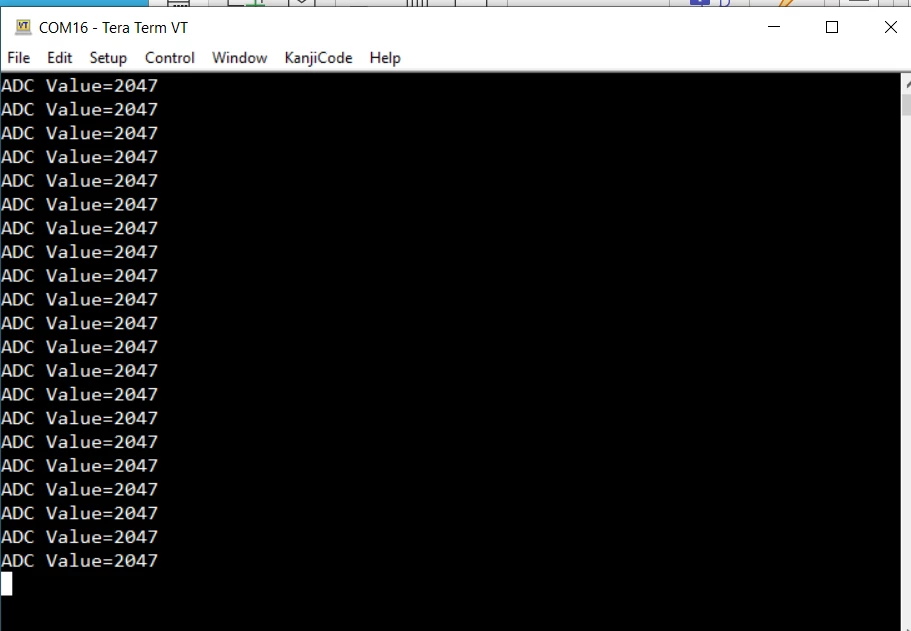
    0693W00000WKunlQAD.png 

    Best regards,

    Romain,

    6 replies

    RomainR.
    ST Employee
    December 13, 2022

    Hello MFara.4 (Community Member)

    You are looking for code examples for transferring from STM32 to Python by serial, do you mean by a UART device of the STM32 or other like USB, SPI or I2C ? 

    Is the code you are looking for is in C/C++ language? 

    Have you looked in the HAL library of the device you are using for examples related to USART transfer?

    Can you be more precise in your question?

    Best regards,

    Romain,

    To give better visibility on the answered topics, please click on Accept as Solution on the reply which solved your issue or answered your question.
    MFara.4
    MFara.4Author
    Associate III
    December 13, 2022

    Thanks for the reply!

    Yes I need examples which are related to USAERT transfer.

    MFara.4
    MFara.4Author
    Associate III
    December 13, 2022

    Thanks for the reply!

    Yes I need examples which are related to USAERT transfer.

    MFara.4
    MFara.4Author
    Associate III
    December 13, 2022

    one more question! I use this code to get the data ADC and transmit it but I can't see my data on Tera Term, I see my data in live Expression but not in Tera Term so most probably problem comes from Transmit part!! I would be happy if you take a look at the code that which part might be wrong.(STMG01291)

    ADC1 - IN9 (tick)

    Parameter Settings --> ADC Settings --> Continuous Conversion Mode (Enabled)

    Enable USART1 asynchronous

    Parameter Settings --> Basic Parameters --> Baud rate 9600

    void SystemClock_Config(void);

    static void MX_GPIO_Init(void);

    static void MX_ADC1_Init(void);

    static void MX_USART1_UART_Init(void);

    /* USER CODE BEGIN PFP */

    /* USER CODE END PFP */

    /* Private user code ---------------------------------------------------------*/

    /* USER CODE BEGIN 0 */

    uint16_t readValue;

    char string[10];

    /* USER CODE END 0 */

    /**

     * @brief The application entry point.

     * @retval int

     */

    int main(void)

    {

     /* USER CODE BEGIN 1 */

     /* USER CODE END 1 */

     /* MCU Configuration--------------------------------------------------------*/

     /* Reset of all peripherals, Initializes the Flash interface and the Systick. */

     HAL_Init();

     /* USER CODE BEGIN Init */

     /* USER CODE END Init */

     /* Configure the system clock */

     SystemClock_Config();

     /* USER CODE BEGIN SysInit */

     /* USER CODE END SysInit */

     /* Initialize all configured peripherals */

     MX_GPIO_Init();

     MX_ADC1_Init();

     MX_USART1_UART_Init();

     /* USER CODE BEGIN 2 */

     HAL_ADC_Start(&hadc1);

     /* USER CODE END 2 */

     /* Infinite loop */

     /* USER CODE BEGIN WHILE */

     while (1)

     {

     HAL_ADC_PollForConversion(&hadc1,1000);

     readValue = HAL_ADC_GetValue(&hadc1);

     HAL_UART_Transmit(&huart1, (uint8_t *)&readValue, sizeof(readValue), 100);

    RomainR.
    ST Employee
    December 13, 2022

    Hi MFara.4 (Community Member)

    You must convert your variable readValue in Ascii Char to display it in any terminal.

    Before transmit it with HAL_UART_Transmit.

    As an example below:

    Best regards

    #include <stdio.h> // for sprintf usage
    static char adc_buf[16] = {0};
    static uint32_t adc_len = 0;
     
    /* Convert in array of ASCII char and compute array lenght */
    adc_len = sprintf(adc_buf, "ADC Value=%d/r/n", readValue);
     
    /* Transmit Array */
    if (HAL_UART_Transmit(&huart1, (uint8_t *)adc_buf, adc_len, HAL_MAX_DELAY) != HAL_OK)
    {
     Error_Handler();
    }

    In order to give better visibility on the answered topics, please click on 'Select as Best' on the reply which solved your issue or answered your question. See also 'Best Answers'

    To give better visibility on the answered topics, please click on Accept as Solution on the reply which solved your issue or answered your question.
    MFara.4
    MFara.4Author
    Associate III
    December 13, 2022

    Thanks again for the reply!

    I changed the codes but again I am unable to see my data on it! I am sure a small thing is missing. could you look agin the revised code and give me idea.

    #include <stdio.h> // for sprintf usage

    /* Private includes ----------------------------------------------------------*/

    /* USER CODE BEGIN Includes */

    /* USER CODE END Includes */

    /* Private typedef -----------------------------------------------------------*/

    /* USER CODE BEGIN PTD */

    /* USER CODE END PTD */

    /* Private define ------------------------------------------------------------*/

    /* USER CODE BEGIN PD */

    /* USER CODE END PD */

    /* Private macro -------------------------------------------------------------*/

    /* USER CODE BEGIN PM */

    /* USER CODE END PM */

    /* Private variables ---------------------------------------------------------*/

    ADC_HandleTypeDef hadc1;

    UART_HandleTypeDef huart1;

    /* USER CODE BEGIN PV */

    /* USER CODE END PV */

    /* Private function prototypes -----------------------------------------------*/

    void SystemClock_Config(void);

    static void MX_GPIO_Init(void);

    static void MX_ADC1_Init(void);

    static void MX_USART1_UART_Init(void);

    /* USER CODE BEGIN PFP */

    /* USER CODE END PFP */

    /* Private user code ---------------------------------------------------------*/

    /* USER CODE BEGIN 0 */

    uint16_t readValue;

    static char adc_buf[16] = {0};

    static uint32_t adc_len = 0;

    /* USER CODE END 0 */

    /**

     * @brief The application entry point.

     * @retval int

     */

    int main(void)

    {

     /* USER CODE BEGIN 1 */

     /* USER CODE END 1 */

     /* MCU Configuration--------------------------------------------------------*/

     /* Reset of all peripherals, Initializes the Flash interface and the Systick. */

     HAL_Init();

     /* USER CODE BEGIN Init */

     /* USER CODE END Init */

     /* Configure the system clock */

     SystemClock_Config();

     /* USER CODE BEGIN SysInit */

     /* USER CODE END SysInit */

     /* Initialize all configured peripherals */

     MX_GPIO_Init();

     MX_ADC1_Init();

     MX_USART1_UART_Init();

     /* USER CODE BEGIN 2 */

     HAL_ADC_Start(&hadc1);

     /* USER CODE END 2 */

     /* Infinite loop */

     /* USER CODE BEGIN WHILE */

     while (1)

     {

      /* USER CODE END WHILE */

     HAL_ADC_PollForConversion(&hadc1,1000);

     readValue = HAL_ADC_GetValue(&hadc1);

     adc_len = sprintf(adc_buf, "ADC Value=%d/r/n", readValue);

     if (HAL_UART_Transmit(&huart1, (uint8_t *)adc_buf, adc_len,HAL_MAX_DELAY) != HAL_OK);

      /* USER CODE BEGIN 3 */

     }

     /* USER CODE END 3 */

    }

    RomainR.
    RomainR.Best answer
    ST Employee
    December 13, 2022

    Sorry.

    I made a typo error in line below (/r/n vs \r\n):

    adc_len = sprintf(adc_buf, "ADC Value=%d/r/n", readValue);

    Change it as follow:

    adc_len = sprintf(adc_buf, "ADC Value=%d\r\n", readValue);

    Otherwise this code works very well (see screenshot below)

    Check your hardware connection.

    Check your terminal settings baudrate, word length, parity and stop bit must be aligned between USART Initialization and your terminal.

    0693W00000WKunlQAD.png 

    Best regards,

    Romain,

    To give better visibility on the answered topics, please click on Accept as Solution on the reply which solved your issue or answered your question.
    MFara.4
    MFara.4Author
    Associate III
    December 13, 2022

    I am really thankful!

    but as I use macOS too, There's a new Mac app called Serial, that I want to see my data on it or by importing serial on Python! can you give me idea?

    Thanks for the time and consideration

    RomainR.
    ST Employee
    December 13, 2022

    Hi MFara.4,

    I do not know this app, and I'm not MacOS user.

    Usually, I use Python and pySerial plugin under Linux or Windows.

    Tesla DeLorean  sent you a good code in python, this should work well on your MacOs, I will not superset his code, I use pretty same script with writing UART data into a csv file.

    After that it is python, whatever the operating system.

    You must make the effort to learn it.

    Good luck,

    BR

    Romain,

    To give better visibility on the answered topics, please click on Accept as Solution on the reply which solved your issue or answered your question.
    Tesla DeLorean
    Guru
    December 13, 2022

    On the Python side, something along the lines of

    import serial
     
    s = serial.Serial('COM23', baudrate=115200) # Open serial port
     
     while (s.in_waiting != 0):
     data = s.readline().decode('ascii', errors='replace')
     
    # process / convert 'data' into variables

    Tips, Buy me a coffee, or three.. PayPal Venmo (See Profile) Up vote any posts that you find helpful, it shows what's working..
    MFara.4
    MFara.4Author
    Associate III
    December 13, 2022

    Thanks for the reply!

    I am getting this error...

    SerialException: [Errno 16] could not open port /dev/tty.usbmodem143103: [Errno 16] Resource busy: '/dev/tty.usbmodem143103'

    Tesla DeLorean
    Guru
    December 13, 2022

    At some level you're going to need to get a mastery of the languages and equipment you've chosen to use.

    Perhaps it is already open by another application? Or needs some different attributes?

    Tips, Buy me a coffee, or three.. PayPal Venmo (See Profile) Up vote any posts that you find helpful, it shows what's working..