Andres Cao
Associate III
March 3, 2017
Question

SPI Master NSS always low in STM32F4

  • March 3, 2017
  • 14 replies
  • 10733 views
Posted on March 03, 2017 at 12:34

Hi guys!

I'm configuring the Nucleo 64 with the STM32F446RE to use SPI as a Master.

The problem I'm having right now is that the NSS pin is always low. Clock and MOSI are perfect. What I would like is that the NSS is high, and goes low during the transmission, then high again.

I've tried setting the NSS as Hardware output, and Software in Cube, but still failed to get what I want. 

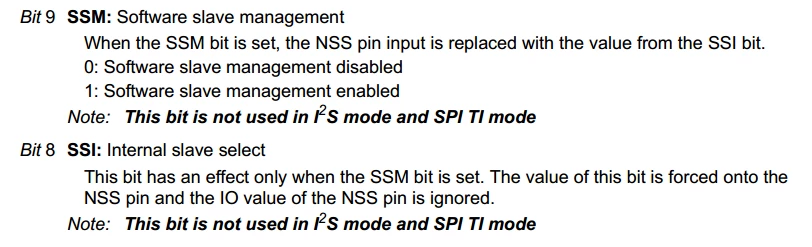
I think this configuration should be sorted with the following 3 bits, from CR1 and CR2. Right now Cube is setting SSOE= 1, SSM=1, SSI=1. And the NSS pin is configured as hardware output in Cube. 

0690X00000606TiQAI.png0690X00000606TjQAI.png

Any clues on how should I setup this? I would like to avoid having to use a random pin as CS and pull it manually.

Thanks!!

    This topic has been closed for replies.

    14 replies

    S.Ma
    Principal
    March 3, 2017
    Posted on March 03, 2017 at 13:01

    If there is only one master SPI, have you tried to make NSS a GPIO (no alternate function)?

    Andres Cao
    Associate III
    March 3, 2017
    Posted on March 03, 2017 at 13:55

    There is only one master and one slave. I'm not entirely sure what you mean, to do the Chip Select toggling a pin before and after transmission?

    Jan Waclawek
    Visitor II
    March 3, 2017
    Posted on March 03, 2017 at 13:27

    What I would like is that the NSS is high, and goes low during the transmission, then high again.

    There's no such functionality in the F4 SPI. In some other STM32 families, NSS may be active only during transmission, but then also toggles between frames (bytes), which may not be what you want either.

    You have to do this 'manually', setting the NSS pin as GPIO output. Don't forget the NSS input signal into the SPI module needs to be low (internally) low even if set to soft-NSS.

    JW

    Andres Cao
    Associate III
    March 3, 2017
    Posted on March 03, 2017 at 14:00

    Thanks for your help!

    So if I want to implement a simple 16bit spi protocol, as shown (AS5048 encoder), I have to do it manually?

    0690X00000606TkQAI.png

    This would negate all advantages of using DMA since I still have to poll the busy flag to set it high again.

    What still puzzles me is that the NSS signal goes low immediately after the MX_SPI2_Init() function. 

    waclawek.jan
    Super User
    March 3, 2017
    Posted on March 03, 2017 at 14:37

    This would negate all advantages of using DMA since I still have to poll the busy flag to set it high again.

    Well, not *all* advantages - it still will shovel all the bytes/halfwords you need into the port without processor intervention - but for short frames there's no advantage in it, true.

    The SPI implementation in STM32 is, so to speak, underoptimal :)

    JW

    ST Technical Moderator
    March 3, 2017
    Posted on March 03, 2017 at 14:03

    Hi,

    You may assign NSS as GPIO CS, as the reference manual RM0390 says for Hardware NSS management (SSM = 0) that:

    NSS output enable (SSM=0,SSOE = 1): this configuration is only used when the MCU is set as master. The NSS pin is managed by the hardware. The NSS signal is driven low as soon as the SPI is enabled in master mode (SPE=1), and is kept low until the SPI is disabled (SPE =0).

    0690X00000606TdQAI.png

    Imen

    In order to give better visibility on the answered topics, please click on 'Best answer' on the reply which solved your issue or answered your question. Thanks
    Andres Cao
    Associate III
    March 3, 2017
    Posted on March 03, 2017 at 14:13

    Hi Imen, thanks for your answer. 

    To my understanding, that's what I'm doing in Cube :

    0690X00000606TDQAY.png0690X00000606OKQAY.png0690X00000606U1QAI.png

    And checking the CR1&2 register values after init, it all seems ok, as shown. However, the NSS pin is driven low and stays there.

    0690X00000606ULQAY.png

    Any clues?

    Nemui Trinomius
    Associate II
    March 3, 2017
    Posted on March 03, 2017 at 15:06

    Dear Andres Cao,

    Change SSM bit to 1.

    On CubeMX, Change NSS signal type to Software output.

    Best regards,

    Nemui.

    Jaroslaw Hill
    Associate
    July 16, 2017
    Posted on July 16, 2017 at 04:56

    Hi,

    I had to face the same problem, but on the STM32F105, SPI master + DMA and hardware NSS.

    Before I had found the issue it looked like this

    0690X00000607bSQAQ.png

    After reading the discussion I realized that disabling the SPI in DMA callback resolves the issue.

    static void SpiCallback(SPI_HandleTypeDef *hspi)

       {

       __HAL_SPI_DISABLE(hspi); // disable NSS

       };

    void HAL_SPI_ErrorCallback(SPI_HandleTypeDef *hspi)

       { SpiCallback(hspi); };

    void HAL_SPI_TxRxCpltCallback(SPI_HandleTypeDef *hspi)

       { SpiCallback(hspi); };

    void HAL_SPI_TxCpltCallback(SPI_HandleTypeDef *hspi)

       { SpiCallback(hspi); };

    After that transmission looks like this.

    0690X00000607WsQAI.png

    I hope it will help you.

    Vangelis Fortounas
    Associate II
    August 10, 2017
    Posted on August 10, 2017 at 17:23

    Hello to all!

    It is not writen in any RM or DS  that NSS pin in Master mode,  is responsible to control the CS of a slave device and to provide the necessary timing for this!

    It is very clear also, in Master mode, that  NSS pin is kept low when master enabled  until the master is disabled.

    So this is not a problem.  is the normal behaviour of SPI Master NSS pin.

    When a Master  keep the NSS pin low in a multi device bus , this means  that all devices (with same NSS functionality) will be forced to act as slaves and will not try to act as Masters.(if properly configured for this ofcourse).

    0690X00000607lQQAQ.png

    When  the Master  frees the NSS line, informs the bus that any other device can take the control of the bus as a new Master by forcing his  NSS pin low.

    Conclusion. If you want to have one Master on the bus , and only slave devices , inside Master's device the NSS functionality is useless and the GPIO can be used as an ordinary pin.

    Georgi Marinov
    Associate
    June 12, 2018
    Posted on June 12, 2018 at 15:00

    Hello. I had the same problem with stm32l0. When you use hardware NSS (on master). 

    1. SPI_CR2_SSOE = 1

    2. Hal lib always enable SPI on transfer. So you should disable SPI when finish transfer (__HAL_SPI_DISABLE)

    3. Set pullup for NSS gpio pin in GPIO_PUPD

    This setup work for me.

    BCoch
    Senior
    November 7, 2018

    THis tripped me up for a while too. Even when the STM32F is set to be the bus master, with HW NSS, the STM32F drives it low, but doesn't drive it high when not selected! Thus if you start out looking at the NSS pin, it looks like nothing's happening.

    Unless there is some configuration I missed, the pin must be independently pulled up, either externally, or via the internal GPIO pull-up. (Which is too weak to allow rapid consecutive SPI transactions.)

    waclawek.jan
    Super User
    November 8, 2018

    > Even when the STM32F is set to be the bus master, with HW NSS, the STM32F drives it low,

    > but doesn't drive it high when not selected!

    By "not selected", you mean that you set SPI_CR1.SPE=0? Try toggling that bit, i.e. clear it, then immediately set it again.

    JW

    BCoch
    Senior
    November 8, 2018

    Yes, JW. (Actually I call LL_SPI_Disable.) If I set it again (by calling LL_SPI_Enable) after setting transfer direction to LL_SPI_HALF_DUPLEX_TX, NSS gets re-asserted, and left that way (even though there's no data to transmit).

    waclawek.jan
    Super User
    November 8, 2018

    > NSS gets re-asserted

    That is 0, i.e. pulled to ground?

    Interesting.

    JW

    [EDIT] Stupid me, this is the expected behaviour. I never used the "hardware" NSS as master (exactly because of its very limited utility), so I developed a misconception of how it works since this has been discussed here. Sorry.