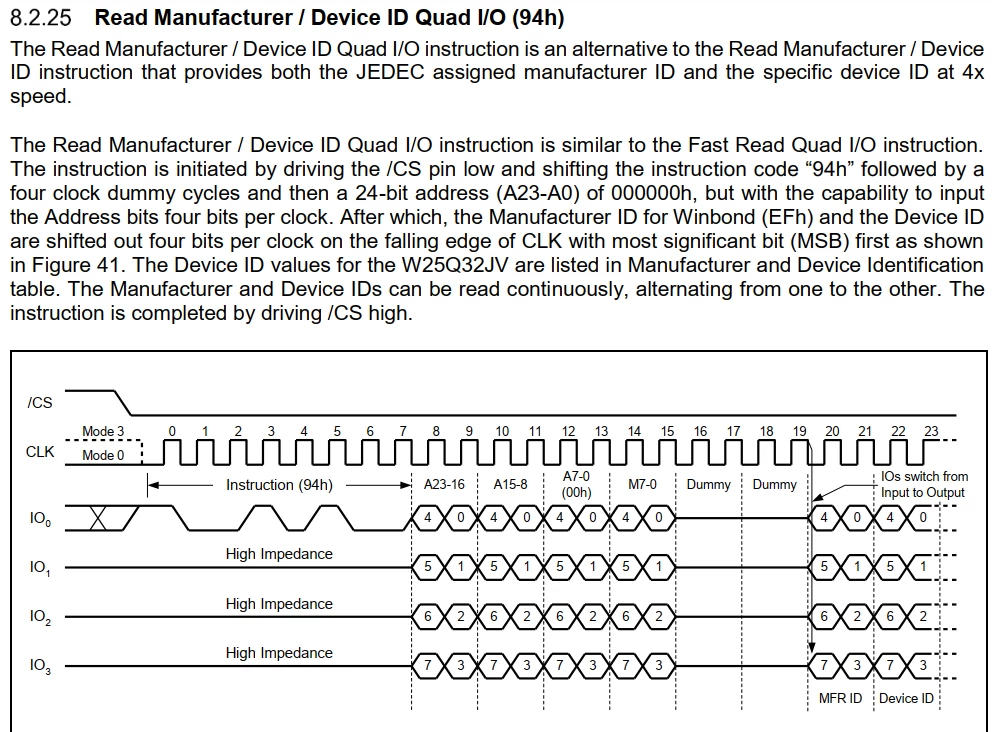
Need to accurately read Manufacturer/Device ID using QuadSPI from a W25Q32JV (Winbond Flash).
I understand need to send Instruction 0x90, followed by 3 dummy bytes 0x00 to external flash. The rest configuration is OK. The code is as following.
This is SPI_INIT function.
static void MX_QUADSPI_Init(void)
{
/* QUADSPI parameter configuration*/
hqspi.Instance = QUADSPI;
hqspi.Init.ClockPrescaler = 0;
hqspi.Init.FifoThreshold = 4;
hqspi.Init.SampleShifting = QSPI_SAMPLE_SHIFTING_HALFCYCLE;
hqspi.Init.FlashSize = 23;
hqspi.Init.ChipSelectHighTime = QSPI_CS_HIGH_TIME_2_CYCLE;
hqspi.Init.ClockMode = QSPI_CLOCK_MODE_0;
hqspi.Init.FlashID = QSPI_FLASH_ID_2;
hqspi.Init.DualFlash = QSPI_DUALFLASH_DISABLE;
if (HAL_QSPI_Init(&hqspi) != HAL_OK)
{
Error_Handler();
}
}
and the following function is used to read ID from Flash. The Manufacturing ID is of 1 byte and Device ID is of 2 bytes. So the length is 3. Address is 0x00. how to send 3 dummy bytes (0x00). Shall I edit dummy cycles for it?
void QSPI_Flash_ID_Read(uint8_t *data, int length, uint32_t address){
QSPI_AutoPollingMemReady(&hqspi);
QSPI_CommandTypeDef sCommand;
sCommand.InstructionMode = QSPI_INSTRUCTION_1_LINE;
sCommand.AddressSize = QSPI_ADDRESS_24_BITS;
sCommand.AlternateByteMode = QSPI_ALTERNATE_BYTES_NONE;
sCommand.DdrMode = QSPI_DDR_MODE_DISABLE;
sCommand.DdrHoldHalfCycle = QSPI_DDR_HHC_ANALOG_DELAY;
sCommand.SIOOMode = QSPI_SIOO_INST_EVERY_CMD;
/* Reading Sequence ------------------------------------------------ */
sCommand.Instruction = READ_ID_CMD3; //0x90
sCommand.AddressMode = QSPI_ADDRESS_1_LINE;
sCommand.Address = address;
sCommand.NbData = length;
sCommand.DataMode = QSPI_DATA_4_LINES;
sCommand.DummyCycles = 0;
HAL_QSPI_Command(&hqspi, &sCommand, HAL_QPSI_TIMEOUT_DEFAULT_VALUE);
HAL_QSPI_Receive(&hqspi, data, 1000);
}