Armani.Pejman
Associate
November 14, 2015
Question

HAL_CAN_Transmit timeout error

  • November 14, 2015
  • 9 replies
  • 6813 views
Posted on November 14, 2015 at 11:22

Hello, I'm trying to communicate with a STM32f4x9 EVAL board and a STM32F429-Discovery board via CAN Bus,

I am using MCP2551 transceiver IC for Discovery board, I know that CAN1 is being used by LCD and CAN2 is used by USB OTG. So I de-soldered the C53 (4k7 uf) capacitor of Discovery board (according to a video on

https://www.youtube.com/watch?v=4fYoXGiIdDs

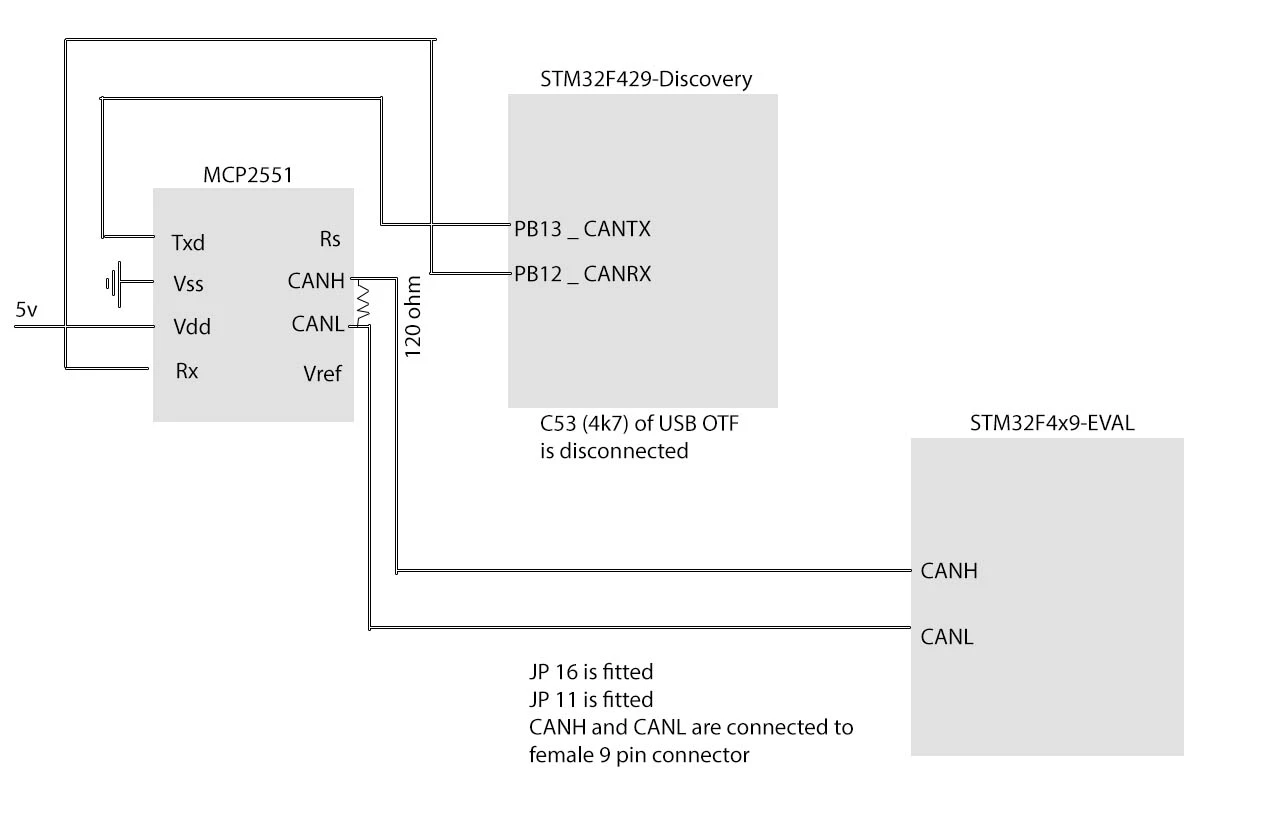
), I have tested everything, wirings, HAL configs for CAN, etc.. But I'm getting timeout when I call the HAL_CAN_Transmit function. I am using pure STMCube examples (STM32F4x9_EVAL\Examples\CAN\CAN_Networking), I re-configured the same example for Discovery board, using CAN2 instead of CAN1. Here is my wiring schematic: 0690X000006035cQAA.jpg I did not touch the Eval example, but here is my code for Discovery board:

bool CANWorker::init_HAL_CAN()
{
// Placed in MCP file:
GPIO_InitTypeDef GPIO_InitStruct;
/*##-1- Enable peripherals and GPIO Clocks #################################*/
/* CAN2 Periph clock enable */
CANx_CLK_ENABLE();
/* Enable GPIO clock ****************************************/
CANx_GPIO_CLK_ENABLE();
/*##-2- Configure peripheral GPIO ##########################################*/ 
/* CAN2 TX GPIO pin configuration */
GPIO_InitStruct.Pin = CANx_TX_PIN;
GPIO_InitStruct.Mode = GPIO_MODE_AF_PP;
GPIO_InitStruct.Speed = GPIO_SPEED_FAST;
GPIO_InitStruct.Pull = GPIO_PULLUP;
GPIO_InitStruct.Alternate = CANx_TX_AF;
HAL_GPIO_Init(CANx_TX_GPIO_PORT, &GPIO_InitStruct);
/* CAN2 RX GPIO pin configuration */
GPIO_InitStruct.Pin = CANx_RX_PIN;
GPIO_InitStruct.Mode = GPIO_MODE_AF_PP;
GPIO_InitStruct.Speed = GPIO_SPEED_FAST;
GPIO_InitStruct.Pull = GPIO_PULLUP;
GPIO_InitStruct.Alternate = CANx_RX_AF;
HAL_GPIO_Init(CANx_TX_GPIO_PORT, &GPIO_InitStruct);
/*##-3- Configure the NVIC #################################################*/
/* NVIC configuration for CAN2 Reception complete interrupt */
HAL_NVIC_SetPriority(CANx_RX_IRQn, 1, 0);
HAL_NVIC_EnableIRQ(CANx_RX_IRQn);
CAN_FilterConfTypeDef sFilterConfig;
static CanTxMsgTypeDef TxMessage;
static CanRxMsgTypeDef RxMessage;
/*##-1- Configure the CAN peripheral #######################################*/
_canHandle.Instance = CAN2;
_canHandle.pTxMsg = &TxMessage;
_canHandle.pRxMsg = &RxMessage;
_canHandle.Init.TTCM = DISABLE;
_canHandle.Init.ABOM = DISABLE;
_canHandle.Init.AWUM = DISABLE;
_canHandle.Init.NART = DISABLE;
_canHandle.Init.RFLM = DISABLE;
_canHandle.Init.TXFP = DISABLE;
_canHandle.Init.Mode = CAN_MODE_NORMAL;
_canHandle.Init.SJW = CAN_SJW_1TQ;
_canHandle.Init.BS1 = CAN_BS1_6TQ;
_canHandle.Init.BS2 = CAN_BS2_8TQ;
_canHandle.Init.Prescaler = 2;
if(HAL_CAN_Init(&_canHandle) != HAL_OK)
{
/* Initialization Error */
Error_Handler();
return false;
}
/*##-2- Configure the CAN Filter ###########################################*/
sFilterConfig.FilterNumber = 14;
sFilterConfig.FilterMode = CAN_FILTERMODE_IDMASK;
sFilterConfig.FilterScale = CAN_FILTERSCALE_32BIT;
sFilterConfig.FilterIdHigh = 0x0000;
sFilterConfig.FilterIdLow = 0x0000;
sFilterConfig.FilterMaskIdHigh = 0x0000;
sFilterConfig.FilterMaskIdLow = 0x0000;
sFilterConfig.FilterFIFOAssignment = 0;
sFilterConfig.FilterActivation = ENABLE;
sFilterConfig.BankNumber = 14;
if(HAL_CAN_ConfigFilter(&_canHandle, &sFilterConfig) != HAL_OK)
{
/* Filter configuration Error */
Error_Handler();
return false;
}
/*##-3- Configure Transmission process #####################################*/
_canHandle.pTxMsg->StdId = 0x321;
_canHandle.pTxMsg->ExtId = 0x01;
_canHandle.pTxMsg->RTR = CAN_RTR_DATA;
_canHandle.pTxMsg->IDE = CAN_ID_STD;
_canHandle.pTxMsg->DLC = 2;
return true;
}

void HAL_CAN_RxCpltCallback(CAN_HandleTypeDef* CanHandle)
{
if ((CanHandle->pRxMsg->StdId == 0x321)&&(CanHandle->pRxMsg->IDE == CAN_ID_STD) && (CanHandle->pRxMsg->DLC == 2))
{
LED_Display(CanHandle->pRxMsg->Data[0]);
ubKeyNumber = CanHandle->pRxMsg->Data[0];
}
/* Receive */
if(HAL_CAN_Receive_IT(CanHandle, CAN_FIFO0) != HAL_OK)
{
/* Reception Error */
//Error_Handler();
}
}

CANWorker::CANWorker ()
{
init_HAL_CAN();
BSP_PB_Init(BUTTON_KEY, BUTTON_MODE_GPIO);
/*##-2- Start the Reception process and enable reception interrupt #########*/
if(HAL_CAN_Receive_IT(&_canHandle, CAN_FIFO0) != HAL_OK)
{
/* Reception Error */
Error_Handler();
}
/* Infinite loop */
while(1)
{
while(BSP_PB_GetState(BUTTON_KEY) == KEY_PRESSED)
{
if(ubKeyNumber == 0x4) 
{
ubKeyNumber = 0x00;
}
else
{
LED_Display(++ubKeyNumber);
/* Set the data to be transmitted */
_canHandle.pTxMsg->Data[0] = ubKeyNumber;
_canHandle.pTxMsg->Data[1] = 0xAD;
/*##-3- Start the Transmission process ###############################*/
if(HAL_CAN_Transmit(&_canHandle, 1000) != HAL_OK)
{
/* Transmition Error */
Error_Handler();
}
HAL_Delay(10);
while(BSP_PB_GetState(BUTTON_KEY) != KEY_NOT_PRESSED)
{
}
}
}
}
}

But the ''HAL_CAN_Transmit'' returns timeout, waiting for TransmitMailbox to be sent (Following codes are from : stm32f4xx_hal_can.c

/* Check End of transmission flag */
while(!(__HAL_CAN_TRANSMIT_STATUS(hcan, transmitmailbox)))
{
/* Check for the Timeout */
if(Timeout != HAL_MAX_DELAY)
{
if((Timeout == 0)||((HAL_GetTick() - tickstart ) > Timeout))
{
hcan->State = HAL_CAN_STATE_TIMEOUT;
/* Process unlocked */
__HAL_UNLOCK(hcan);
return HAL_TIMEOUT;
}
}
}

What am I doing wrong? It's not because I use a MCP2551 and the EVAL board is using HVD230 transceiver instead, right? It seems that the other not does not ACK the sent frame, am I right? What causes this? #transmission #stm32 #stm32f4 #can #can #error #timeout #can-timeout
This topic has been closed for replies.

9 replies

Armani.Pejman
Associate
November 16, 2015
Posted on November 16, 2015 at 08:36

Please help me! I can't figure out the problem...

jpeacock
Associate
November 16, 2015
Posted on November 16, 2015 at 13:48

Check the CAN ESR register on both sides.  It will tell you what the error code is.

  Jack Peacock
vlr
Associate II
November 19, 2015
Posted on November 19, 2015 at 12:38

Hello, i have the same problem.

Did you find

the solution

?

can you explain me please?

Armani.Pejman
Associate
December 1, 2015
Posted on December 01, 2015 at 13:10

Well, the timeout problem was a physical link issue, I don't remember what it was exactly (maybe the MCP2551s where broken, because I changed them), however, it is working right now.

I also tried without using transceiver ICs, page 4 of this document : 

http://www.keil.com/appnotes/files/apnt_236.pdf and it worked fine.

The problem I still have, is that I can not use CAN2, receive interrupts are not called, so I changed my code to use CAN1.

I you still have problem, put your configurations and codes, maybe I can help you :)

Armani.Pejman
Associate
January 28, 2016
Posted on January 29, 2016 at 00:50

For anyone who is trying to read a car ECU CAN data, here is a handy github gist

(A guide how to automate the baudrate calculating for CAN bus) 

https://gist.github.com/Arman92/154e2540847b32c44c29

David Pekin
Senior
December 26, 2017
Posted on December 27, 2017 at 00:25

I'm getting the same timeout error at the same location.  I've ported the CAN Networking sample over from the eval board sample sources to the STM32f303re.  I can send a packet and it appears to get to the 2nd STM32 across the CAN bus based on looking at the TX and RX lines on the 2 devices but it never seems to trigger the CAN TX or RX interrupts.  I see that the 303 has different interrupts than the eval board processor and I've tried to map them correctly but so far have had no luck.   

Has anyone succeeded at getting CAN working on the STM32F303re?

T J
Senior III
December 27, 2017
Posted on December 27, 2017 at 02:44

is Rx or Tx not running ?

I have CAN working on '091 and '767

I started by receiving packets from an external CanDo unit. then I worked on transmission.

I couldn't get the examples to work either.

I use the HAL Callbacks;

void CEC_CAN_IRQHandler(void)

{

  /* USER CODE BEGIN CEC_CAN_IRQn 0 */

            CAN_IRQFlag = true;

            checkCanRxFifos();

  /* USER CODE END CEC_CAN_IRQn 0 */

  HAL_CAN_IRQHandler(&hcan);

  /* USER CODE BEGIN CEC_CAN_IRQn 1 */

  /* USER CODE END CEC_CAN_IRQn 1 */

}
David Pekin
Senior
December 27, 2017
Posted on December 27, 2017 at 20:27

It appears the TX is 'working'.  In quotes because I see a repeatable waveform on the CAN bus when I press the button which triggers the send.  The packet is exactly from the CAN Networking sample.  But, I never get any  TX or RX callbacks or interrupts from the CAN routines.  The main.h file (below) declares the RX IRQs but not the TX IRQs.  Also, I'm not sure what the AF9_CAN gpio pin is used for or if that pin needs to be changed for the 303re part.

/* Exported types ------------------------------------------------------------*/

/* Exported constants --------------------------------------------------------*/

/* User can use this section to tailor CANx instance used and associated

resources */

/* Definition for CANx clock resources */

♯ define CANx CAN1

♯ define CANx_CLK_ENABLE() __HAL_RCC_CAN1_CLK_ENABLE()

♯ define CANx_GPIO_CLK_ENABLE() __HAL_RCC_GPIOD_CLK_ENABLE()

♯ define CANx_FORCE_RESET() __HAL_RCC_CAN1_FORCE_RESET()

♯ define CANx_RELEASE_RESET() __HAL_RCC_CAN1_RELEASE_RESET()

/* Definition for USARTx Pins */

♯ define CANx_TX_PIN GPIO_PIN_11

♯ define CANx_TX_GPIO_PORT GPIOA

♯ define CANx_TX_AF GPIO_AF9_CAN

♯ define CANx_RX_PIN GPIO_PIN_12

♯ define CANx_RX_GPIO_PORT GPIOA

♯ define CANx_RX_AF GPIO_AF9_CAN

/* Definition for USARTx's NVIC */

♯ define CANx_RX_IRQn CAN_RX0_IRQn

♯ define CANx_RX_IRQHandler CAN_RX0_IRQHandler

I must say the whole CAN subsystem and HAL implementation is very opaque to me.  I feel like I'm stumbling around in the dark.  Is there any documentation describing this?  I know the eval board (the source of the networking sample code) has individual interrupts for CAN and it appears the 303re uses an interrupt that handles both USB and CAN. We're not using USB on this product but on some forum post someone indicated that you needed to initialize USB before initializing CAN?   Any ideas?

Waiting for the CAN light to illuminate....

T J
Senior III
December 28, 2017
Posted on December 28, 2017 at 01:56

Yes, I had trouble too...

did you know that the ABOM bit must be set.   /*!< Enable or disable the automatic bus-off management.

in the L95616 datasheet, page 5, the RXO pin is definitively going to your STM32 Rx pin...

You must make sure any tranmission stdID is always different from any other source. otherwise the canbus will go into an error state and then you must power cycle your whole network to clear it.

I used port pins to set a different 'ID' for each board, then they use different stdID in the frame.

The issue is that the canbus hardware checks it has the buscontrol as it transmits the stdID, after that, if two devices are using the same stdID then both will succeed past the stdID part of the frame, then if the data is not exactly the same from both transmitters, the canbus will go into fault. Then you must power cycle your whole network to clear it. (there is an error flag for that. Eventually, your code should be able to recover from a bus failed state)

If you can transmit ok onto the canbus, then you can receive it on the dongle ?

T J
Senior III
December 28, 2017
Posted on December 28, 2017 at 02:13

PA12 is the Tx pin... page 40 of the data sheet.

David Pekin
Senior
December 28, 2017
Posted on December 28, 2017 at 20:23

Thanks Nick.  What data sheet do you have?  I have RM0316. Is there a better one?  Anyway, that's my error.  I took the Eval sample sources and changed PD0 and PD1 to PA12 and PA11 respectively.  I reversed them.  So, I changed them in the header file, rebuilt and reflashed and the performance is the same as it was. 

I still don't know how to set the CAN bus ID.  I haven't found it in docs.   Is it a hardware setting on the Nucleo boards?  I must say the documentation leaves much to be desired...

FLASH:  I was wrong.  I am now getting a CAN receive interrupt!  And I'm receiving the data that I am transmitting from the USB dongle.  I still haven't received anything on the dongle from my Nucleo board.  Nor have I received anything on the Nucleo from the other Nucleo.  I suspect that's the CAN ID issue we're working on.  How do I set the CAN ID?

Maybe there is a light at the end of the tunnel (that isn't a train!).

Tesla DeLorean
Guru
December 28, 2017
Posted on December 28, 2017 at 20:37

Data Sheet != Reference Manual

For former describes specific parts, pins and performance, the latter describes more interior functionality across a family of parts

http://www.st.com/content/ccc/resource/technical/document/datasheet/f2/1f/e1/41/ef/59/4d/50/DM00058181.pdf/files/DM00058181.pdf/jcr:content/translations/en.DM00058181.pdf


PA11 CAN_RX

PA12 CAN_TX

RM0316 is for the STM32F303 parts, for the F4 parts you'll want RM0090 and the appropriate Data Sheets

Tips, Buy me a coffee, or three.. PayPal Venmo (See Profile) Up vote any posts that you find helpful, it shows what's working..
T J
Senior III
December 28, 2017
Posted on December 28, 2017 at 21:34

Sorry for the confusion...it takes a while for the understanding to click into place.

it is a message ID.

the higher priority messages are automatically sent first by negotiation across the 'CAN-BUS'

so you must make your messages unique or you will put the bus into an error state.

so I set an address on each board separately, only used a message ID unique to that address.

all the problems stopped after that.

Don't forget, nothing will work while the 'bus' is in that error state, you will need to power cycle all connected devices to be sure its cleared.

David Pekin
Senior
December 29, 2017
Posted on December 29, 2017 at 00:11

 ,

 ,

Ok. , I think I'm starting to get my mind right... ,  , I can understand the concept of only 1 device accepting certain packets and no 2 devices may accept the same packet ID. , So we use filters to do this. , For testing, I want the board to only , accept StdMsgID = 0x320 . , So I set the mask and ID both to 0x320 and now I don't recieve the incoming message. ,  ,I set the ID to 0x320 and the mask to 0x1fffffff and still don't get the packet. , When the mask and ID are both 0x0000 , the packet is received and its StdID is 0x320. ,  ,Is there any documentation on the filter ID/Mask implementation?

 , ,

/* ♯ ♯ -2- Configure the CAN Filter ♯ ♯ ♯ ♯ ♯ ♯ ♯ ♯ ♯ ♯ ♯ ♯ ♯ ♯ ♯ ♯ ♯ ♯ ♯ ♯ ♯ ♯ ♯ ♯ ♯ ♯ ♯ ♯ ♯ ♯ ♯ ♯ ♯ ♯ ♯ ♯ ♯ ♯ ♯ ♯ ♯ ♯ ♯ */

 ,

sFilterConfig.FilterNumber = 0,

 ,

sFilterConfig.FilterMode = CAN_FILTERMODE_IDMASK,

 ,

sFilterConfig.FilterScale = CAN_FILTERSCALE_32BIT,

 ,

sFilterConfig.FilterIdHigh = 0x0000,

 ,

sFilterConfig.FilterIdLow = 0x320, ,  ,  ,  ,  , // works with , 0x0000

 ,

sFilterConfig.FilterIdLow = 0x0000,

 ,

sFilterConfig.FilterMaskIdHigh = 0x1fff, ,  ,// works with 0x0000

 ,

sFilterConfig.FilterMaskIdLow = 0xffff, ,  , // works with 0x0000

 ,

sFilterConfig.FilterFIFOAssignment = 0,

 ,

sFilterConfig.FilterActivation = ENABLE,

 ,

sFilterConfig.BankNumber = 14,

 ,

Thanks

Tesla DeLorean
Guru
December 29, 2017
Posted on December 29, 2017 at 00:19

sFilterConfig.FilterIdLow = 0x0320 << 5;    

sFilterConfig.FilterIdLow = 0;

sFilterConfig.FilterMaskIdHigh = 0x7ff << 5; 

sFilterConfig.FilterMaskIdLow = 0;
Tips, Buy me a coffee, or three.. PayPal Venmo (See Profile) Up vote any posts that you find helpful, it shows what's working..