Associate II
December 10, 2024
Solved

STM32H7S78-DK pll3 periph error for lcd

  • December 10, 2024
  • 3 replies
  • 1783 views

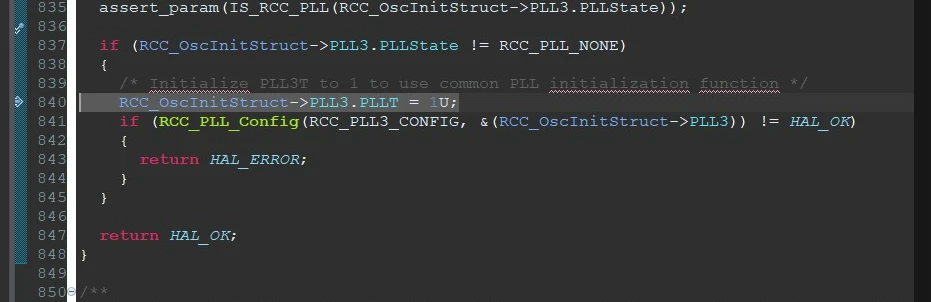
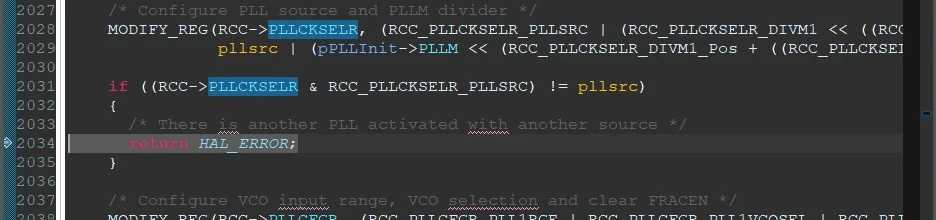
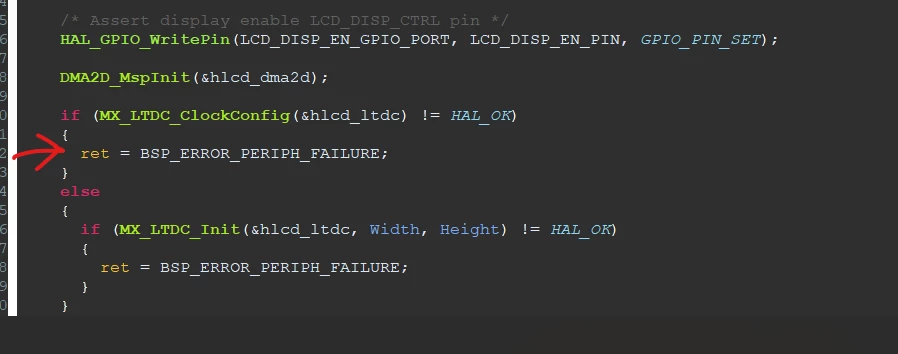
I tried the bsp example among the examples of the stm32 h7s78-dk board. I integrated it into my own code. My aim is to use the LCD screen and broadcast the camera output on it. In the first stage, I try to print any text on the screen. The BSP example code works but cannot be debugged. I also get an error about pll3 when trying to initialize lc in my own code. I have shared the reasons for the error step by step in the pictures while debugging.

hamzatamer_0-1733824321085.pnghamzatamer_1-1733824397807.png


hamzatamer_4-1733824441527.png

hamzatamer_5-1733824451590.png


This topic has been closed for replies.
Best answer by hamzatamer

here is to solution, if you want to run examples first you have to configure debug and startup settings. if you use stm32h7s78-dk or similar card you should keep in mind that it is a card with an external loader. First, add external loader in debug settings, after that, If you do not have a boot project, add the BOOT_XIP.hex file to the startup under the binary folder in the Templates folder and move the following line, i.e. move down also uncheck load symbols

3 replies

Andrew Neil
Super User
December 10, 2024

Please see the Posting Tips for how to properly post source code - not as images:

https://community.st.com/t5/community-guidelines/how-to-write-your-question-to-maximize-your-chances-to-find-a/ta-p/575228 


@hamzatamer wrote:

The BSP example code works but cannot be debugged.


What do you mean by that?


A complex system that works is invariably found to have evolved from a simple system that worked.A complex system designed from scratch never works and cannot be patched up to make it work.
Associate II
December 10, 2024

some stm32h7s78-dk's examples are not working, for example BSP,LTDC_Display_2Layers,LTDC_ColorKeying. Error is in common.

if ((RCC->PLLCKSELR & RCC_PLLCKSELR_PLLSRC) != pllsrc)
{
/* There is another PLL activated with another source */
return HAL_ERROR;
}


this area returns HAL_ERROR i dont know why it is example code. I don't change anything. I open the code from the examples section and debug it. and it gets stuck at the HSI section. I get this error on samples that include LCD screens

 RCC_OscInitStruct.OscillatorType = RCC_OSCILLATORTYPE_HSI;
 RCC_OscInitStruct.HSIState = RCC_HSI_ON;
 RCC_OscInitStruct.PLL1.PLLState = RCC_PLL_NONE;
 RCC_OscInitStruct.PLL2.PLLState = RCC_PLL_NONE;
 RCC_OscInitStruct.PLL3.PLLState = RCC_PLL_ON;
 RCC_OscInitStruct.PLL3.PLLSource = RCC_PLLSOURCE_HSI;

 RCC_OscInitStruct.PLL3.PLLM = 4;
 RCC_OscInitStruct.PLL3.PLLN = 25;
 RCC_OscInitStruct.PLL3.PLLP = 2;
 RCC_OscInitStruct.PLL3.PLLQ = 20;
 RCC_OscInitStruct.PLL3.PLLR = 16;
 RCC_OscInitStruct.PLL3.PLLS = 2;
 RCC_OscInitStruct.PLL3.PLLT = 2;
 RCC_OscInitStruct.PLL3.PLLFractional = 0;

 if (HAL_RCC_OscConfig(&RCC_OscInitStruct) != HAL_OK)
 {
 /* Initialization error */
 while(1);
 }
 PeriphClkInit.PeriphClockSelection = RCC_PERIPHCLK_LTDC;
 PeriphClkInit.LtdcClockSelection = RCC_LTDCCLKSOURCE_PLL3R;


hamzatamerAuthorBest answer
Associate II
December 11, 2024

here is to solution, if you want to run examples first you have to configure debug and startup settings. if you use stm32h7s78-dk or similar card you should keep in mind that it is a card with an external loader. First, add external loader in debug settings, after that, If you do not have a boot project, add the BOOT_XIP.hex file to the startup under the binary folder in the Templates folder and move the following line, i.e. move down also uncheck load symbols