E-John
Associate III
June 24, 2021
Solved

STM32F070X6 nBoot_SW?

  • June 24, 2021
  • 1 reply
  • 2513 views

In AN2606 Application note "STM32 microcontroller system memory boot mode" on page 53, it describes that

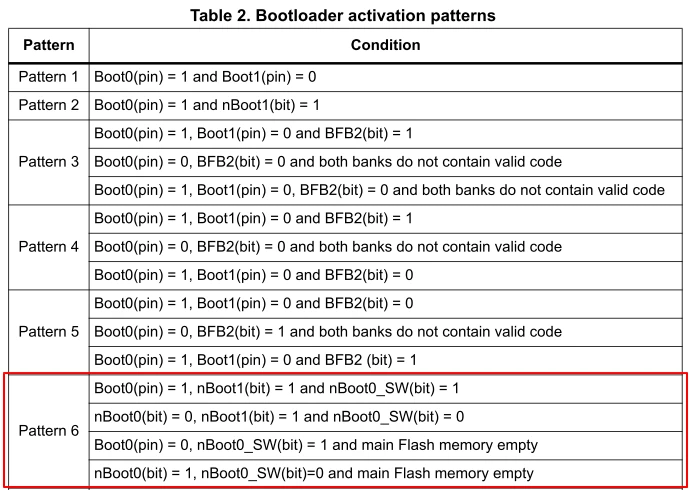
The STM32F070x6 bootloader is activated by applying Pattern 6 (described in Table 2: 

Bootloader activation patterns). Table 17 shows the hardware resources used by this 

bootloader.

and on Page 24, Bootloader activation patterns, where can I find nBoot0_SW and how to set it?

Thanks and best regards,

E-John​

0693W00000BbsNCQAZ.png

This topic has been closed for replies.
Best answer by TDK

Your chip doesn't have an nBoot0_SW bit. You cannot set it because it doesn't exist. Pattern 6 is not a relevant bootloader pattern for your chip.

On chips that have it, nBoot0_SW (aka BOOT_SEL) is within the option bytes and settable just like nBOOT1. The STM32F042 has this bit.

1 reply

TDK
June 24, 2021

nBOOTx are option bytes and can be set using STM32CubeProgrammer or in your code, if they exist on your chip.

Look at the reference manual for your MCU. Only the nBOOT1 option byte exists, so you will also need the BOOT0 pin high to activate the bootloader.

0693W00000BbvF1QAJ.png

"If you feel a post has answered your question, please click ""Accept as Solution""."
E-John
E-JohnAuthor
Associate III
June 25, 2021

Boot0(pin) = 1, it means that to set the pin Boot0 to VDD, it is no problem.

nBoot1(bit) = 1, it means that to set the bit20(nBOOT1) to value b'1 in register "User and read protection option byte" either by STM32CubeProgrammer or our code, it is no problem.

nBoot0_SW(bit) = 1, I don't quite understand, what is it and how to set it?

TDK
TDKBest answer
June 25, 2021

Your chip doesn't have an nBoot0_SW bit. You cannot set it because it doesn't exist. Pattern 6 is not a relevant bootloader pattern for your chip.

On chips that have it, nBoot0_SW (aka BOOT_SEL) is within the option bytes and settable just like nBOOT1. The STM32F042 has this bit.

"If you feel a post has answered your question, please click ""Accept as Solution""."