
Associate III
May 6, 2024
Question

Connect B-U585I-IOT2A to Azure IoT cloud

  • May 6, 2024
  • 13 replies
  • 8166 views

Hi Tech Support Team,

I would like to connect the B-U585I-IOT2A board to Azure IoT cloud using STM32CUBE IDE.

I am confusing on the setup steps.

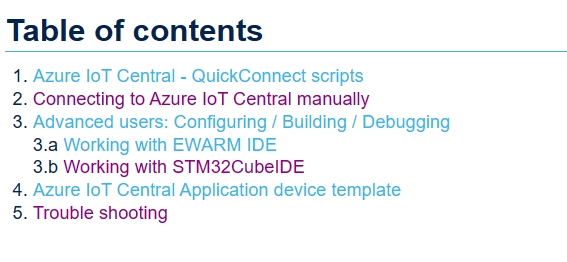
Should I go through the steps 1 and 2 then follow steps 3.b?

Or just start with steps 3.b? 
bay_0-1714974852528.png

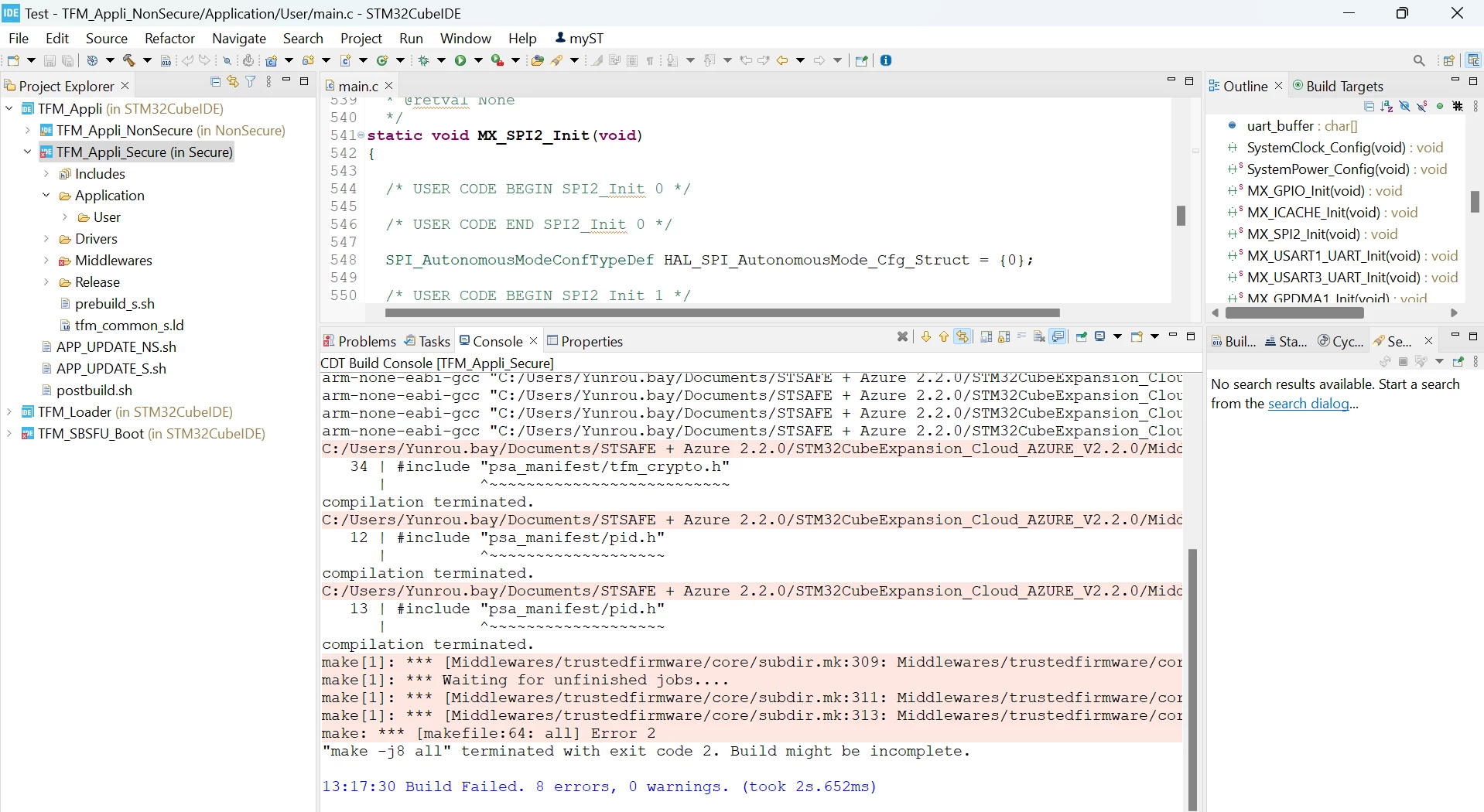
And also, when build the TFM_Appli_Secure project it come out error, there is no pid.h file under psa_manifest folder.
bay_1-1714975031177.png


Please help. Thanks.


This topic has been closed for replies.

13 replies

STTwo-32
ST Technical Moderator
May 6, 2024

Hello @bay 

I suggest you take a look at user manual and follow all steps that help you configuring your application.

For the TFM_Appli_Secure project, I've been able to reproduce that issue and I've reported internally for correction as soon as possible (under internal ticket number 180694).

Best Regards.

STTwo-32

To give better visibility on the answered topics, please click on Accept as Solution on the reply which solved your issue or answered your question.
bayAuthor
Associate III
May 6, 2024

Is it this is the reference manual you are referring to?

um2839-discovery-kit-for-iot-node-with-stm32u5-series-stmicroelectronics.pdf

This reference manual does not mention on the setup steps to Azure IoT. Any other documents that I can refer to?

Can you give an estimated time when I can get the working source code?

ST Technical Moderator
May 6, 2024

Hi @bay 

Can you double check if the paths of files exist and be sure that paths are correct in you STM32CubeIDE project ?

You can update or add non-existing paths as follows: 

- go to project properties

- go to C/C++ Build -> Settings -> MCU GCC Compiler -> Include paths


Then correct the paths if paths were wrong !!

If any path is not available, you can add it by clicking on (+) at the top right of include paths windows. 

Another suggestions, if all exists and not working, try to avoid any special character like + that I can see in your path.

Try also to avoid very long paths or spaces ....

Below a screenshot showing where to add, verify, remove or correct the paths using cubeIDE. the mouse is on the add button in the screen shoot:

CMYL_0-1714992431952.png


best regards 

bayAuthor
Associate III
May 7, 2024

Hi CMYL,

I have re-extract the folder into shorter path and remove the special character.

And before and after I added the path, can build the project successfully but with 470 warnings and the TFM_SBSFU_Boot project getting errors.

bay_1-1715045728873.png


bay_0-1715045599187.png

bay_2-1715050754116.png


ST Technical Moderator
May 7, 2024

Hi @bay 


The snapshots contain the warnings,  what is the error messages ?


bayAuthor
Associate III
May 8, 2024

bay_0-1715130911306.png


ST Technical Moderator
June 19, 2024

Hi @bay 

There is no information in this snapshot that can help to understand the errors.

Can you start from the beginning of the console and copy the full messages ?


Best Regards

Visitor II
December 3, 2024

Was there a resolution to this issue, I am having the same symptoms with the STM32CubeExpansion_Cloud_AZURE_V2.3.0 project.

I have added Application/User/syscalls.c to each project in the TFM_Appli project to eliminate the _close() and other syscall.c warnings. Now I have one warning that I cannot resolve:

"C:/ST/STM32CubeIDE_1.15.1/STM32CubeIDE/plugins/com.st.stm32cube.ide.mcu.externaltools.gnu-tools-for-stm32.12.3.rel1.win32_1.0.200.202406191623/tools/bin/../lib/gcc/arm-none-eabi/12.3.1/../../../../arm-none-eabi/bin/ld.exe: warning: TFM_SBSFU_Boot.elf has a LOAD segment with RWX permissions"

I don't think this warning is causing my linker to error out, I have turned on all the verbose flags but still don't see an error.  Attached is the full output.  

The project is on the root of its own drive so path issues mentioned before should not be a problem.

Any help or information would be 


Visitor II
December 3, 2024

To resolve the linker warning which does stop the link process in the TFM_SBSFU_Boot project was to add (READONLY) callout to various > FLASH sections in the stm32u5xx_s.ld file:

.ARM.extab : ALIGN(4)

changed to

.ARM.extab (READONLY) : ALIGN(4) /* The READONLY keyword is only supported in GCC11 and later, remove it if using GCC10 or earlier. */


The following sections also need to be changed:

.ARM.exidx (READONLY) : /* The READONLY keyword is only supported in GCC11 and later, remove it if using GCC10 or earlier. */

.zero.table (READONLY) : /* The READONLY keyword is only supported in GCC11 and later, remove it if using GCC10 or earlier. */

.copy.table (READONLY) : /* The READONLY keyword is only supported in GCC11 and later, remove it if using GCC10 or earlier. */


They should be changed to prevent the warning in all the project's .ld files

but in the other projects, the linker does not stop.

I hope this helps someone else find this issue faster than I did.
