

lre.1
Associate
April 11, 2024
Solved

STM32F4 DISC Usb not recognized

  • April 11, 2024
  • 4 replies
  • 2332 views

I have STM32F4 DISC board and I worked with it several weeks. It was working correctly but today when I was set a SPI connection with other stm32f030 mcu, I plug-in and plug-out usb cable and I got "USB device not recognized" error message.

I didn't change anything. 

When I was plug-in, power led on board lighting dimly. Is this a sign for corruption of card??
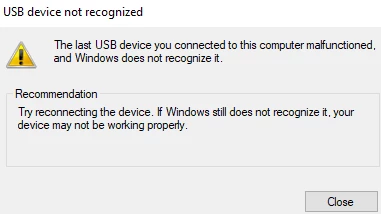
lre1_0-1712874838524.png

stm32cude ide can not detect stm32 disc board.
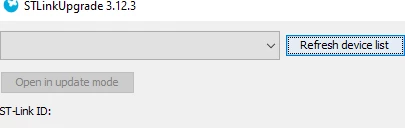
lre1_2-1712875047684.png

Thanks for any help


This topic has been closed for replies.
Best answer by lre.1

Hello again.

I connected external power (5V and GND) to on board pins and board started working correctly.

If I disconnect external GND cable from board and only 5V cable connected on board. Card continued working correctly :flushed_face: . It was interesting

Which component corrupted on board? Any suggestion?

######## edit ########

I found fault on D1 (BAT60JFILM) diode, if I short circuit it board can working.


4 replies

Karl Yamashita
Principal
April 11, 2024

Have you tried restarting your computer and/or docking station? Every once in while I get similar warnings and after power cycling my docking station, the USB ports start working again. 

If a reply has proven helpful, click on Accept as Solution so that it'll show at top of the post.CAN Jammer an open source CAN bus hacking toolCANableV3 Open Source
lre.1
lre.1Author
Associate
April 11, 2024

I restart computer and also uninstall and install driver st-link v2 but. doesn't change anything.

Power Led and LD8 led always on. 

I found something : "LD8 (red LED) indicates an over-current from connected device", is this related my issue ?

Pavel A.
April 11, 2024

I didn't change anything. 

It just happens to things. Suppose you have a hard drive full of valuable data. All is good, then suddenly you hear a subtle click click and it is dead. 


lre.1
lre.1AuthorBest answer
Associate
April 12, 2024

Hello again.

I connected external power (5V and GND) to on board pins and board started working correctly.

If I disconnect external GND cable from board and only 5V cable connected on board. Card continued working correctly :flushed_face: . It was interesting

Which component corrupted on board? Any suggestion?

######## edit ########

I found fault on D1 (BAT60JFILM) diode, if I short circuit it board can working.
