


gadzhi
Associate
Dec 5, 2020 6:49 AM UTC
Question

CubeIDE does not see ST-Link Server

Hello. I don't know exactly what the IDE needs, but it doesn't seem to see the St link server, but at the same time says that it is installed. When you press the Debug or Run button, a window appears with the inscription "ST-Link Server is required to launch the debug session. Please download in on www.st.com".0693W000006Ej45QAC.pngI tried versions 1.5, 1.4 and as far as I remember 1.1. I wanted to try other versions, but the download was constantly interrupted. Is it just me or everyone? It looks like the site needs mirrors.
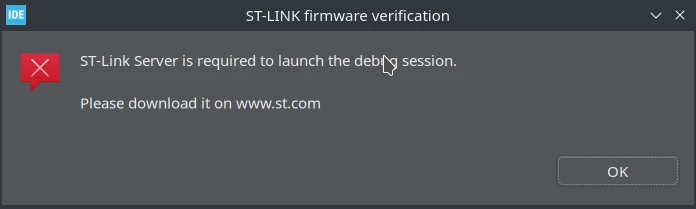
Separately downloaded St-link-server 2.0.2. At the time of installation, the answer was

"sudo ./st-stlink-server.2.0.2-1-linux-amd64.install.sh 

[sudo] пароль дл�? gadzhi:   

Creating directory makeself_dir_o9t3i4

Verifying archive integrity... All good.

Uncompressing STM STLink-Server installer 100%  

STMicroelectronics Software License Agreement

<License...>

License accepted.

stlink-server v2.0.2 (2020-10-13-14:11) installation started.

Already installed version is newer or equal: �?трока 64:

NOT downgrading. Aborting stlink-server installation.

Error installing stlink-server".

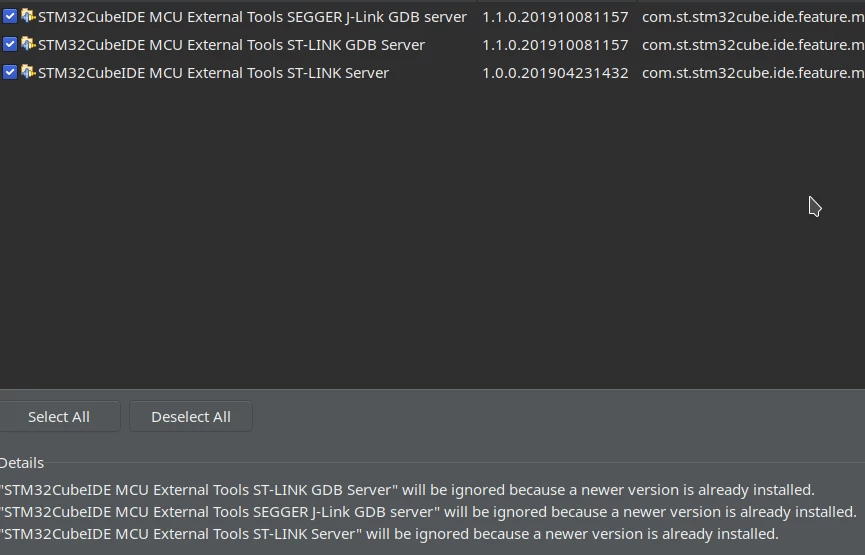
I also tried to install the server through Help> Install New Software ... Answer:

"Cannot complete the request. See the error log for details.

"STM32CubeIDE MCU External Tools ST-LINK GDB Server" will be ignored because a newer version is already installed. 

"STM32CubeIDE MCU External Tools SEGGER J-Link GDB server" will be ignored because a newer version is already installed. 

"STM32CubeIDE MCU External Tools ST-LINK Server" will be ignored because a newer version is already installed."0693W000006Ej4AQAS.pngMy main system is Manjaro Linux (system updated). Everything works well on Windows 10. I tried to program two boards and there were no problems.
I am newbie, don't kick me hard and please explain in detail.

I am looking for a solution in 4 or 5 days. I was looking for two of them incorrectly - why the IDE does not see stlink, but it turned out that it does not see not stlink, but stlink server.

I searched a lot and everywhere, asked in many Telegram chat channels. I came here last, because I prefer to look for the answer myself and because I don't know English and this is Google Translator. Therefore, I'm sorry if you don't understand something in this text.

This topic has been closed for replies.

17 replies

maharramov
Associate
Jan 8, 2021 12:45 PM UTC

Hi Gadzi! I also just encountered the same problem on Windows 10. Very strange that it suddenly stopped working. Being a newbie unfortunately I cannot help either. But I am trying now to see what potentially could go wrong.

SSerj.1
Visitor II
Jan 9, 2021 6:05 PM UTC

Hi i was helped by installing en.st-link-server and additional packages in linux:

sudo apt-get install libncurses5 libgpm2:i386 libncurses5:i386

and select sudo usermod -a -G dialout user_name, then reboot the system, after that everything is determined

(mxlinux distribution)

gadzhi
gadzhiAuthor
Associate
Jan 13, 2021 4:28 PM UTC

I installed the same versions of packages that you specified, and also gave permission to the user, but nothing has changed.

This is the default debugger configuration

0693W000007B9MVQA0.png0693W000007B9MLQA0.png0693W000007B9M1QAK.png0693W000007B9LwQAK.png

SSerj.1
Visitor II
Jan 14, 2021 4:28 PM UTC

..

Hz.1
Visitor II
Jan 12, 2021 3:09 AM UTC

Hi

I met the same problem on Ubuntu 20.04, CubeIde 1.5.1​

tried to install st-link server from st.com website or `install new software` in CubeIde, do not work

tried SSerj.1's method, do not work

need help plz!

KCamp.1651
Visitor II
Jan 15, 2021 10:17 PM UTC

The following solved the problem for me (Windows 10, CubeIde 1.5.1):

  1. Download stlink-server 2.0.2-1 from the ST website
  2. Close all instances of CubeIDE
  3. Rename "C:\Program Files (x86)\STMicroelectronics\stlink_server" e.g. to old_stlink_server
  4. Run the stlink-server installer, st-stlink-server.2.0.2-1.msi
gadzhi
gadzhiAuthor
Associate
Jan 16, 2021 3:56 PM UTC

In windows 10 everything works for me. What's the path of stlink-server in linux?

Hz.1
Visitor II
Jan 21, 2021 11:43 AM UTC

have the same question.

did not find a way to uninstall stlink-server on linux.

did not find any thing like `st link server` from `apt` command or from CubeIde.

but tell me already installed new version when I tried to install.

Amily.1
Visitor II
Feb 24, 2021 12:14 PM UTC

Проблему решил на Ubuntu 20.04:

1) Удалил STM32CubeIDE

2) У�?тановил ST-Link Server

3) Заново у�?тановил STM32CubeIDE (ver 1.4.0)

Cc.3
Visitor II
Mar 4, 2021 5:39 PM UTC

2 ways:

  1. download stlink-server file from ST.com, extract, get stlink-server.2.0.2-1 excutable file. move it to /usr/bin, and rename to stlink-server.
  2. use openOCD instead.
    1. ) install openOCD.
    2. )stm32cubeide--run--externaltools--externaltools configuration (or you can excute openocd in terminal:#openocd -f /usr/share/openocd/scripts/interface/stlink-v2.cfg -f /usr/share/openocd/scripts/target/stm32f1x.cfg)0693W000008w4WYQAY.png
    3. dubug configuration, use GDB Hardware Debugging, not STM32 Cortex-M C/C++ Application. GDB command=arm-none-eabi-gdb. JTAG device=ST-LINK(openOCD).0693W000008w4XHQAY.png
Visitor II
Oct 8, 2024 2:50 AM UTC

Hi I'm having the same problem on my MacBook 

I've already downloaded the latest file but it doesn't work..

((((The following solved the problem for me (Windows 10, CubeIde 1.5.1):

  1. Download stlink-server 2.0.2-1 from the ST website
  2. Close all instances of CubeIDE
  3. Rename "C:\Program Files (x86)\STMicroelectronics\stlink_server" e.g. to old_stlink_server
  4. Run the stlink-server installer, st-stlink-server.2.0.2-1.msi)))

I don't know how to solve this problem. The solution that you told me above can only be solved in Windows.

Could you give me a hand?

OOnya.1
Visitor II
Feb 18, 2022 11:03 AM UTC

Hi, I had the same problem with Windows 10. I was using IDE version 1.8.0. Here is how I solved it.

  1. I downloaded the ST-LINK server software module (version 2.0.2) from st.com.
  2. I closed all open windows of the CubeIDE
  3. I unzipped and installed the server-link
  4. I reoppened my project and run it again
RPraj.6
Visitor II
Apr 25, 2023 4:53 PM UTC

Hi,

i am facing the same problem but after installation st link server the problem solved.