cancel
Showing results for 
Search instead for 
Did you mean: 

Code is running well on STM32H755ZIQ board but not on a custom board

kavyamm
Associate III

Post moved from this thread.

@ STTwo-32

I am using the same STM32H755ZIQ board and facing the same issue where the target is not detected by ST-Link after uploading the program.
This is the code link: https://github.com/kavyammengineer/stm32debug/tree/main/led_on_off
The code works correctly on the Nucleo-H755ZIQ board, but when I upload it to my customized board, the target gets stuck and is no longer detected by ST-Link.
kavyamm_0-1770191263693.png
kavyamm_1-1770197296232.png
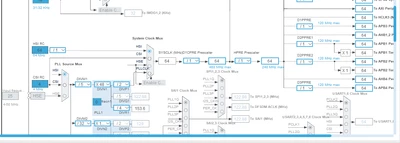
this is my sysclk 64Mhz 

1 ACCEPTED SOLUTION

Accepted Solutions

Hello,

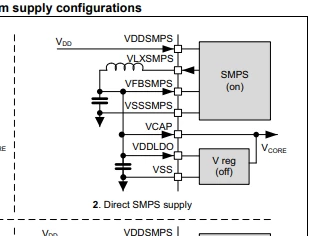
Your project is configured in SMPS:

mALLEm_1-1770365696050.png

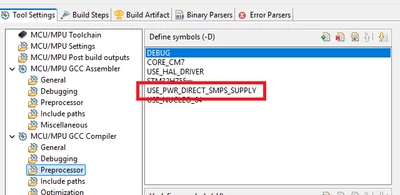
The definition is in your IDE project is well set to Direct SMPS:

mALLEm_2-1770365909611.png

Most probably your issue is in your hardware. Need to ensure first your board is hardwired in Direct SMPS.

To give better visibility on the answered topics, please click on "Accept as Solution" on the reply which solved your issue or answered your question.

View solution in original post

8 REPLIES 8
mƎALLEm
ST Employee

Hello,


@kavyamm wrote:

Post moved from this thread.

The code works correctly on the Nucleo-H755ZIQ board, but when I upload it to my customized board, the target gets stuck and is no longer detected by ST-Link.


Need to ensure you have the same hardware configuration as of Nucleo-H755ZIQ on your custom board. So the first question comes here: what is the power configuration you have on your custom board? Direct SMPS? LDO? 

Nucleo-H755ZIQ board is Direct SMPS configuration by default. So if your board is not in direct SMPS by hardware, you've locked your MCU and you need to unlock it.

Please read: How can I recover my STM32H7/STM32H7RS board after facing a power configuration deadlock?

To give better visibility on the answered topics, please click on "Accept as Solution" on the reply which solved your issue or answered your question.
kavyamm
Associate III

@mƎALLEm 
I am using a direct SMPS power supply on the custom board. I have a doubt — is there any chance that the startup code is different between the custom board and the development board?NO RIGHT
 If you have time, could you please take a quick look at the code once of the CM7 core ?

@mƎALLEm 
Is there any condition that requires using a 400 Hz clock when using a direct SMPS supply? Or is it okay to use the internal HSE clock?

Hello,

Your project is configured in SMPS:

mALLEm_1-1770365696050.png

The definition is in your IDE project is well set to Direct SMPS:

mALLEm_2-1770365909611.png

Most probably your issue is in your hardware. Need to ensure first your board is hardwired in Direct SMPS.

To give better visibility on the answered topics, please click on "Accept as Solution" on the reply which solved your issue or answered your question.

@kavyamm wrote:

@mƎALLEm 
Is there any condition that requires using a 400 Hz clock when using a direct SMPS supply? Or is it okay to use the internal HSE clock?


You can go up to 400MHz with SMPS configuration, no more.. using PLL and HSI.

To give better visibility on the answered topics, please click on "Accept as Solution" on the reply which solved your issue or answered your question.

Sorry, I asked the question incorrectly. Is it okay to use the internal HSI clock?

Yes you can use HSI with or without PLL i.e. System clock = 64MHz .

To give better visibility on the answered topics, please click on "Accept as Solution" on the reply which solved your issue or answered your question.
Pavani
Associate II

Hi,

As an initial step, I would recommend creating a fresh project in STM32CubeIDE and implementing a very simple application, such as toggling an LED.

If this basic code is flashed successfully on the custom board without any ST-Link target detection errors, it would help confirm that there is no fundamental issue in the Hardware of the STM32H755ZIQ board.

One possible cause of the issue could be a difference in the linker script configuration. I suggest comparing the linker scripts used for the evaluation (Nucleo) board and the custom board. If there are differences, especially in the memory definitions, it could lead to target detection or execution issues.

Please verify that the FLASH and RAM memory regions (FLASH.ld and RAM.ld entries) are correctly defined according to the custom board’s memory layout and update them if required.

Best regards,
Pavani