
cancel
Showing results for 
Search instead for 
Did you mean: 

STM32N6 NUCLEO - Infinite loop issue in LL_ATON_RT_RunEpochBlock() during NPU inference

Student_0726
Associate II

Hello,

I am currently experiencing difficulties using the STM32N6 NUCLEO board.

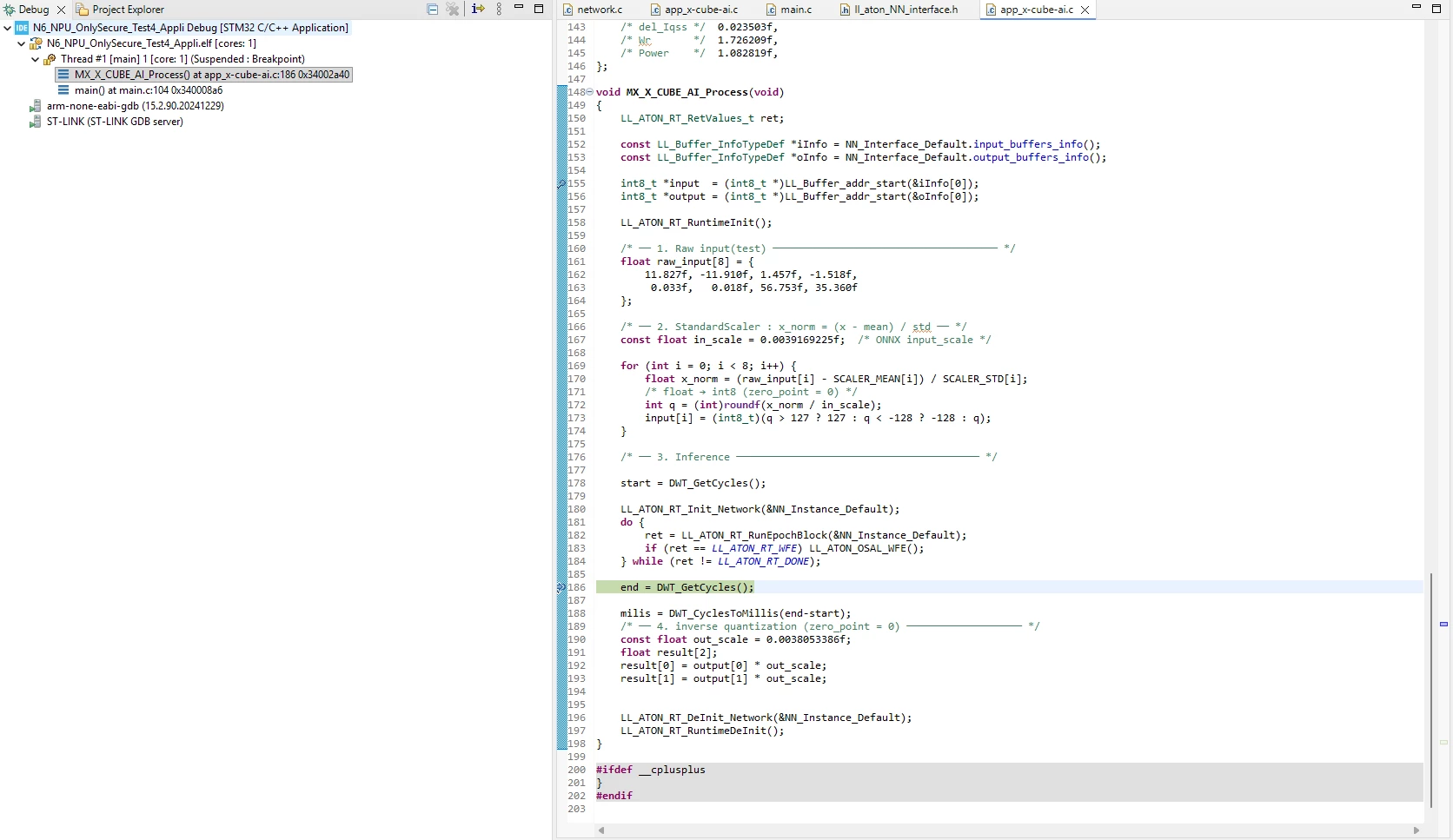
My goal is to test NPU execution using X-CUBE-AI within CubeMX. However, I am stuck in an infinite loop inside the MX_X_CUBE_AI_Process function. Specifically, LL_ATON_RT_RunEpochBlock() continuously returns only the LL_ATON_RT_DONE status, preventing the loop from terminating as expected.


do {

ret = LL_ATON_RT_RunEpochBlock(&NN_Instance_Default);

if (ret == LL_ATON_RT_WFE) LL_ATON_OSAL_WFE();

} while (ret != LL_ATON_RT_DONE);


I Can't get the LL_ATON_RT_DONE, only LL_ATON_RT_WFE.

This issue persists even when using files generated via Cube AI Studio.

I have configured the AXI and Clock settings in CubeMX (CPU: 600MHz, NPU: 800MHz, AXI: 800MHz). Since the model is simple, I am using internal memory only and have not enabled any security (TrustZone) or external memory settings.

Environment Versions:

  • CubeIDE: 2.1.1

  • CubeMX: 6.16.1

  • CubeAI Studio: 1.1.0

  • CubeProgrammer: 2.22.0

  • ST Edge AI: 4.0

  • ST-LINK: V3J17M10

I have attached one of the project files I’ve been testing. It would be a huge help if you could guide me to a solution for this issue.
 
1 ACCEPTED SOLUTION

Accepted Solutions
hamitiya
ST Employee

Hello @Student_0726,

I don't have any issue doing so with the debugger, with STM32N6570-DK and NUCLEO-N657X0-Q.

image.png


On your side, are you working through the debugger or through loading scripts?

Is your board having correct power supply ? You should have the a green color in led LD4. If it is orange, it means the power is not sufficient.


Best regards,

Yanis


In order to give better visibility on the answered topics, please click on 'Accept as Solution' on the reply which solved your issue or answered your question.

View solution in original post

4 REPLIES 4
hamitiya
ST Employee

Hello @Student_0726,

I don't have any issue doing so with the debugger, with STM32N6570-DK and NUCLEO-N657X0-Q.

image.png


On your side, are you working through the debugger or through loading scripts?

Is your board having correct power supply ? You should have the a green color in led LD4. If it is orange, it means the power is not sufficient.


Best regards,

Yanis


In order to give better visibility on the answered topics, please click on 'Accept as Solution' on the reply which solved your issue or answered your question.
Student_0726
Associate II

@hamitiya Thank you for the reply.

I checked your feedback and tried running it again—now it passes through correctly!

I was testing in the CubeIDE debug environment, and the LD4 green LED was on as expected.


Honestly, I’m not sure why it’s working now, as I haven't changed any code and the USB connection wasn't unstable before. It’s a bit mysterious why it was consistently failing earlier but works fine now.


I feel a bit bad for taking up your time with this, but I'm just glad it's resolved! Now I can move forward with my experiments with a much lighter heart. Thank you again!

Hello @Student_0726 

No problem! Glad it helped!

Feel free to ask again if you have any questions :)


Best regards,

Yanis


In order to give better visibility on the answered topics, please click on 'Accept as Solution' on the reply which solved your issue or answered your question.
Student_0726
Associate II

I’ve discovered a new issue with the test code I posted in my previous question.

To verify the NPU operation, I modified the input values and checked for corresponding changes in the output. However, I noticed that the output values remain unchanged regardless of the input.

I would like to know if I have misconfigured the AI Process structure or if there is an error elsewhere in my setup.

I feel like I'm missing something small, yet I'm still stuck. It’s a bit frustrating.