

Associate
January 27, 2026
Question

Using STM32CubeProgrammer on Windows Server with USB redirection

  • January 27, 2026
  • 6 replies
  • 550 views

Hello,

I'm trying to use STM32CubeProgrammer with STLink Debug Interface on remote Windows Serveur via RDP.

I installed the driver, the device is detected via USB Redirection
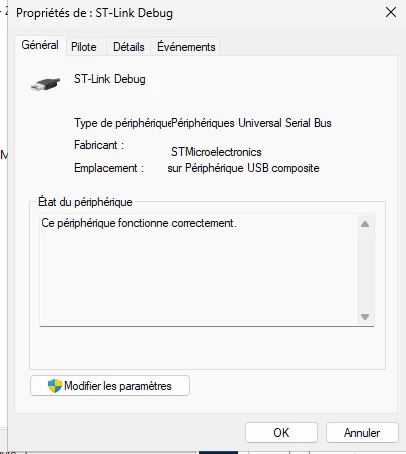
lchan31_0-1769521908271.png

but STM32CubeProgrammer doesnt detect the interface:
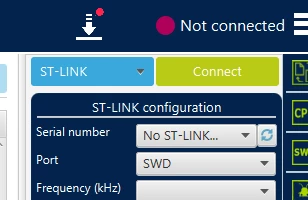
lchan31_1-1769521963386.png

If I directly plug the device on a physical port, it works well.


Do someone successfully set up such a configuration ? Is there any special detection on the app ? It would avoid us to install about 60 windows on our clients!

Thanks :)


6 replies

Pavel A.
January 27, 2026

Could you share more details on the USB redirection method?

Does the server machine support RemoteFX redirection of  USB devices? (In Group policy: Remote Desktop Session Host → Device and Resource Redirection → Allow RDP redirection of other supported RemoteFX USB devices) ?


lchan31Author
Associate
January 28, 2026

Hello,

Thanks for your reply, here are the infos

Server side: Windows Server 2025 + RDSH role

    Computer Configuration > Policies > Administrative Templates > Windows Components > Remote Desktop Services > Remote Desktop Session Host > Device and Resource Redirection => Do not allow supported Plug and Play device redirection  => Disabled

On the client side:

   - test with Windows 11:

            Computer Configuration > Administrative Templates > Windows Components > Remote Desktop Services >
Remote Desktop Connection Client > RemoteFX USB Device Redirection
"Allow RDP redirection of other supported RemoteFX USB devices from this computer" => Enabled for User and Admins (I think it is a client setting not a server setting)

  - test with freerdp: /usb:auto


With 2 clients St-Link Debug Interface is visible on RDP session


Louis


lchan31Author
Associate
January 28, 2026

lchan31_0-1769602143168.png


Pavel A.
January 28, 2026

I don't currently have access to a RD server, but the Copilot says what to check on Client and Server sides:

On the client (Windows 11):

  • Use the full Remote Desktop Connection app (mstsc.exe)
  • In Local Resources → More…, check Other supported RemoteFX USB devices
    (or equivalent depending on Windows version)

On the server (Windows Server):

Enable via Group Policy:
Computer Configuration →
    Administrative Templates →
         Windows Components →
              Remote Desktop Services →
                    Remote Desktop Session Host →
                          Device and Resource Redirection →
                               Allow RDP redirection of other supported RemoteFX USB devices


Regarding freerdp:  do you use that instead of the mstsc?

In any case (mstsc or other client) would like to see the Details view of ST-LINK in device manager: Device instance path, Device stack... ?

( Unfortunately there is no quick way to see if the forwarded ST-LINK device has the required device interface property.)


lchan31Author
Associate
January 28, 2026

On the client (Windows 11):

  • Use the full Remote Desktop Connection app (mstsc.exe)
  • In Local Resources → More…, check Other supported RemoteFX USB devices
    (or equivalent depending on Windows version)

=> Yes I activated the device on client that's why it's redirected on the server

lchan31_0-1769610507582.png

Allow RDP redirection of other supported RemoteFX USB devices

=> Yes it's activated too, otherwise the device is not redirected

Regarding freerdp:  do you use that instead of the mstsc?

=> I tried 2 cases:

  - mstsc on Windows 11 client
  - freerdp on Linux + X11


Some details for ST-Link Debug device (sorry it's in french) as seen on the RDSH host

lchan31_6-1769611264104.png


lchan31_7-1769611314738.png


lchan31Author
Associate
January 28, 2026
KeyName Data
------- ----
{3464F7A4-2444-40B1-980A-E0903CB6D912} 10 3
{80497100-8C73-48B9-AAD9-CE387E19C56E} 6 0
{83DA6326-97A6-4088-9453-A1923F573B29} 10 ...2dcee32&0&tsusb-session7-3735928569&1&43b4c4ca-779c-4480-a60c-4c98dc6c1a85
{83DA6326-97A6-4088-9453-A1923F573B29} 15 True
{83DA6326-97A6-4088-9453-A1923F573B29} 3 oem16.inf:c14ce8840c48fa1f:USB_Install:2.2.0.0:USB\VID_0483&PID_374B&MI_00
{A8B865DD-2E3D-4094-AD97-E593A70C75D6} 16 {winusb.inf}
{A8B865DD-2E3D-4094-AD97-E593A70C75D6} 26 False
DEVPKEY_Device_BaseContainerId {BCACF260-E606-5703-AA12-F57AB854E792}
DEVPKEY_Device_BusNumber 0
DEVPKEY_Device_BusReportedDeviceDesc ST-Link Debug
DEVPKEY_Device_BusTypeGuid {9D7DEBBC-C85D-11D1-9EB4-006008C3A19A}
DEVPKEY_Device_Capabilities 130
DEVPKEY_Device_Class USBDevice
DEVPKEY_Device_ClassGuid {88BAE032-5A81-49F0-BC3D-A4FF138216D6}
DEVPKEY_Device_CompatibleIds ...ass_ff, USB\COMPAT_VID_0483&Class_ff, USB\Class_ff&SubClass_ff&Prot_ff...}
DEVPKEY_Device_ConfigFlags 0
DEVPKEY_Device_ConfigurationId oem16.inf:USB\VID_0483&PID_374B&MI_00,USB_Install
DEVPKEY_Device_ContainerId {BCACF260-E606-5703-AA12-F57AB854E792}
DEVPKEY_Device_DeviceDesc STMicroelectronics STLink dongle
DEVPKEY_Device_DevNodeStatus 25174026
DEVPKEY_Device_Driver {88bae032-5a81-49f0-bc3d-a4ff138216d6}\0000
DEVPKEY_Device_DriverDate 01/04/2021 02:00:00
DEVPKEY_Device_DriverDesc STMicroelectronics STLink dongle
DEVPKEY_Device_DriverInfPath oem16.inf
DEVPKEY_Device_DriverInfSection USB_Install
DEVPKEY_Device_DriverProvider STMicroelectronics
DEVPKEY_Device_DriverRank 16711681
DEVPKEY_Device_DriverVersion 2.2.0.0
DEVPKEY_Device_EnumeratorName USB
DEVPKEY_Device_FirstInstallDate 28/01/2026 15:29:44
DEVPKEY_Device_FriendlyName ST-Link Debug
DEVPKEY_Device_HardwareIds {USB\VID_0483&PID_374B&REV_0100&MI_00, USB\VID_0483&PID_374B&MI_00}
DEVPKEY_Device_HasProblem False
DEVPKEY_Device_InLocalMachineContainer False
DEVPKEY_Device_InstallDate 28/01/2026 15:29:44
DEVPKEY_Device_InstallState 0
DEVPKEY_Device_InstanceId USB\VID_0483&PID_374B&REV_0100&MI_00\4&3910C851&0&0000
DEVPKEY_Device_IsPresent True
DEVPKEY_Device_IsRebootRequired False
DEVPKEY_Device_LastArrivalDate 28/01/2026 15:29:44
DEVPKEY_Device_LegacyBusType 15
DEVPKEY_Device_Manufacturer STMicroelectronics
DEVPKEY_Device_MatchingDeviceId USB\VID_0483&PID_374B&MI_00
DEVPKEY_Device_Parent ...2dcee32&0&tsusb-session7-3735928569&1&43b4c4ca-779c-4480-a60c-4c98dc6c1a85
DEVPKEY_Device_PDOName \Device\000000f6
DEVPKEY_Device_PowerData {56, 0, 0, 0...}
DEVPKEY_Device_ProblemCode 0
DEVPKEY_Device_RemovalPolicy 3
DEVPKEY_Device_RemovalPolicyDefault 3
DEVPKEY_Device_ReportedDeviceIdsHash 1655816723
DEVPKEY_Device_SafeRemovalRequired False
DEVPKEY_Device_Service WinUSB
DEVPKEY_Device_SessionId 7
DEVPKEY_Device_Siblings ...4&3910c851&0&0001, USB\VID_0483&PID_374B&REV_0100&MI_02\4&3910c851&0&0002}
DEVPKEY_Device_Stack {\Driver\WINUSB, \Driver\usbccgp}
DEVPKEY_NAME ST-Link Debug