
Visitor
September 22, 2026
Question

STM32F401CCU6 Black Pill – ST-LINK V2 Clone Unable to Get Core ID / No STM32 Target Found

  • September 22, 2026
  • 4 replies
  • 12 views


Hi everyone,

I am trying to connect an STM32F401CCU6 Minimum System Board to an ST-LINK/V2 clone using SWD, but STM32CubeProgrammer is unable to detect the target MCU.

Hardware:

  • MCU: STM32F401CCU6

  • Board: STM32F401CCU6 Minimum System Board / Black Pill

  • Debugger: ST-LINK/V2 clone

  • OS: Windows

  • Software: STM32CubeProgrammer

SWD connections

I have verified the pin tracing multiple times:

ST-LINK/V2 clone STM32F401CCU6 board
3.3V 3V3
GND GND
SWDIO PA13 / SWDIO
SWCLK PA14 / SWCLK
RESET R / NRST

I am not using the 5V or SWIM pins.

CubeProgrammer

Windows detects the ST-LINK correctly. Device Manager shows STM32 STLink.

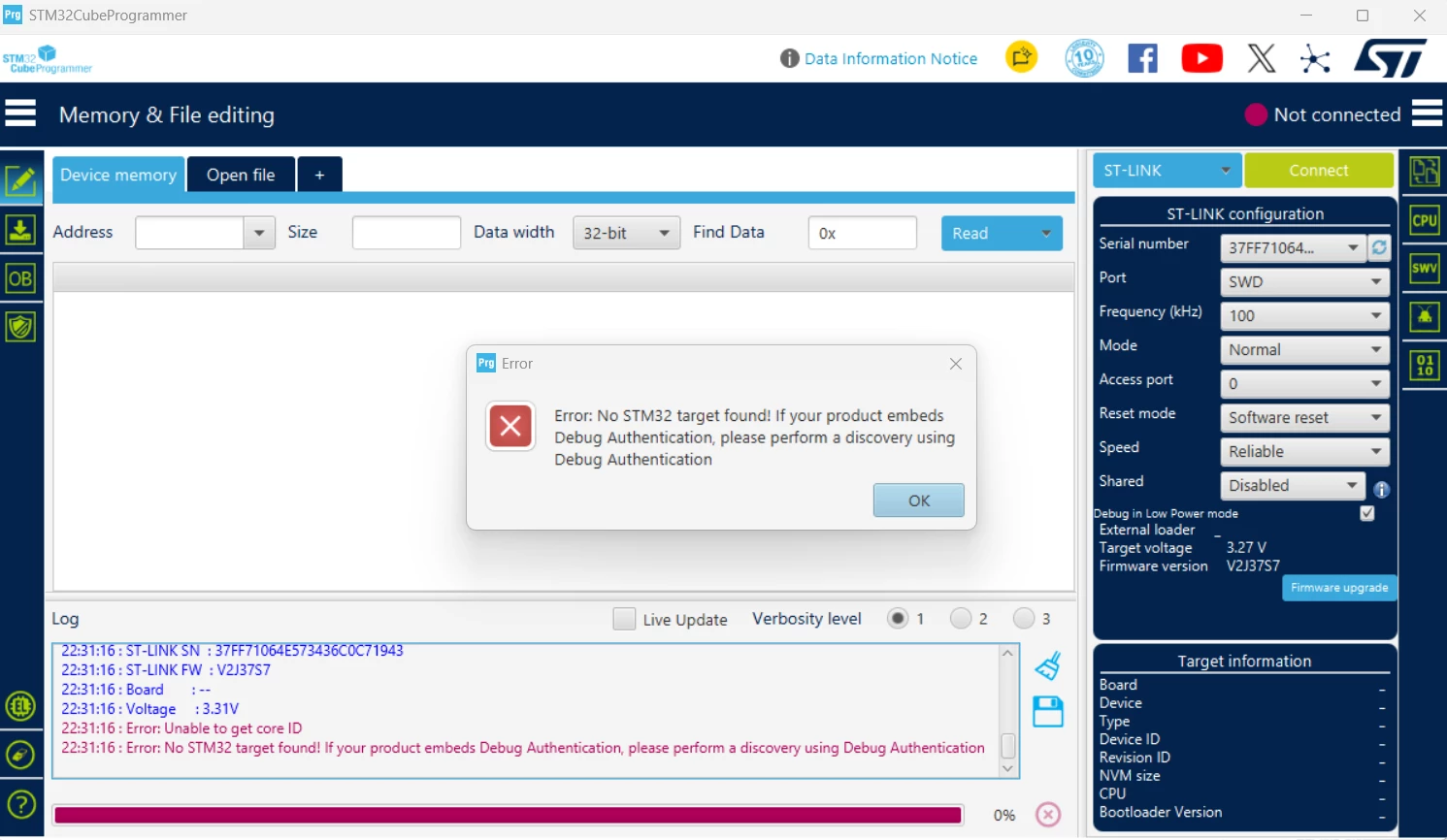
CubeProgrammer also detects the ST-LINK and reports:

  • Port: SWD

  • Target voltage: ~3.27–3.31 V

  • ST-LINK firmware: V2J37S7

However, when I try to connect, I get:

Error: Unable to get core ID
Error: No STM32 target found!

If your product embeds Debug Authentication,
please perform a discovery using Debug Authentication

The Target Information section remains empty.

Troubleshooting already performed

I have tried:

  1. SWD frequency 4000 kHz

  2. SWD frequency reduced to 100 kHz

  3. Normal + Software reset

  4. Under Reset + Hardware reset

  5. Connected ST-LINK RESET → board NRST

  6. Verified SWDIO → PA13

  7. Verified SWCLK → PA14

  8. Verified GND and 3.3 V connections

  9. Tried with and without the Black Pill USB connected

The result remains:

Unable to get core ID
No STM32 target found

The ST-LINK itself is detected correctly, and target voltage is visible, but the STM32F401CCU6 Core ID cannot be read.

Could anyone advise whether there are known issues with this particular STM32F401CCU6 board and ST-LINK/V2 clone, or whether there is another hardware-level test I should perform to determine whether the problem is the board/MCU or the ST-LINK clone?

I can also provide photos of the board, SWD wiring, and CubeProgrammer settings if needed.

Thank you.
 

4 replies

Andrew Neil
Super User
September 22, 2026

Could anyone advise whether there are known issues with this particular STM32F401CCU6 board and ST-LINK/V2 clone

The issues with the Clone STLink is that it is a fake product - so it is not supported by ST.

The Black Pill is also not an ST product, and may contain a fake STM32.


For best results, use a supported ST board; eg, NUCLEO-F401RE - which gives you the assurance of both a genuine STM32 and a genuine STLink.

A complex system that works is invariably found to have evolved from a simple system that worked.A complex system designed from scratch never works and cannot be patched up to make it work.
AScha.3
Super User
September 22, 2026

Well accidently i just have a F401 black pill connected with a st-link V2 (stick  or maybe “clone “); working fine.

Set Programmer to : software reset, connect normal or hot plug.

Try.


If you feel a post has answered your question, please click on " Best Answer ".
alakaAuthor
Visitor
September 22, 2026

 STM32CubeProgrammer detected the ST-LINK and showed ~3.3 V target voltage, but I was getting:

Unable to get core ID
No STM32 target found

I verified the SWD connections (SWDIO → PA13, SWCLK → PA14, GND, 3.3 V and NRST) and tried 100 kHz, Normal/Software Reset and Under Reset/Hardware Reset, but the issue remained.

To check whether the MCU itself was working, I tested the USB bootloader. I held BOOT0, pressed and released RESET, and then released BOOT0. This made the STM32 enter its factory bootloader mode instead of running the normal application. Windows detected STM32 Bootloader, and STM32CubeProgrammer was able to connect through USB and read the MCU successfully. This confirmed that the MCU was alive.

The actual issue was the physical SWDIO connection. After properly soldering the SWDIO connection, the ST-LINK immediately connected and CubeProgrammer successfully detected the MCU.

So in my case, the problem was poor/intermittent SWDIO contact, not a damaged MCU or faulty ST-LINK clone.


TDK
September 22, 2026
  1. Verified SWDIO → PA13

  2. Verified SWCLK → PA14


The actual issue was the physical SWDIO connection.

These threads pop up all the time where the OP says one thing that later turns out not to be true.

One thing that may help is showing how things were verified instead of just saying it’s been verified. Showing a picture of the setup can help. Ultimately, you need to show what the problem is in order for anyone to spot it. Otherwise all you can hope for is generic advice to double check everything until the issue is found.

Could anyone advise whether there are known issues with this particular STM32F401CCU6 board and ST-LINK/V2 clone, or whether there is another hardware-level test I should perform to determine whether the problem is the board/MCU or the ST-LINK clone?

AI seems to like to add bad questions like this when the real issue is so much more basic.

"If you feel a post has answered your question, please click ""Accept as Solution""."
