

Explorer
October 9, 2025
Solved

STM32CubeProgrammer Debug Authentication Discover Does Not Work

  • October 9, 2025
  • 3 replies
  • 1532 views

The "Discover" button on the STM32CubeProgrammer fails to connect to my my STM32H56x (STM32H562VGT6) in the Closed state (0x72). The instructions I followed for enabling password security are in the "How to enable RDP-like product state flash protection in STM32H5 microcontrollers" post. No errors came up in following these steps. To summarize my steps:

1. Installed STM32CubeProgrammer and STM32TrustedPackage Creator

2. Generated OBKey and password.bin files from DA_ConfigWithPassword.xml 

3. Set PRODUCT_STATE to Provisioning (0x17) and executed "Start Provisioning" with the generated .obk file

4. Set PRODUCT_STATE to Closed (0x72) 


The issue arises when going to perform a regression. In the Debug Authentication window, clicking the "Discover" button does not prompt me to select a password file and throws an error that states "Failed to communicate with target !". The Debug Authentication sequence does not start. 
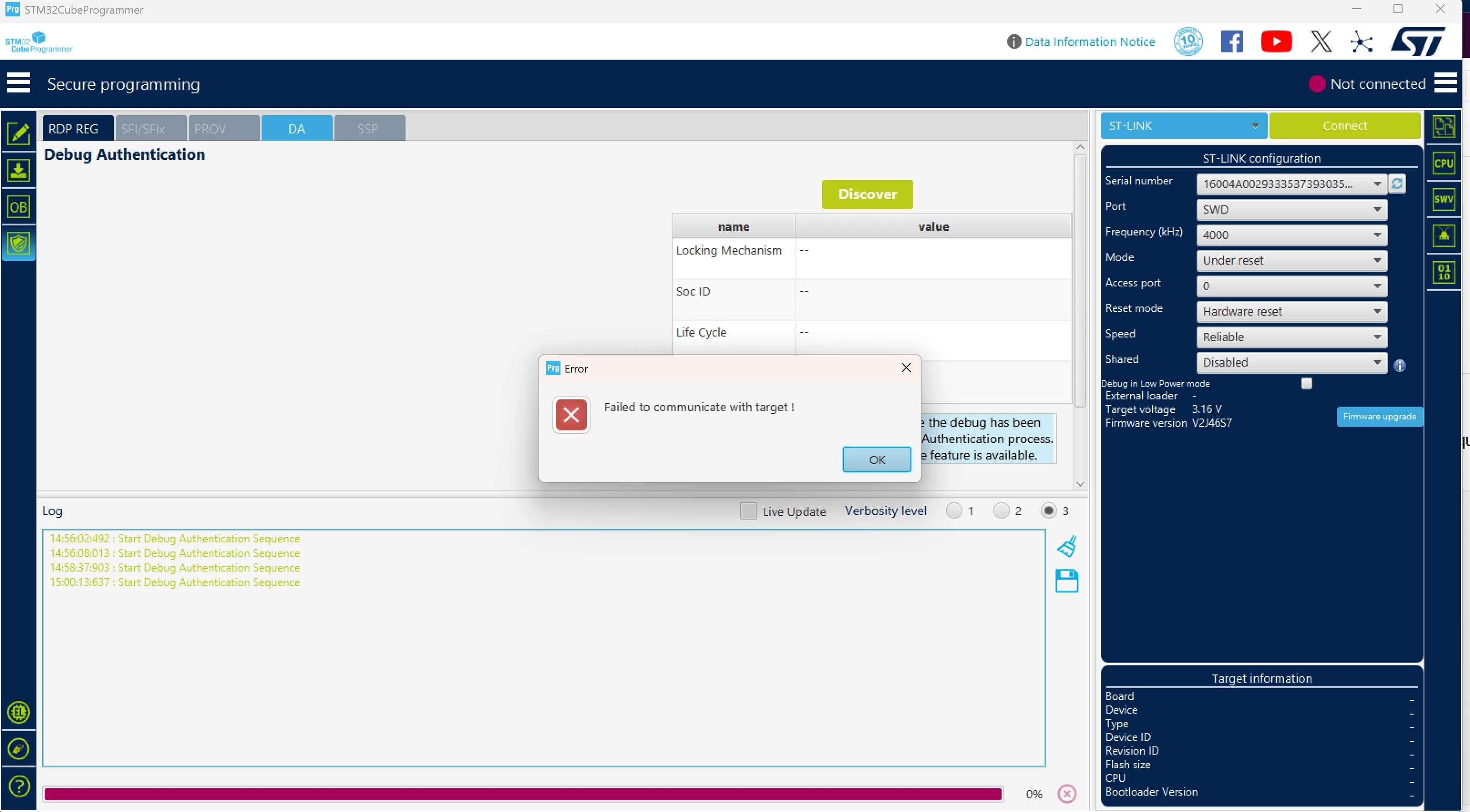
mmtimmerman_0-1760047238371.png

The same error occurs whether or not my ST-Link V2 is physically attached to the board, so I've confirmed that the error does happens when the debugger is connected to the MCU. I've additionally done the same methods on a second board and found the same problem with a second board. 


Does anyone know how I can fix this error and use debug authentication to connect my boards? Any assistance would be appreciated. 

Best answer by Imen.D

Hello @mmtimmerman and welcome to the Community,

Please share more details: the log file and STM32CubeProgrammer version used.

Maybe you have installed 32 bits version of STM32CubeProgrammer!

As mentioned in the STM32CubeProgrammer errata 2.20.x, Debug authentication is not supported on Windows 32 bits. Could you check with 64 bits version?

You can also refer to this application note that may help you: Getting started with debug authentication (DA) for STM32 MCUs

3 replies

Imen.DBest answer
ST Technical Moderator
October 14, 2025

Hello @mmtimmerman and welcome to the Community,

Please share more details: the log file and STM32CubeProgrammer version used.

Maybe you have installed 32 bits version of STM32CubeProgrammer!

As mentioned in the STM32CubeProgrammer errata 2.20.x, Debug authentication is not supported on Windows 32 bits. Could you check with 64 bits version?

You can also refer to this application note that may help you: Getting started with debug authentication (DA) for STM32 MCUs

In order to give better visibility on the answered topics, please click on 'Best answer' on the reply which solved your issue or answered your question. Thanks
Aziz BRIGUI
ST Technical Moderator
October 15, 2025

Hello,

In addition to what @Imen pointed out, make sure reset pin is properly connected between ST-LINK and target.

Aziz

In order to give better visibility on the answered topics, please click on 'Accept as Solution' on the reply which solved your issue or answered your question.
Visitor
August 20, 2026

Hello,

I am experiencing a similar Debug Authentication problem with a custom board using an STM32H562VGT6.

Configuration:

- STM32H562VGT6
- TrustZone disabled
- Password-based Debug Authentication
- STM32CubeProgrammer 2.23.0, Linux 64-bit
- The DA OBKey was provisioned successfully
- PRODUCT_STATE was changed from PROVISIONING to CLOSED
- The application firmware still starts correctly in CLOSED state

After power cycling, the device runs its application normally and appears over USB as our Mass Storage device. Therefore, the application firmware was not erased and the device is not stuck in the system bootloader.

I tried Debug Authentication discovery using:

STM32_Programmer_CLI -c port=SWD debugauth=2

With an ST-LINK/V2 running firmware V2J39S7, the result is:

Start Debug Authentication Sequence
Open SDM Lib
No device found by ST-Link
Debug Authentication: Discovery Failed

I then replaced it with another ST-LINK/V2 running firmware V2J45S7. CubeProgrammer detects this probe correctly. Discovery progresses further and opens the SDM library, but either hangs or fails with:

Unable to detect DBGMCU Mailbox
Debug Authentication: Discovery Failed

When the reset sequence progresses further, the log shows:

Asserting target reset
Writing magic number
De-asserting target reset
No response from the target
The target is unable to boot on RSS_DA or is in OPEN mode
Failed to open communication with the target

NRST, SWDIO, SWCLK and GND are connected. The physical reset button works, and the application starts normally after a complete power cycle. The NRST line is also connected to another controller through a 2N7002 reset circuit, which may be relevant.

Before purchasing an ST-LINK/V3, I would like to clarify:

1. Is an original ST-LINK/V3 required or strongly recommended for Debug Authentication on STM32H562?
2. Should ST-LINK/V2 with firmware V2J45S7 support the complete password-based DA regression procedure?
3. Can the additional 2N7002 circuit on NRST prevent the RSS_DA boot sequence even though normal reset works?
4. Is there a way to verify that the provisioned OBKey correctly enables password-based DA while the device is already in CLOSED state?
5. Is any special connection mode, reset timing or SWD frequency required for STM32H562 in CLOSED state?

I do not want to perform any uncontrolled operation because the application currently works and the password/OBK recovery files are available. The goal is to confirm that full regression to OPEN can be performed reliably if it is ever needed.

Thank you.