Associate III
Sep 18, 2025 11:54 PM UTC
Solved

STM32CubeProgrammer: Can't select connection type in Linux

When I am trying to use the STM32CubeProgrammer in Linux, only the default connection option of J-Link is available. No other options "drop down" in the drop-down menu. Since I am set up to connect over USB, this means I am unable to connect to or reprogram the board (STM32MP257F-DK). 

When I test this same thing on Windows, it shows USB as a connection option, and it can connect successfully. The drop-down menu appears normal. It used to work properly like this in Linux before, and I don't believe I changed any settings in STM32CubeProgrammer since then. 

Is there a way I can get the standard behavior back when using Linux? I am following the steps as described here: https://wiki.st.com/stm32mpu/wiki/Getting_started/STM32MP2_boards/STM32MP257x-DK/Let%27s_start/Populate_the_target_and_boot_the_image 

This topic has been closed for replies.
Aziz BRIGUI
Aziz BRIGUIBest answer
ST Technical Moderator
Sep 30, 2025 2:16 PM UTC

Hello @rdmikkelsen

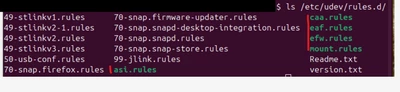
I'm seeing files with execute permissions that AFAIK should not be there. Could you try moving them somewhere else and retry. Maybe they're causing a conflict of some kind.

AzizBRIGUI_0-1759241782688.png

Aziz

In order to give better visibility on the answered topics, please click on 'Accept as Solution' on the reply which solved your issue or answered your question.

6 replies

Aziz BRIGUI
ST Technical Moderator
Sep 23, 2025 2:34 PM UTC

Hello @rdmikkelsen

Please refer to STM32CubeProgrammer user manual page 13.

You need to install libusb via this command line:

sudo apt-get install libusb-1.0.0-dev

I also suggest copying the rules in "[CubeProgrammer install path]/Driver/rules" into "/etc/udev/rules.d" to have all interfaces available. You can navigate to it and use :

sudo cp *.* /etc/udev/rules.d

Hope you'll find this helpful.

Aziz

In order to give better visibility on the answered topics, please click on 'Accept as Solution' on the reply which solved your issue or answered your question.
Associate III
Sep 23, 2025 5:36 PM UTC

Thank you for the response. I can confirm that libusb was already installed as stated in the manual, and the udev rules were copied into that location. With the commands you gave, I got messages confirming that libusb was already on the newest version, and the relevant rules are already present in /etc/udev/rules.d

Is there anything else that could potentially cause issues here? 

Aziz BRIGUI
ST Technical Moderator
Sep 25, 2025 9:34 AM UTC

Hello,

Are you sure you restarted STM32CubeProgrammer after those modifications? Could you try running ls on /etc/udev/rules.d and share the output?

Thanks,

Aziz

In order to give better visibility on the answered topics, please click on 'Accept as Solution' on the reply which solved your issue or answered your question.