Associate II
Oct 23, 2024 7:06 PM UTC
Solved

STM32 programmer failed PCB not working afterwards


I'm trying to flash my custom STM32L152RET6 board using the command-line version of CubeProgrammer. Initially, everything seemed fine, but I wanted to ensure the firmware couldn't be read out. So, I set the option bytes with -ob RDP=1 to enable read protection. However, after doing this, the flashing process failed, and now my program no longer runs.

I was able to flash it again using a Segger debugger, but when I try to run the program, it crashes at startup. The voltages all seem normal, so I don't suspect a hardware issue. Could this be due to some incorrectly set registers or option bytes in the CPU?

Here’s the command I used:

STM32_Programmer_CLI.exe -c port=usb1 -ob RDP=1 -d firmware.hex -v


Any advice would be greatly appreciated!


This topic has been closed for replies.
mt1Best answer
Associate II
Oct 31, 2024 6:45 AM UTC

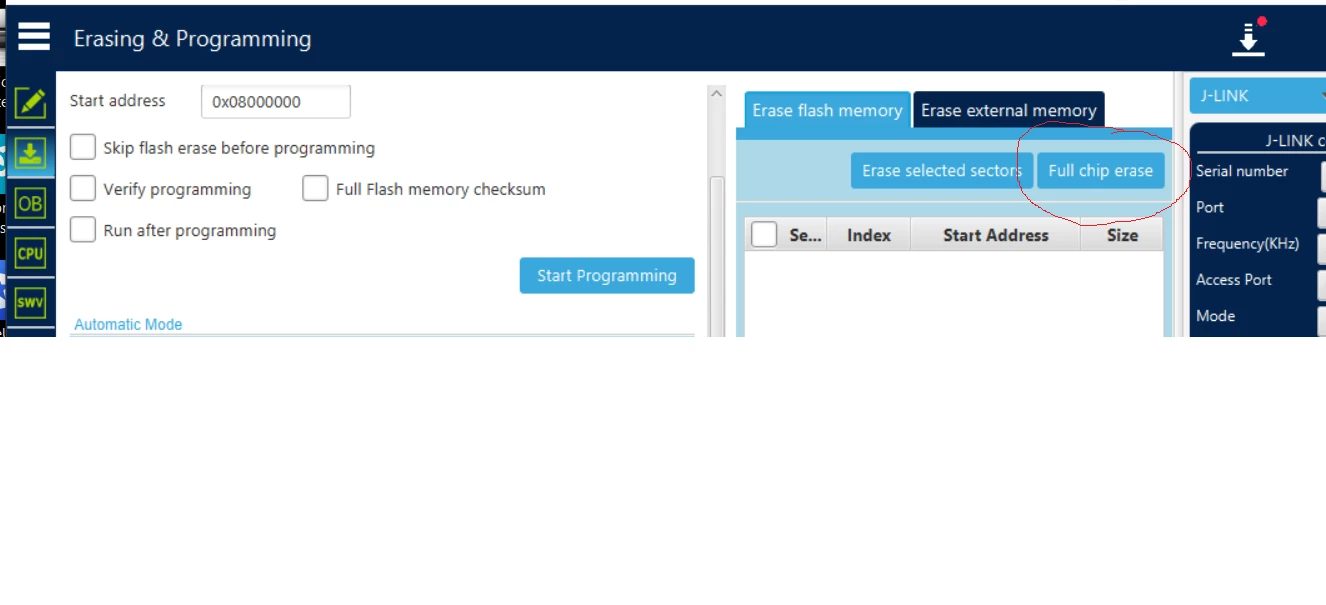
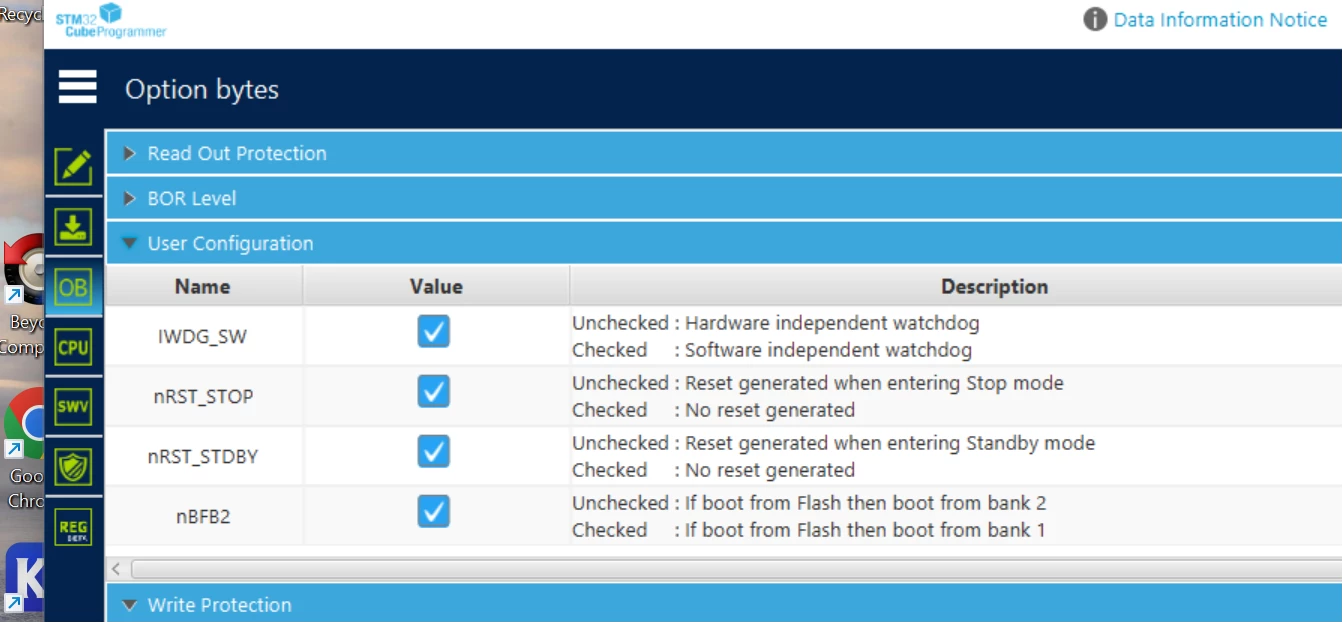
I fixed the broken PCB, when I looked in the Cube programmer GUI the option byte  nBFB2 was not set so it would boot from bank2. When enable this option and also did a full chip erase everything was working just fine !

Why I could still flash it with the segger debugger (in bank 1 ?) and the program would still go to the main , but then  only crashed when it wanted to init the HAL is still a mystery to me.

mt1_0-1730357049656.pngmt1_1-1730357073868.png


5 replies

Tesla DeLorean
Guru
Oct 23, 2024 10:04 PM UTC

Your app running on the STM32 should be able to print out content/state of FLASH and/or OB

Check it it write protects the base sectors.

Usually you can clear these with a Mass Erase, or walked in via the UART connection to the System Boot Loader.

As you say Segger also has an un-brick app.

Can you use ST-LINK via SWDIO/SWCLK ? To connect/inspect?

Tips, Buy me a coffee, or three.. PayPal Venmo (See Profile) Up vote any posts that you find helpful, it shows what's working..
mt1Author
Associate II
Oct 24, 2024 4:48 PM UTC

Yes I can just debug no problem. But when it inits the HAL driver it gives an exception and crashes

Visitor II
Oct 24, 2024 12:55 PM UTC

Try reverting the RDP level back to RDP=0 (no read protection) and see if your program starts running properly. You can do this by issuing the following command:


STM32_Programmer_CLI.exe -c port=usb1 -ob RDP=0


Look for any unexpected settings, particularly those related to:

  • Boot configuration (nBOOT0, nBOOT1)
  • Write protection (WRP)
  • Watchdog settings (IWDG_SW, WWDG_SW)
  • Flash memory configuration
  • If you want to redesign the board, you can see this for reference:

https://www.pcbway.com/project/shareproject/Getting_Started_with_STM32_Arduino_code_Programming_and_PCB_Design_b4b9891e.html

mt1Author
Associate II
Oct 24, 2024 4:51 PM UTC

That is a good one I will try indeed the -ob RDP=0  option !

But what I do not understand is that the Segger SWD can just write new flash code. So its not write protected anymore. Or the Segger ignores the protection bits ?

mt1AuthorBest answer
Associate II
Oct 31, 2024 6:45 AM UTC

I fixed the broken PCB, when I looked in the Cube programmer GUI the option byte  nBFB2 was not set so it would boot from bank2. When enable this option and also did a full chip erase everything was working just fine !

Why I could still flash it with the segger debugger (in bank 1 ?) and the program would still go to the main , but then  only crashed when it wanted to init the HAL is still a mystery to me.

mt1_0-1730357049656.pngmt1_1-1730357073868.png