ST Migration account
ST Community Manager
September 15, 2026
Solved

Export pinout

  • September 15, 2026
  • 2 replies
  • 42 views

I've just installed CubeMX2 to start work on a new project using STM32C552xxx.

My normal practice is to export a .csv of all the processor pins along with the alternate functions and in CubeMX this is easy.

But Cube MX2 only exports a .csv like this:

Position Pin Type Signals Pin labels
1 PE2 gpio    
2 PC13 gpio    
3 PC14-OSC32_IN(OSC32_IN) gpio    

Please tell me there is an option to list all the alternate functions in the.csv.

It is quite impossible to to allocate the pins and peripherals for a new design working only with the pop_up detail view in CubeMX2. 

An acceptable alternative would be for ST to just publish such a .csv some where.

MK

Best answer by Oussama_TROUDI

Hello
Thank you for your feedback.

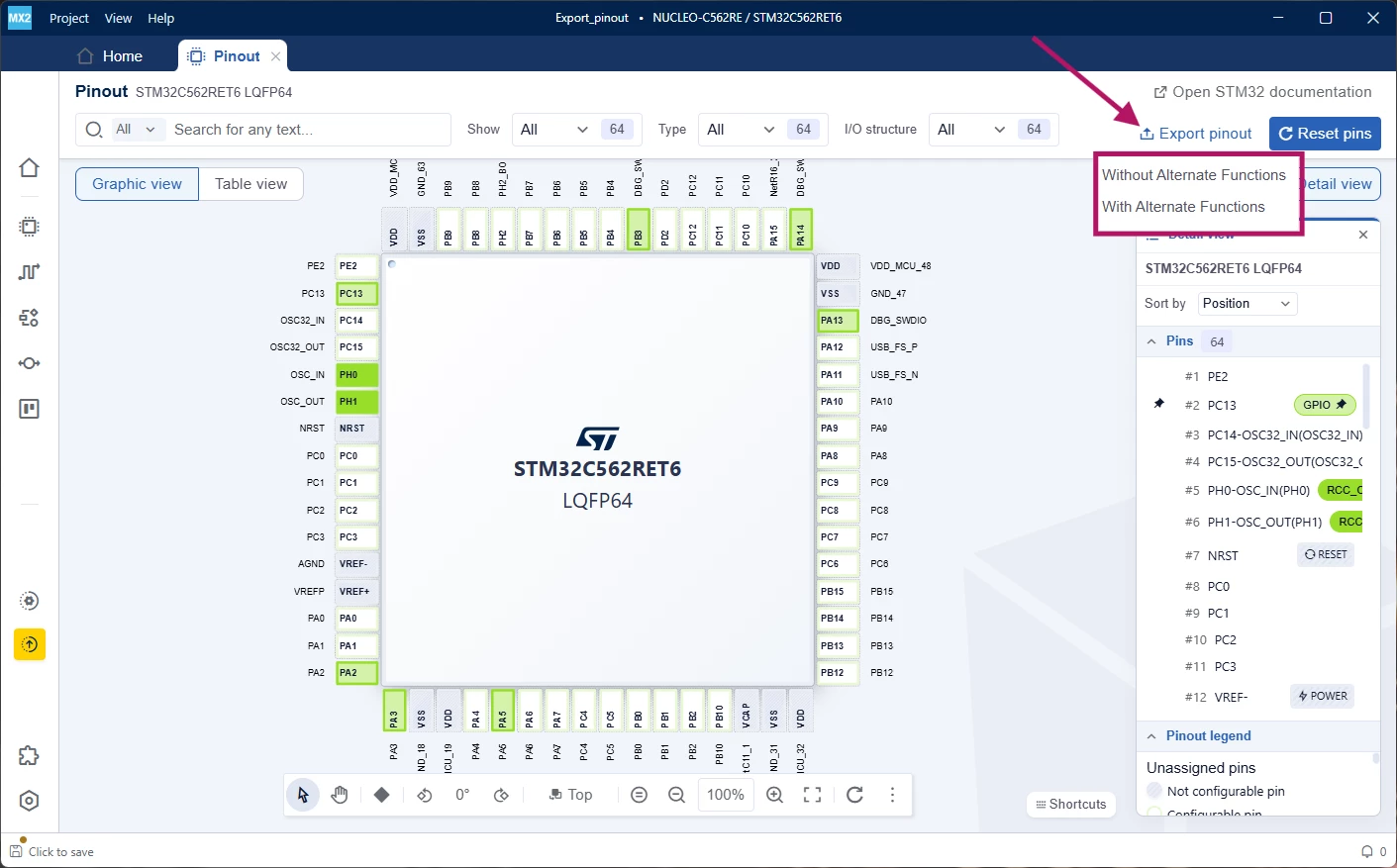
In STM32CubeMX2 version 1.1.1, the pinout can be exported in CSV format either without alternate functions or with alternate functions.

Best regards,
Oussama

2 replies

Andrew Neil
Super User
September 15, 2026

Please tell me there is an option to list all the alternate functions in the.csv.

CubeMX can do this - so MX2 absolutely needs to do it, too!


A complex system that works is invariably found to have evolved from a simple system that worked.A complex system designed from scratch never works and cannot be patched up to make it work.
Oussama_TROUDI
Oussama_TROUDIBest answer
ST Technical Moderator
September 15, 2026

Hello
Thank you for your feedback.

In STM32CubeMX2 version 1.1.1, the pinout can be exported in CSV format either without alternate functions or with alternate functions.

Best regards,
Oussama

In order to give better visibility on the answered topics, please click on 'Accept as Solution' on the reply which solved your issue or answered your question.