
DShes
Visitor II
February 11, 2019
Solved

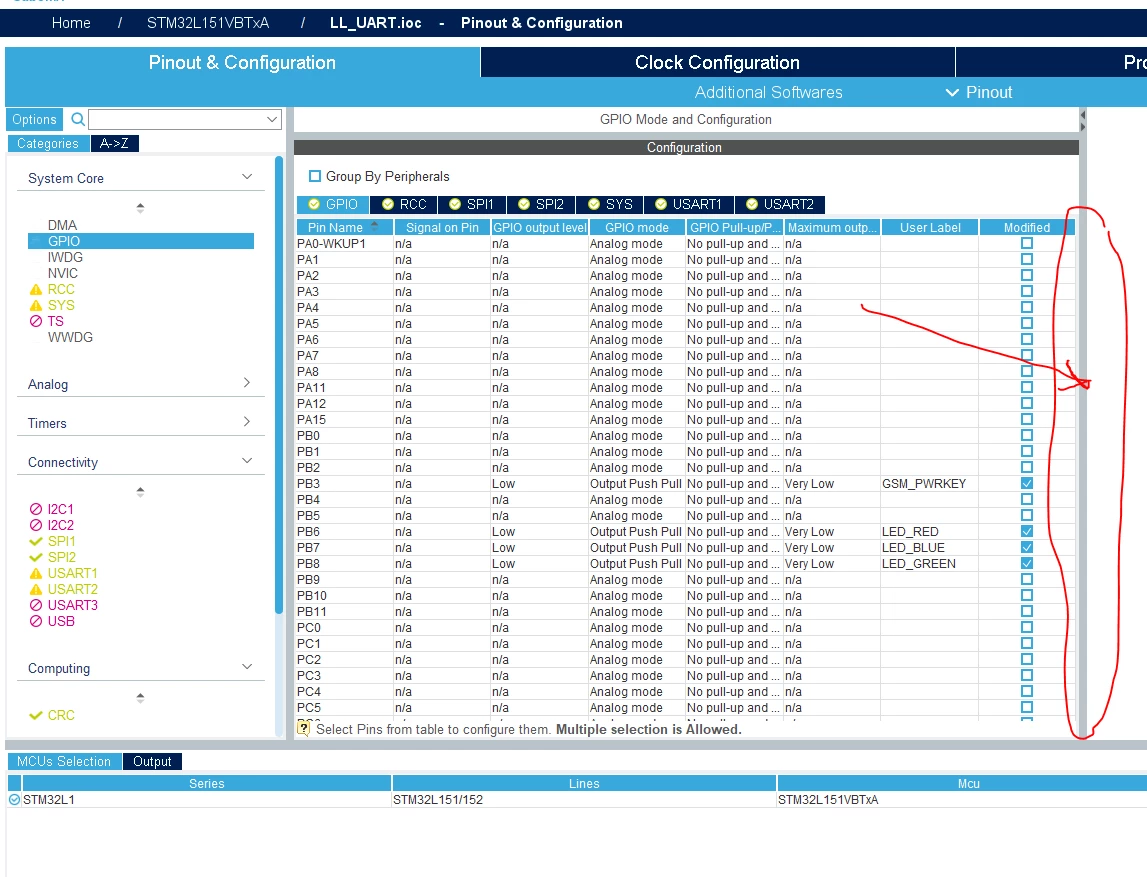
Why I don't look scroll bar on the GPIO table

  • February 11, 2019
  • 4 replies
  • 2074 views

I get and install CubeMX 5.0.1

In page Pinout&Configuration->GPIO I havent all GPIO (look screenshot)
0690X000006DTeLQAW.png

This topic has been closed for replies.
Best answer by Roberto.F

Nevermind. Looks like I hadn't updated my version of STM32CubeMx software.

It is fixed in the latest version 5.2.0 (to update go to Help -> Check for Updates)

4 replies

pchun
Associate
February 12, 2019

same issue with me, can someone please assist on this? Thanks.0690X000006DWM4QAO.jpg

ST Technical Moderator
February 12, 2019

Hello,

You are right, this issue will be fixed in the next STM32CubeMX release.

Thanks for your contribution.

Kind Regards,

Imen

In order to give better visibility on the answered topics, please click on 'Best answer' on the reply which solved your issue or answered your question. Thanks
Roberto.F
Associate II
May 15, 2019

Hi,

Its been three months. I am experiencing the same issue. Can you please let me know which version I should use where this is fixed?

Thanks.

Roberto.F
Roberto.FBest answer
Associate II
May 15, 2019

Nevermind. Looks like I hadn't updated my version of STM32CubeMx software.

It is fixed in the latest version 5.2.0 (to update go to Help -> Check for Updates)