KiptonM
Senior III
December 10, 2021
Solved

What is the purpose of labeling pins in the MX program if you cannot use the labels in your code?

  • December 10, 2021
  • 8 replies
  • 3944 views

In the Device Configuration Tool it allows you to name pins. But it appears my program is not aware of those pin names and I cannot find any .h or .c file where the mapping is defined. The are only defined in a .ioc file, which the compiler does not use.

I would have thought the Code Generator would have done that.

So I have to make my own .h file with the mapping defined.

This topic has been closed for replies.
Best answer by Sara BEN HADJ YAHYA

Hello @KiptonM​ ,

Thanks for your feedback,

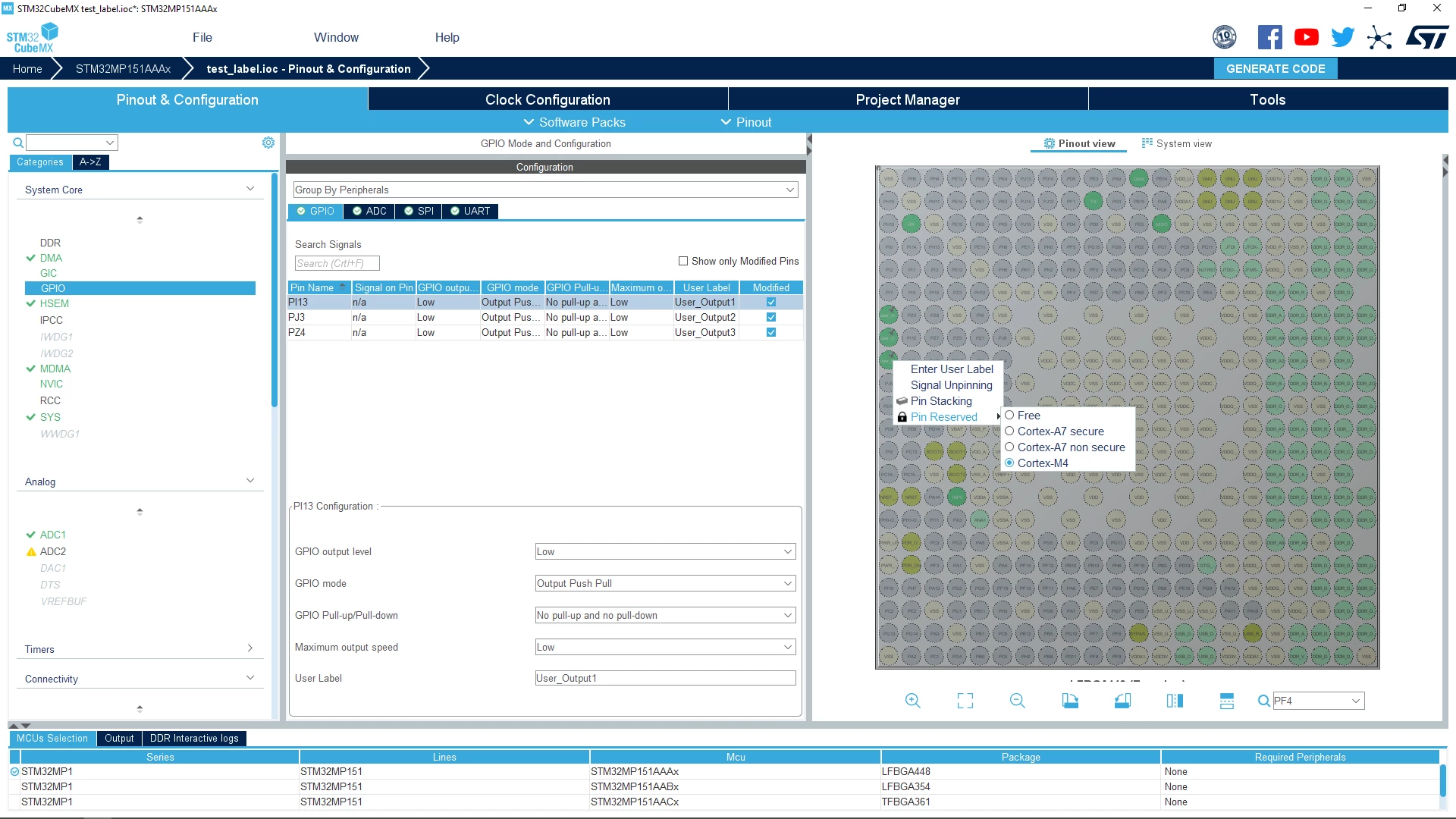
Seems that you didn't assign the pins to Cortex M4, to do so you need to right click on the pin and then select Cortex M4 which is under Pin Reserved field (Please refer to the attachement).

0693W00000HoNUgQAN.png 

Please try to test it and if it didn't work then please share your .ioc file and specify the CubeMX version.

If you issue is solved, please close this post by clicking the "Select as Best" button. This will help other members of the community find this response more quickly :)

Regards,

Sara.

8 replies

Bob S
Super User
December 10, 2021

When you say "name pins", do you mean that you enter something in the "User Label" field? If so, those DO show up in the code, see main.h. For example, is you name a pin "BLUE_LED", you will find #defines for BLUE_LED_GPIO_Port and BLUE_LED_Pin. Those defines can then be used in HAL_GPIO_WritePin(), etc., or the HAL_LL_GPIO functions, or even in your own "write direct to registers" code.

Or are you somehow doing something else to "name" the pins?

KiptonM
KiptonMAuthor
Senior III
December 10, 2021

I do not know what you are talking about.

Here is my entire generated main.h file

/* USER CODE BEGIN Header */
/**
 ******************************************************************************
 * @file : main.h
 * @brief : Header for main.c file.
 * This file contains the common defines of the application.
 ******************************************************************************
 * @attention
 *
 * <h2><center>&copy; Copyright (c) 2021 STMicroelectronics.
 * All rights reserved.</center></h2>
 *
 * This software component is licensed by ST under Ultimate Liberty license
 * SLA0044, the "License"; You may not use this file except in compliance with
 * the License. You may obtain a copy of the License at:
 * www.st.com/SLA0044
 *
 ******************************************************************************
 */
/* USER CODE END Header */
 
/* Define to prevent recursive inclusion -------------------------------------*/
#ifndef __MAIN_H
#define __MAIN_H
 
#ifdef __cplusplus
extern "C" {
#endif
 
/* Includes ------------------------------------------------------------------*/
#include "stm32mp1xx_hal.h"
 
/* Private includes ----------------------------------------------------------*/
/* USER CODE BEGIN Includes */
#include <stdint.h>
#include <stdlib.h>
#include <string.h>
#include <stdio.h>
/* USER CODE END Includes */
 
/* Exported types ------------------------------------------------------------*/
/* USER CODE BEGIN ET */
 
/* USER CODE END ET */
 
/* Exported constants --------------------------------------------------------*/
/* USER CODE BEGIN EC */
 
/* USER CODE END EC */
 
/* Exported macro ------------------------------------------------------------*/
/* USER CODE BEGIN EM */
 
/* USER CODE END EM */
 
/* Exported functions prototypes ---------------------------------------------*/
void Error_Handler(void);
 
/* USER CODE BEGIN EFP */
 
/* USER CODE END EFP */
 
/* Private defines -----------------------------------------------------------*/
/* USER CODE BEGIN Private defines */
 
/* USER CODE END Private defines */
 
#ifdef __cplusplus
}
#endif
 
#endif /* __MAIN_H */
 
/************************ (C) COPYRIGHT STMicroelectronics *****END OF FILE****/

Here is a screen shot of some of my GPIO pins from MX

KiptonM
KiptonMAuthor
Senior III
December 10, 2021

Cut and paste did not work. Here is the screen shot.

TDK
December 10, 2021

For MCUs, the labels are defined in main.h (and only for the core they're assigned to, for multi-core chips).

You're on an MPU and the usage may be different.

I updated the topic tag from MCUs to MPUs.

"If you feel a post has answered your question, please click ""Accept as Solution""."
S.Ma
Principal
December 11, 2021

As long as your board signal name are only defines, it won't show up in a debug watch window, it will be another layer of indirection when febugging....

Sara BEN HADJ YAHYA
ST Technical Moderator
December 13, 2021

Hello @KiptonM​ ,

Thanks for your feedback,

Seems that you didn't assign the pins to Cortex M4, to do so you need to right click on the pin and then select Cortex M4 which is under Pin Reserved field (Please refer to the attachement).

0693W00000HoNUgQAN.png 

Please try to test it and if it didn't work then please share your .ioc file and specify the CubeMX version.

If you issue is solved, please close this post by clicking the "Select as Best" button. This will help other members of the community find this response more quickly :)

Regards,

Sara.

In order to give better visibility on the answered topics, please click on 'Best answer' on the reply which solved your issue or answered your question.
KiptonM
KiptonMAuthor
Senior III
December 13, 2021

I did not know that existed. On other pins it is in the configuration window where you choose which processor it is.

The IDE is very good at hiding options.

Thanks,

Kip

Sara BEN HADJ YAHYA
ST Technical Moderator
December 14, 2021

Hello @KiptonM​ ,

You are right, with other multicore MCUs, CubeMX let the user choose the pin context, but with the MP1 family this option is not available yet. This is a known issue and already reported internally. It will be fixed soon.

Regards,

Sara.

In order to give better visibility on the answered topics, please click on 'Best answer' on the reply which solved your issue or answered your question.