


Andrew Neil
Super User
October 12, 2026
Question

v6.17.0: Edited values do not "stick" without tab or enter

For example, if I edit the ‘Synchronous Predivider’ value for the STM32F030 RTC:
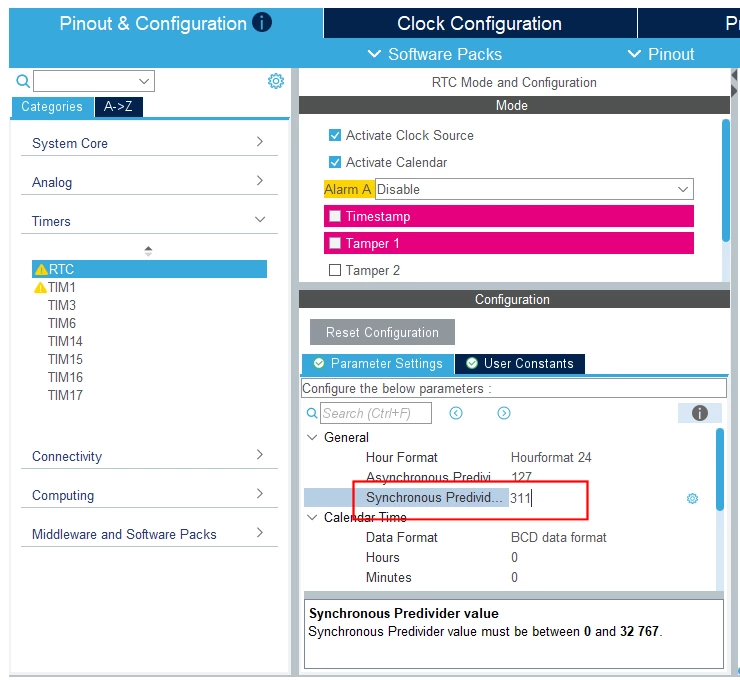
 

Then, say, click on TIM1:
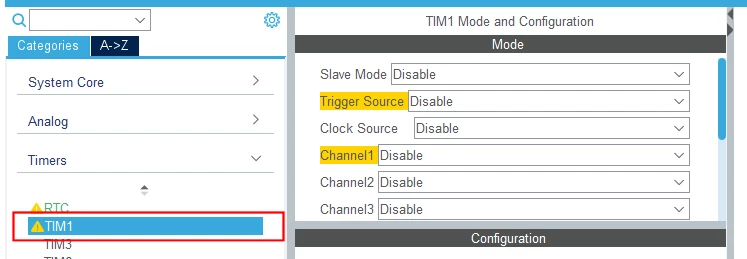
 

Then go click back to the RTC view:
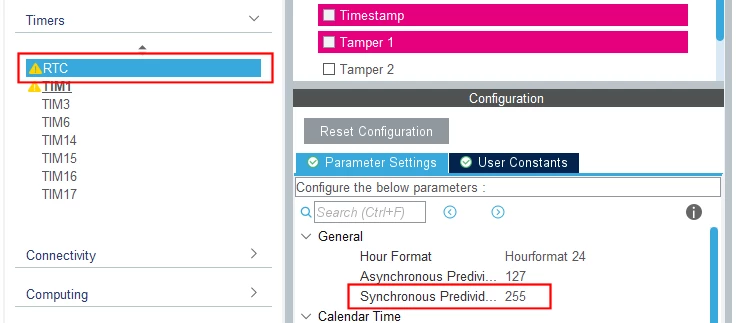
 

My edit is gone!


I’ve also been caught-out with this on UART baudrate.

I suspect it applies to any numeric-entry field.


This should, at least, ask if I want to lose edits.


On Win11-Pro.

5 replies

Andrew Neil
Super User
October 12, 2026

 Another example - I have typed-in a new ‘Synchronous Predivider’ value:


If I then click on the ‘Tamper 2’ checkbox, it gets enabled - but, again, my edit is lost:


However, if I edit the ‘Synchronous Predivider’ value, and then click into the ‘Asynchronous Predivider’ box - my edit is not lost!

A complex system that works is invariably found to have evolved from a simple system that worked.A complex system designed from scratch never works and cannot be patched up to make it work.
Ghofrane GSOURI
ST Technical Moderator
October 12, 2026

Hello ​@Andrew Neil 

Could you please try to use the latest version of STM32CubeMX6.18.1?

And please make sure to press “Enter “ after editing the field.

THX

Ghofrane

To give better visibility on the answered topics, please click on Accept as Solution on the reply which solved your issue or answered your question.
Andrew Neil
Super User
October 12, 2026

And please make sure to press “Enter “ after editing the field.

That is my entire point - we should not have to worry about that !

A complex system that works is invariably found to have evolved from a simple system that worked.A complex system designed from scratch never works and cannot be patched up to make it work.
Ghofrane GSOURI
ST Technical Moderator
October 12, 2026

Hello ​@Andrew Neil 

This is the expected behavior in MX: edited values are only committed when you validate the field, typically by pressing Tab or Enter. If you click away or continue without validating, the change may not be applied.

So in short: this is the way MX works by design.

To give better visibility on the answered topics, please click on Accept as Solution on the reply which solved your issue or answered your question.
Andrew Neil
Super User
October 12, 2026

this is the way MX works by design.

Then it is a poor design!

#UXFail.

A complex system that works is invariably found to have evolved from a simple system that worked.A complex system designed from scratch never works and cannot be patched up to make it work.