

antonius
Associate III
April 1, 2019
Question

Timer3 generating 5Hz pulse ?

  • April 1, 2019
  • 11 replies
  • 4784 views

Dear Member,

How can I generate 5Hz pulse on OC using TIM3 ?

Here is my setting on STM32CubeMx0690X0000089KbvQAE.jpg
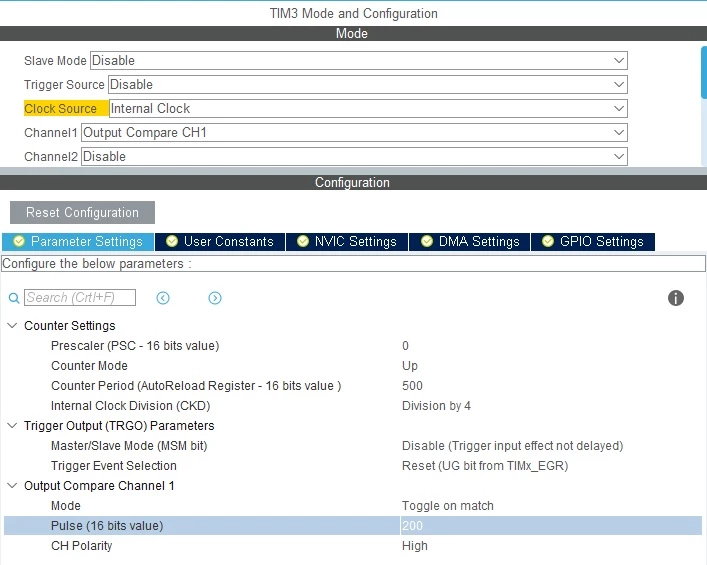
Thanks

This topic has been closed for replies.

11 replies

antonius
antoniusAuthor
Associate III
April 1, 2019

I got PC6 with LED and it's ON, but I don't know what the frequency is,

The setting is :

TIM3->CR1 |= TIM_CR1_CEN;

      HAL_TIM_Base_Start(&htim3);

      HAL_TIM_OnePulse_Start(&htim3,1);

What do I miss here ?

thanks

antonius
antoniusAuthor
Associate III
April 1, 2019

Please correct me :

The code :

 htim3.Instance = TIM3;

 htim3.Init.Prescaler = 12;

 htim3.Init.CounterMode = TIM_COUNTERMODE_UP;

 htim3.Init.Period = 10000;

 htim3.Init.ClockDivision = TIM_CLOCKDIVISION_DIV4;

Frequency I got : 2097KHz/(4x10000x12) = 4.3 Hz

??

Bob S
Super User
April 1, 2019

htim3.Init.ClockDivision does not do what you think it does. It determines the clock rate on the input filter (if you were using the timer channel as an INPUT, which you are not). It is not another prescaler that divides the timer's input clock to the CNT register, so it has no effect on your output signal.

And is your timer clock really 2.097 MHz?

antonius
antoniusAuthor
Associate III
April 2, 2019

Yes it is 2.097Mhz

Is this setting equal to 5Hz ?

===

 htim3.Instance = TIM3;

 htim3.Init.Prescaler = 10;

 htim3.Init.CounterMode = TIM_COUNTERMODE_UP;

 htim3.Init.Period = 10000;

 htim3.Init.ClockDivision = TIM_CLOCKDIVISION_DIV4;

2.097M / *400k

S.Ma
Principal
April 1, 2019

Recap question: What are the clocks available in the chip? MHz? LSI, LSE?

If you want 5 Hz, I would simply use Systick with 1 msec ISR, create a 32 bit milisec counter in RAM as global variable, when this counter reaches 5000, reset it by SW and toggle your output manually.

When time units are so far from kHz, SW implementation maybe good enough.

antonius
antoniusAuthor
Associate III
April 2, 2019

How to to reset in Software ?

S.Ma
Principal
April 2, 2019

Reset = write 0 on it

uint32_t msec_counter = 0;
 
void My1msecSystickISR(void) // find the corresponding function in the cubemx generated code
{
msec_counter++;
if(msec_counter>=2000) {
 // hello, 0.2 sec elapsed for 5Hz period
LED_Toggle();
msec_counter = 0;
}
}
