TDK
April 10, 2026
Solved

The chip text orientation in STM32CubeMX/MX2 does not match reality. Why?

  • April 10, 2026
  • 5 replies
  • 2830 views

In STM32CubeMX, here is the orientation for a chip with a red dot marking pin 1 at the top left when text reads from left to right.
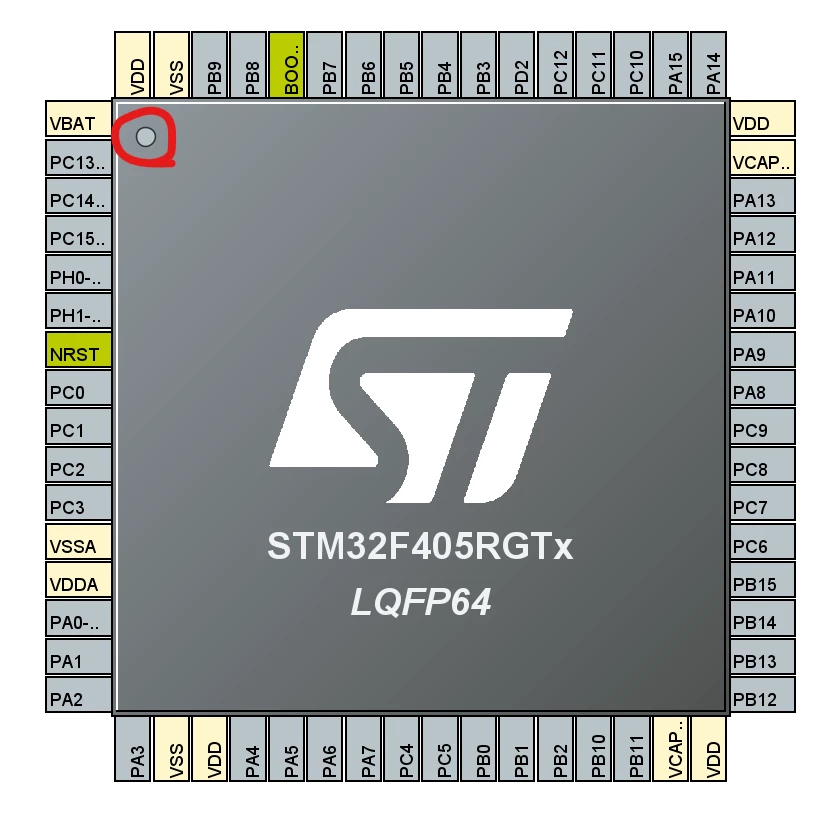
TDK_1-1775852597907.png

In real life, here is the orientation for a chip with a red dot marking pin 1. As far as I'm aware, all STM32 chips are oriented like this, with pin 1 at the bottom left when text reads from left to right.
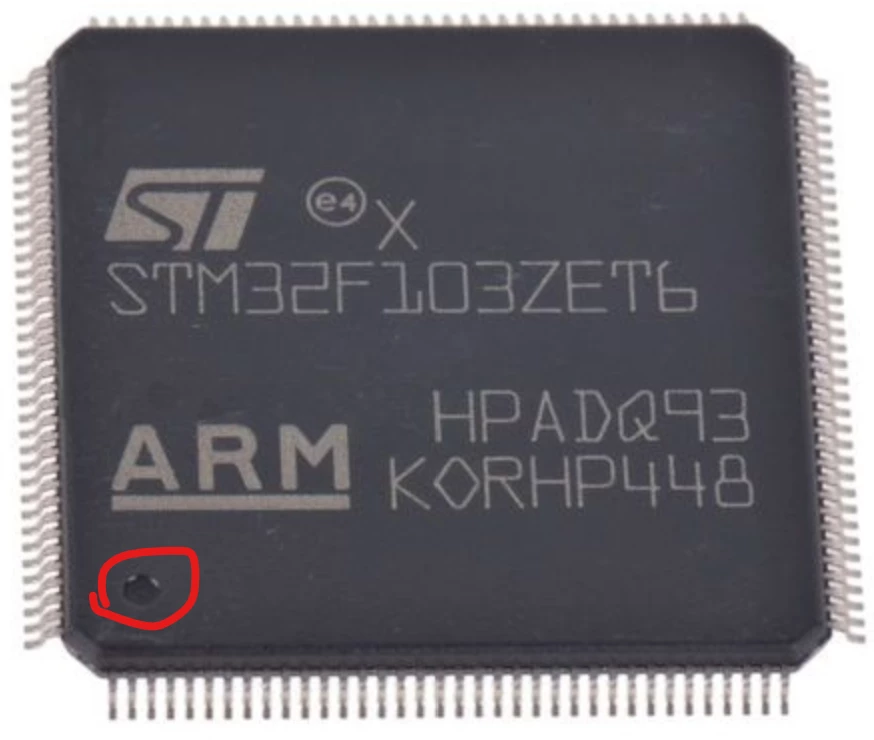
TDK_0-1775852547058.png


Why is the text rotated 90 degrees differently? Is this intentional? If there is a reasonable explanation, I'm interested in hearing it. It seems to only add confusion. Wouldn't it make more sense if the default orientation (or at least the text orientation) to match between the two?


In STM32CubeMX, you can rotate the part for convenience. This is useful. However, the text also rotates, so if you put pin 1 in the bottom left like in reality, the text is now rotated.
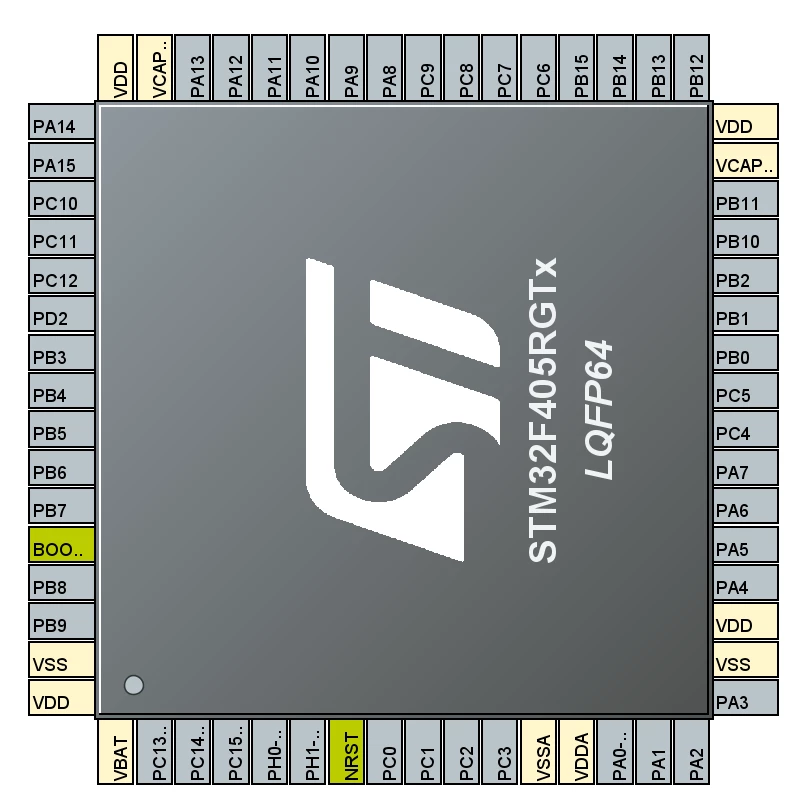
TDK_2-1775852654905.png


(This is the same story in STM32CubeMX2.)
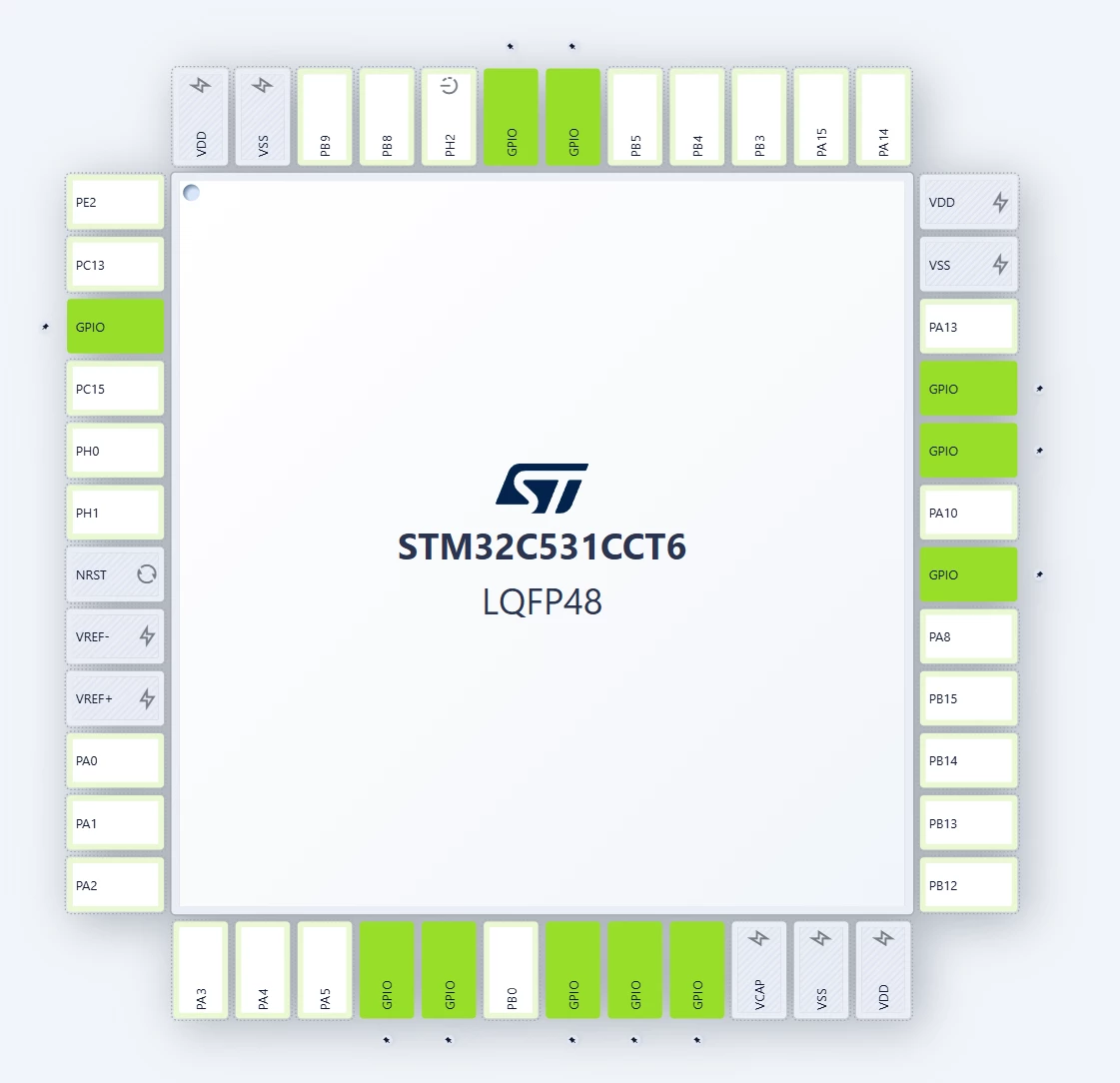
TDK_0-1775852873345.png


Best answer by STOne-32

Dear @TDK @mƎALLEm @Peter BENSCH ,

This Orientation was always there in all LQFP devices figures in product datasheets since STM32F103, almost 20 years ago CubeMX is just reflecting the datasheet figures ( but with the logo and marking instead of LQFPXx ) . The remark is valid But wanted to share from where it comes . 
Regards,

STOne-32

5 replies

Peter BENSCH
Technical Moderator
April 10, 2026

What an interesting discovery! I’ve been using CubeMX since the very beginning, have run plenty of beginner training sessions, created programme templates – and hadn’t noticed it until now! Thanks for spotting and posting that, @TDK!

Regards
/Peter

In order to give better visibility on the answered topics, please click on Accept as Solution on the reply which solved your issue or answered your question.
mƎALLEm
Technical Moderator
April 10, 2026

One of the users fell into the same confusion today in this post.

To give better visibility on the answered topics, please click "Best answer" on the reply which solved your issue or answered your question.
STOne-32
STOne-32Best answer
Technical Moderator
April 11, 2026

Dear @TDK @mƎALLEm @Peter BENSCH ,

This Orientation was always there in all LQFP devices figures in product datasheets since STM32F103, almost 20 years ago CubeMX is just reflecting the datasheet figures ( but with the logo and marking instead of LQFPXx ) . The remark is valid But wanted to share from where it comes . 
Regards,

STOne-32

TDK
TDKAuthor
April 11, 2026

Hi @STOne-32 thanks for the reply.

> CubeMX is just reflecting the datasheet figures

Okay, I think I can understand. Here is the one figure showing pin names and the chip. Pin 1 is top-left. This is very close to the CubeMX presentation, except the pin 1 marking isn't shown.

TDK_0-1775918492806.png


But then here are 3 others from the same datasheet. Pin 1 is bottom-left in all of these.

TDK_1-1775918509404.png

TDK_2-1775918523450.png

TDK_3-1775918538244.png


There does seem to be a JEDEC standard saying pin 1 should be on the top-left but I don't have easy access to the spec.

"If you feel a post has answered your question, please click ""Accept as Solution""."
Amel NASRI
Technical Moderator
April 30, 2026

Hi All,

Thank you @TDK for bringing this to our attention.

Although this behavior is not new and has been present for several years regarding pin 1 marking and text orientation in STM32CubeMX, we understand that it may cause confusion. We have raised this issue with the development team to evaluate the appropriate solution and help avoid any further side effects.

Internal ticket number: CDM0062229 (This is an internal tracking number and is not accessible or usable by customers.)

-Amel


To give better visibility on the answered topics, please click on "Best Answer" on the reply which solved your issue or answered your question.
Andrew Neil
Super User
April 30, 2026

@Amel NASRI wrote:

we understand that it may (sic) cause confusion.


I'm pretty sure that it actually has lead to confusion !

A complex system that works is invariably found to have evolved from a simple system that worked.A complex system designed from scratch never works and cannot be patched up to make it work.
LCE
Principal II
April 30, 2026

ST wants the engineers to stay sharp and pay attention to detail! :D

Amel NASRI
Technical Moderator
April 30, 2026

Yes indeed :) and always refer to the datasheet.

To give better visibility on the answered topics, please click on "Best Answer" on the reply which solved your issue or answered your question.