


MS.19
Associate
October 24, 2018
Question

STM32L053 UART Transmit doesn't work

  • October 24, 2018
  • 5 replies
  • 2015 views

Hello everyone,

I'm trying to connect UART to my board. I've followed many tutorials on youtube but it still does not work properly. I can't see Hello World on COM6.

Board: STM32L053C8

I followed this tutorial:

https://www.youtube.com/watch?v=d6MZHdgCQx0

/* USER CODE BEGIN 0 */
uint8_t myTxData[13] = "Hello World\r\n";
/* USER CODE END 0 */
 
 /* Infinite loop */
 /* USER CODE BEGIN WHILE */
 while (1)
 {
 
		HAL_UART_Transmit(&huart2, myTxData, 13, 10);
		HAL_Delay(1000);
		
 /* USER CODE END WHILE */
 
 /* USER CODE BEGIN 3 */
 
 }
 /* USER CODE END 3 */
 
}
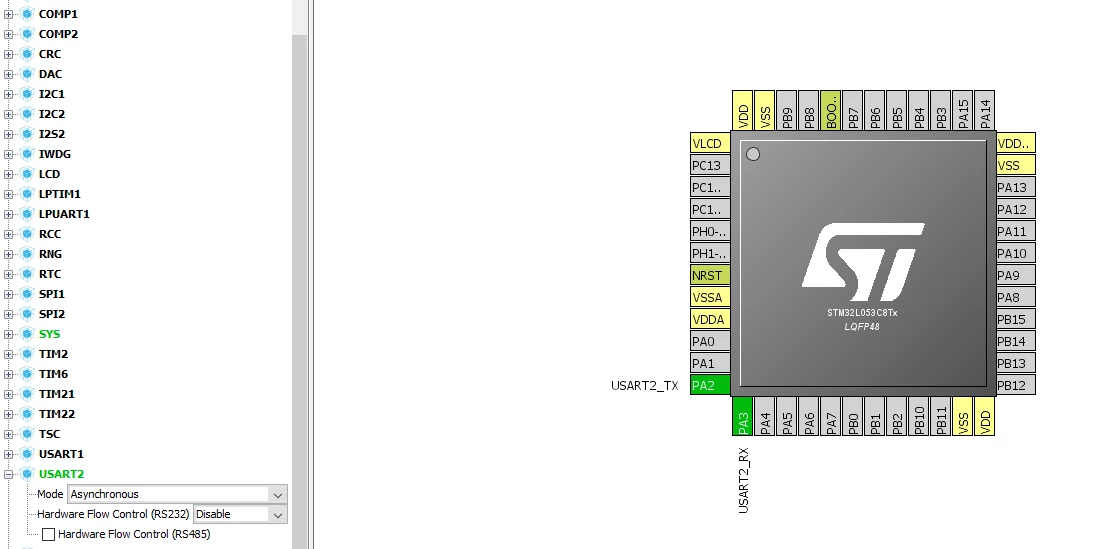
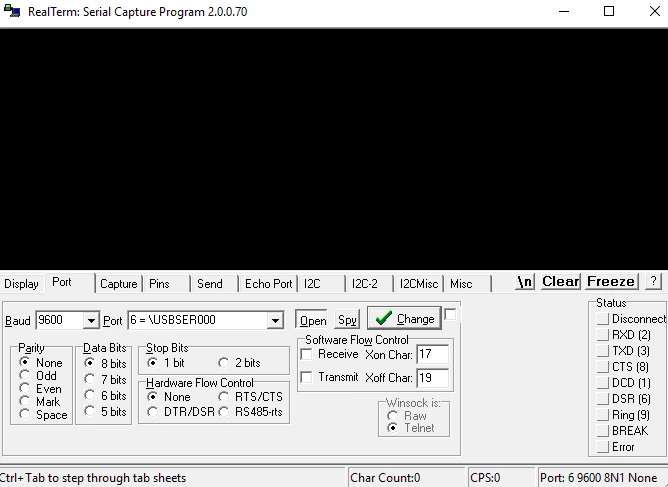
0690X000006CFWeQAO.png

0690X000006CFWoQAO.png

This topic has been closed for replies.

5 replies

Tesla DeLorean
Guru
October 24, 2018

STM32L053C8 is a chip, not a board, assume you have a DISCO board, rather than a NUCLEO, but helps to be specific.

Get the manual for the board you have, and review the schematic. Make sure the pins are consistent with what you are configuring.

Use strlen() for strings, or sizeof()-1 to account for the NUL, try to avoid constants you have to replicate in multiple places, the compiler can figure out the length of an array.

Have a timeout that is longer.

Examine peripheral registers and clocks via debugger.

Tips, Buy me a coffee, or three.. PayPal Venmo (See Profile) Up vote any posts that you find helpful, it shows what's working..
MS.19
MS.19Author
Associate
October 31, 2018

Thank you for your reply!

Now I have configured USART1.

0690X000006CIMQQA4.png

0690X000006CIMVQA4.png

/* USER CODE BEGIN Includes */
uint8_t tx_buff[]={1};
uint8_t rx_buff[10];
 
 while (1)
 {
	HAL_GPIO_TogglePin(GPIOA, GPIO_PIN_5);
	HAL_UART_Transmit_DMA(&huart1,tx_buff,sizeof(tx_buff));// Sending in DMA mode
	HAL_Delay(1000);
}

To RX,TX pins I connected FT232RL FTDI module.

 0690X000006CINEQA4.png

0690X000006CIMfQAO.jpg

With Arduino it works but with STM32 in terminal I get only symbols. Maybe someone could explain me how to correctly set the format?

0690X000006CIMuQAO.png

Also there is a full code of main.c:

https://pastebin.com/kST92XWZ

TPapa
Visitor II
September 11, 2019

Most probably you already have found the answer since almost a year has passed from your last post..

Anyway this is because of wrong Baud Rate. By checking the USART1 initilization function I've notice that there is a typo on "huart1.Init.BaudRate = 9800;" so you just need to correct it to "huart1.Init.BaudRate = 9600;" and you will see the corect data on your terminal.

waclawek.jan
Super User
September 12, 2019

It's a 2% error, not very likely to result in completely unlegible transfer.

Maybe the clock is misconfigured, more precisely, the variable holding the supposed system frequency used in the baudrate calculation (I don't use Cube/HAL).

JW

TPapa
Visitor II
September 13, 2019

You are right, normally you could see the correct data even with a 5% error. However I had a similar experience using one of those modules which probably had a counterfeit FT232RL IC.

Yes, the baud rate error could be caused from a clock missconfiguration, although the CubeMX sets the Clock configuration automatically for the selected board. If he just followed that tutorial without touching the clock configuration section in CubeMX it should work.